<?xml version="1.0" encoding="utf-8"?><feed xmlns="http://www.w3.org/2005/Atom" ><generator uri="https://jekyllrb.com/" version="3.10.0">Jekyll</generator><link href="https://ffmuc.net/feed.xml" rel="self" type="application/atom+xml" /><link href="https://ffmuc.net/" rel="alternate" type="text/html" /><updated>2026-11-10T16:54:21+01:00</updated><id>https://ffmuc.net/feed.xml</id><title type="html">Freifunk München</title><subtitle>Freier Zugang zu Netz und digitalen Diensten ist ein Grundrecht. Freifunk München baut offene Funknetze und betreibt datenschutzfreundliche Infrastruktur: nichtkommerziell und in Europa gehostet.</subtitle><author><name>Freie Netze München e.V.</name><email>hilfe@ffmuc.bayern</email></author><entry><title type="html">Verschlüsseltes DNS: Dein Gerät schaltet jetzt von selbst um</title><link href="https://ffmuc.net/services/dns/2026/11/10/verschluesseltes-dns-ip-zertifikat/" rel="alternate" type="text/html" title="Verschlüsseltes DNS: Dein Gerät schaltet jetzt von selbst um" /><published>2026-11-10T08:00:00+01:00</published><updated>2026-11-10T08:00:00+01:00</updated><id>https://ffmuc.net/services/dns/2026/11/10/verschluesseltes-dns-ip-zertifikat</id><content type="html" xml:base="https://ffmuc.net/services/dns/2026/11/10/verschluesseltes-dns-ip-zertifikat/"><![CDATA[<section data-lang="de" class="language-content active">

  <p><strong>Kurz gesagt:</strong> Wer unsere DNS-Server nutzt, ist ab sofort noch privater unterwegs. Viele moderne Geräte erkennen jetzt von selbst, dass sie mit uns verschlüsselt sprechen können, und schalten automatisch um. <strong>Du musst dafür nichts einstellen.</strong></p>

  <blockquote>
    <p>👉 <strong>Noch nicht dabei?</strong> Unser DNS ist <strong>kostenlos, ohne Anmeldung</strong> und für alle offen. In wenigen Minuten auf Handy, Laptop oder Router eingerichtet: <strong><a href="https://dns-setup.ffmuc.net">dns-setup.ffmuc.net</a></strong></p>
  </blockquote>

  <h2 id="worum-geht-es">Worum geht es?</h2>

  <p>Bevor dein Gerät eine Webseite lädt, fragt es einen DNS-Server nach deren Adresse. Das ist wie ein Blick ins Telefonbuch. Normalerweise passiert das <strong>unverschlüsselt</strong>. Jeder auf dem Weg kann mitlesen, welche Seiten du besuchst, oder die Antwort verfälschen.</p>

  <p><strong>Verschlüsseltes DNS</strong> schützt diese Anfragen. Wir bieten es schon lange an. Bisher musste man es aber meist von Hand einrichten. Viele Geräte kennen nur die IP-Adresse unseres DNS-Servers, zum Beispiel weil der Router sie verteilt. Dann fragen sie unverschlüsselt.</p>

  <h2 id="so-schaltet-dein-gert-automatisch-um">So schaltet dein Gerät automatisch um</h2>

  <p>Das Verfahren dafür heißt <strong>DDR</strong> („Discovery of Designated Resolvers“). Am Beispiel unserer Server sieht das so aus:</p>

  <ol>
    <li><strong>Adresse bekommen:</strong> Dein Router sagt deinem Gerät: „Dein DNS-Server ist 5.1.66.255“ (oder 2001:678:e68:f000::). Mehr weiß das Gerät noch nicht.</li>
    <li><strong>Nachfragen:</strong> Das Gerät fragt 5.1.66.255 (oder 2001:678:e68:f000::): „Kannst du auch verschlüsselt?“ Technisch ist das eine Anfrage nach <code class="language-plaintext highlighter-rouge">_dns.resolver.arpa</code>.</li>
    <li><strong>Antwort bekommen:</strong> Wir antworten: „Ja! Über <span lang="zxx">doq.ffmuc.net</span>, <span lang="zxx">dot.ffmuc.net</span> und <span lang="zxx">doh.ffmuc.net</span>, erreichbar unter 5.1.66.255, 185.150.99.255, 2001:678:e68:f000:: und 2001:678:ed0:f000::.“</li>
    <li><strong>Identität prüfen:</strong> Das Gerät baut eine verschlüsselte Verbindung zu 5.1.66.255 (oder 2001:678:e68:f000::) auf, zum Beispiel mit dem Namen <span lang="zxx">dot.ffmuc.net</span>. Unser Zertifikat zeigt die <strong>Identität</strong> des Servers: die Namen <span lang="zxx">doh.ffmuc.net</span>, <span lang="zxx">dot.ffmuc.net</span> und <span lang="zxx">doq.ffmuc.net</span> <strong>und alle unsere Adressen: 5.1.66.255, 185.150.99.255, 2001:678:e68:f000:: und 2001:678:ed0:f000::</strong>. Das Gerät vergleicht: Ist das wirklich der Server, den ich am Anfang gefragt habe? Die Adresse, mit der das Gerät angefangen hat, steht darin. Also spricht es nicht mit einem Angreifer.</li>
    <li><strong>Umschalten:</strong> Alles passt. Ab jetzt nutzt das Gerät automatisch verschlüsseltes DNS.</li>
  </ol>

  <div class="language-plaintext highlighter-rouge"><div class="highlight"><pre class="highlight"><code>Router ─▶ Gerät   „Dein DNS ist 5.1.66.255
                   oder 2001:678:e68:f000::“
Gerät  ─▶ FFMUC   „Kannst du verschlüsselt?“
FFMUC  ─▶ Gerät   „Ja: dot.ffmuc.net, auch unter
                   5.1.66.255, 185.150.99.255,
                   2001:678:e68:f000::, 2001:678:ed0:f000::“
Gerät  ═▶ FFMUC   verschlüsselt, Name dot.ffmuc.net
Identität im Zertifikat (neu!):
   dot.ffmuc.net ✔  5.1.66.255 ✔  2001:678:e68:f000:: ✔
Gerät  ═▶ ab jetzt verschlüsseltes DNS
</code></pre></div>  </div>

  <h2 id="was-ist-neu">Was ist neu?</h2>

  <p>Die Schritte 1 bis 3 bieten wir <a href="/services/dns/2026/01/09/rfc9462-rfc9463-support/">schon seit Januar</a> an. <strong>Schritt 4 hat bisher nicht geklappt:</strong> In unserem Zertifikat standen nur Namen wie <span lang="zxx">doh.ffmuc.net</span>, aber nicht unsere IP-Adressen. Die Geräte konnten also nicht sicher prüfen, ob sie noch mit uns sprechen, und blieben lieber beim unverschlüsselten DNS.</p>

  <p><strong>Jetzt stehen auch unsere IP-Adressen im Zertifikat.</strong> Damit klappt die Prüfung, und das Gerät schaltet um. Möglich ist das erst seit 2026: Seitdem stellt Let’s Encrypt Zertifikate für IP-Adressen aus. Sie gelten nur wenige Tage und werden automatisch erneuert.</p>

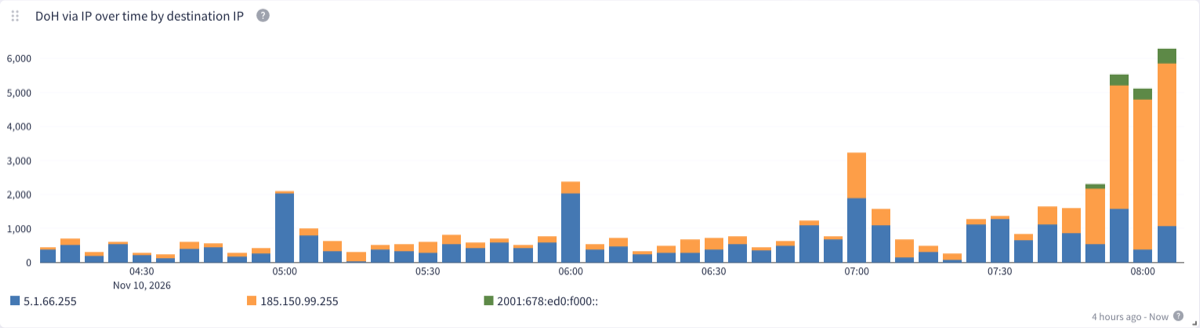
  <p><img src="/assets/posts/2026-11-10-doh-via-ip-requests.png" alt="Balkendiagramm: DoH-Anfragen direkt an unsere IP-Adressen in den letzten 4 Stunden" /></p>

  <p><em>DoH-Anfragen, die direkt an unsere Resolver-IP-Adressen gehen (letzte 4 Stunden). Der Anstieg beginnt, nachdem das neue Zertifikat live gegangen ist. Blau: 5.1.66.255, orange: 185.150.99.255, grün: 2001:678:ed0:f000::. Gezählt werden alle Geräte, die uns über eine IP-Adresse ansprechen, nicht nur Geräte, die automatisch umgeschaltet haben.</em></p>

  <p>Im Freifunk-Netz geht es übrigens noch direkter: Dort sagt das Netz deinem Gerät schon beim Verbinden, dass verschlüsseltes DNS bereitsteht (DNR). Geräte, die das unterstützen, müssen also gar nicht erst nachfragen.</p>

  <h2 id="welche-gerte-machen-das">Welche Geräte machen das?</h2>

  <p>DDR unterstützen zum Beispiel aktuelle Versionen von Windows 11 und Apple-Geräten sowie manche Android-Versionen und Browser. Ob ein Gerät wirklich umschaltet, hängt vom System und seinen Einstellungen ab.</p>

  <h2 id="was-musst-du-tun">Was musst du tun?</h2>

  <ul>
    <li><strong>Nichts.</strong> Es wird einfach sicherer.</li>
    <li>Nutzt du schon <span lang="zxx">doh.ffmuc.net</span>, <span lang="zxx">dot.ffmuc.net</span> oder <span lang="zxx">doq.ffmuc.net</span>, bleibt alles wie bisher.</li>
    <li>Freifunk-Router und Firmware-Updates sind nicht betroffen.</li>
  </ul>

  <h2 id="jetzt-umsteigen-privates-dns-von-freifunk-mnchen">Jetzt umsteigen: privates DNS von Freifunk München</h2>

  <p>Warum unser DNS?</p>

  <ul>
    <li><strong>Kostenlos und ohne Anmeldung:</strong> für alle, nicht nur im Freifunk-Netz.</li>
    <li><strong>Datenschutzfreundlich:</strong> Wir speichern keine Protokolle darüber, wer welche Seite aufruft, und verkaufen oder teilen keine DNS-Daten.</li>
    <li><strong>Keine Zensur:</strong> Wir filtern keine Inhalte.</li>
    <li><strong>Verschlüsselt</strong> mit DoH, DoT und DoQ.</li>
    <li><strong>Gemeinnützig:</strong> betrieben vom Verein Freie Netze München e.V., gelistet auf <a href="https://european-alternatives.eu/de/produkt/ffmuc-dns">European Alternatives</a>.</li>
  </ul>

  <p><strong>👉 <a href="https://dns-setup.ffmuc.net">Jetzt einrichten auf dns-setup.ffmuc.net</a></strong>: mit einfachen Anleitungen für Windows, macOS, iPhone, Android, Linux, Browser und Router.</p>

  <h2 id="fr-technik-interessierte">Für Technik-Interessierte</h2>

  <ul>
    <li><strong>Anycast-IPs:</strong> <code class="language-plaintext highlighter-rouge">185.150.99.255</code>, <code class="language-plaintext highlighter-rouge">5.1.66.255</code>, <code class="language-plaintext highlighter-rouge">2001:678:e68:f000::</code>, <code class="language-plaintext highlighter-rouge">2001:678:ed0:f000::</code></li>
    <li><strong>DoH:</strong> <code class="language-plaintext highlighter-rouge">https://doh.ffmuc.net/dns-query</code> · <strong>DoT:</strong> <code class="language-plaintext highlighter-rouge">dot.ffmuc.net:853</code> · <strong>DoQ:</strong> <code class="language-plaintext highlighter-rouge">doq.ffmuc.net:853</code></li>
    <li><strong>DDR-Antwort</strong> auf <code class="language-plaintext highlighter-rouge">_dns.resolver.arpa</code> (Typ SVCB): DoQ (Priorität 1), DoT (Priorität 2), DoH (Priorität 3), jeweils mit <code class="language-plaintext highlighter-rouge">ipv4hint</code> (<code class="language-plaintext highlighter-rouge">5.1.66.255</code>, <code class="language-plaintext highlighter-rouge">185.150.99.255</code>) und <code class="language-plaintext highlighter-rouge">ipv6hint</code> (<code class="language-plaintext highlighter-rouge">2001:678:e68:f000::</code>, <code class="language-plaintext highlighter-rouge">2001:678:ed0:f000::</code>).</li>
    <li>Das neue Let’s-Encrypt-Zertifikat enthält alle vier Anycast-Adressen (IPv4 und IPv6) als IP-SANs, zusätzlich zu <code class="language-plaintext highlighter-rouge">doh</code>, <code class="language-plaintext highlighter-rouge">dns</code>, <code class="language-plaintext highlighter-rouge">dot</code>, <code class="language-plaintext highlighter-rouge">doq</code>, <code class="language-plaintext highlighter-rouge">anycast</code>, <code class="language-plaintext highlighter-rouge">anycast01</code> und <code class="language-plaintext highlighter-rouge">anycast02.ffmuc.net</code>. Laufzeit etwa 6 Tage, automatische Erneuerung.</li>
    <li>Die IP-Adressen werden per HTTP-Challenge bestätigt. Da Anycast die Prüfung an jeden unserer Server schicken kann, teilen die Server die Antwort untereinander.</li>
    <li>Das bestehende <code class="language-plaintext highlighter-rouge">*.ffmuc.net</code>-Zertifikat bleibt der Standard.</li>
    <li><a href="https://github.com/freifunkMUC/ffmuc-salt-public/pull/697">Pull Request #697: Kurzlebiges DDR-Zertifikat mit Anycast-IP-Adressen</a></li>
    <li><a href="https://www.rfc-editor.org/rfc/rfc9462.html">RFC 9462: Discovery of Designated Resolvers</a> · <a href="https://datatracker.ietf.org/doc/rfc9463/">RFC 9463: DNR</a></li>
    <li><a href="/dns-privacy">Datenschutzerklärung DNS</a></li>
  </ul>

</section>

<section data-lang="en" class="language-content">

  <p><strong>In short:</strong> If you use our DNS servers, you are now even more private. Many modern devices now find out by themselves that they can talk to us encrypted, and switch over automatically. <strong>You do not have to change any setting.</strong></p>

  <blockquote>
    <p>👉 <strong>Not using it yet?</strong> Our DNS is <strong>free, with no sign-up</strong>, and open to everyone. Set it up on your phone, laptop or router in a few minutes: <strong><a href="https://dns-setup.ffmuc.net">dns-setup.ffmuc.net</a></strong></p>
  </blockquote>

  <h2 id="what-is-this-about">What is this about?</h2>

  <p>Before your device loads a website, it asks a DNS server for the site’s address. This is like looking it up in a phone book. Usually this happens <strong>unencrypted</strong>. Anyone along the way can see which sites you visit, or change the answer.</p>

  <p><strong>Encrypted DNS</strong> protects these requests. We have offered it for a long time. But until now, you usually had to set it up by hand. Many devices only know the IP address of our DNS server, for example because the router hands it out. Then they ask unencrypted.</p>

  <h2 id="how-your-device-switches-automatically">How your device switches automatically</h2>

  <p>The method is called <strong>DDR</strong> (“Discovery of Designated Resolvers”). With our servers as an example, it works like this:</p>

  <ol>
    <li><strong>Get the address:</strong> Your router tells your device: “Your DNS server is 5.1.66.255” (or 2001:678:e68:f000::). The device knows nothing more yet.</li>
    <li><strong>Ask:</strong> The device asks 5.1.66.255 (or 2001:678:e68:f000::): “Can you also talk encrypted?” Technically, this is a query for <code class="language-plaintext highlighter-rouge">_dns.resolver.arpa</code>.</li>
    <li><strong>Get the answer:</strong> We answer: “Yes! Use <span lang="zxx">doq.ffmuc.net</span>, <span lang="zxx">dot.ffmuc.net</span> and <span lang="zxx">doh.ffmuc.net</span>, reachable at 5.1.66.255, 185.150.99.255, 2001:678:e68:f000:: and 2001:678:ed0:f000::.”</li>
    <li><strong>Check the identity:</strong> The device opens an encrypted connection to 5.1.66.255 (or 2001:678:e68:f000::), for example with the name <span lang="zxx">dot.ffmuc.net</span>. Our certificate shows the <strong>identity</strong> of the server: the names <span lang="zxx">doh.ffmuc.net</span>, <span lang="zxx">dot.ffmuc.net</span> and <span lang="zxx">doq.ffmuc.net</span> <strong>and all our addresses: 5.1.66.255, 185.150.99.255, 2001:678:e68:f000:: and 2001:678:ed0:f000::</strong>. The device compares: is this really the server I asked at the start? The address the device started with is in it. So it is not talking to an attacker.</li>
    <li><strong>Switch:</strong> Everything matches. From now on, the device uses encrypted DNS automatically.</li>
  </ol>

  <div class="language-plaintext highlighter-rouge"><div class="highlight"><pre class="highlight"><code>Router ─▶ device  "Your DNS is 5.1.66.255
                   or 2001:678:e68:f000::"
device ─▶ FFMUC   "Can you talk encrypted?"
FFMUC  ─▶ device  "Yes: dot.ffmuc.net, also at
                   5.1.66.255, 185.150.99.255,
                   2001:678:e68:f000::, 2001:678:ed0:f000::"
device ═▶ FFMUC   encrypted, name dot.ffmuc.net
Identity in certificate (new!):
   dot.ffmuc.net ✔  5.1.66.255 ✔  2001:678:e68:f000:: ✔
device ═▶ encrypted DNS from now on
</code></pre></div>  </div>

  <h2 id="what-is-new">What is new?</h2>

  <p>We have offered steps 1 to 3 <a href="/services/dns/2026/01/09/rfc9462-rfc9463-support/">since January</a>. <strong>But step 4 did not work:</strong> Our certificate only contained names like <span lang="zxx">doh.ffmuc.net</span>, not our IP addresses. So devices could not safely check that they were still talking to us, and stayed on unencrypted DNS.</p>

  <p><strong>Now our IP addresses are in the certificate, too.</strong> The check passes, and the device switches over. This is only possible since 2026: since then, Let’s Encrypt issues certificates for IP addresses. They are valid for a few days only and renew automatically.</p>

  <p><img src="/assets/posts/2026-11-10-doh-via-ip-requests.png" alt="Bar chart: DoH requests sent directly to our IP addresses in the last 4 hours" /></p>

  <p><em>DoH requests sent directly to our resolver IP addresses (last 4 hours). The rise starts after the new certificate went live. Blue: 5.1.66.255, orange: 185.150.99.255, green: 2001:678:ed0:f000::. The chart counts every client that uses an IP address, not only devices that switched automatically.</em></p>

  <p>In the Freifunk network it is even more direct: there, the network tells your device right when it connects that encrypted DNS is available (DNR). Devices that support this do not even need to ask.</p>

  <h2 id="which-devices-do-this">Which devices do this?</h2>

  <p>DDR is supported, for example, by recent versions of Windows 11 and Apple devices, and by some Android versions and browsers. Whether a device really switches depends on the system and its settings.</p>

  <h2 id="what-do-you-have-to-do">What do you have to do?</h2>

  <ul>
    <li><strong>Nothing.</strong> It simply gets safer.</li>
    <li>If you already use <span lang="zxx">doh.ffmuc.net</span>, <span lang="zxx">dot.ffmuc.net</span> or <span lang="zxx">doq.ffmuc.net</span>, nothing changes.</li>
    <li>Freifunk routers and firmware updates are not affected.</li>
  </ul>

  <h2 id="switch-now-private-dns-from-freifunk-mnchen">Switch now: private DNS from Freifunk München</h2>

  <p>Why our DNS?</p>

  <ul>
    <li><strong>Free and no sign-up:</strong> for everyone, not only in the Freifunk network.</li>
    <li><strong>Privacy-friendly:</strong> We do not keep logs of who visits which site, and we do not sell or share DNS data.</li>
    <li><strong>No censorship:</strong> We do not filter content.</li>
    <li><strong>Encrypted</strong> with DoH, DoT and DoQ.</li>
    <li><strong>Non-profit:</strong> run by the association Freie Netze München e.V., listed on <a href="https://european-alternatives.eu/product/ffmuc-dns">European Alternatives</a>.</li>
  </ul>

  <p><strong>👉 <a href="https://dns-setup.ffmuc.net">Set it up now at dns-setup.ffmuc.net</a></strong>, with easy guides for Windows, macOS, iPhone, Android, Linux, browsers and routers.</p>

  <h2 id="for-the-technically-curious">For the technically curious</h2>

  <ul>
    <li><strong>Anycast IPs:</strong> <code class="language-plaintext highlighter-rouge">185.150.99.255</code>, <code class="language-plaintext highlighter-rouge">5.1.66.255</code>, <code class="language-plaintext highlighter-rouge">2001:678:e68:f000::</code>, <code class="language-plaintext highlighter-rouge">2001:678:ed0:f000::</code></li>
    <li><strong>DoH:</strong> <code class="language-plaintext highlighter-rouge">https://doh.ffmuc.net/dns-query</code> · <strong>DoT:</strong> <code class="language-plaintext highlighter-rouge">dot.ffmuc.net:853</code> · <strong>DoQ:</strong> <code class="language-plaintext highlighter-rouge">doq.ffmuc.net:853</code></li>
    <li><strong>DDR answer</strong> for <code class="language-plaintext highlighter-rouge">_dns.resolver.arpa</code> (type SVCB): DoQ (priority 1), DoT (priority 2), DoH (priority 3), each with <code class="language-plaintext highlighter-rouge">ipv4hint</code> (<code class="language-plaintext highlighter-rouge">5.1.66.255</code>, <code class="language-plaintext highlighter-rouge">185.150.99.255</code>) and <code class="language-plaintext highlighter-rouge">ipv6hint</code> (<code class="language-plaintext highlighter-rouge">2001:678:e68:f000::</code>, <code class="language-plaintext highlighter-rouge">2001:678:ed0:f000::</code>).</li>
    <li>The new Let’s Encrypt certificate contains all four anycast addresses (IPv4 and IPv6) as IP SANs, in addition to <code class="language-plaintext highlighter-rouge">doh</code>, <code class="language-plaintext highlighter-rouge">dns</code>, <code class="language-plaintext highlighter-rouge">dot</code>, <code class="language-plaintext highlighter-rouge">doq</code>, <code class="language-plaintext highlighter-rouge">anycast</code>, <code class="language-plaintext highlighter-rouge">anycast01</code> and <code class="language-plaintext highlighter-rouge">anycast02.ffmuc.net</code>. Lifetime about 6 days, automatic renewal.</li>
    <li>The IP addresses are validated with an HTTP challenge. Because anycast can send the check to any of our servers, the servers share the answer with each other.</li>
    <li>The existing <code class="language-plaintext highlighter-rouge">*.ffmuc.net</code> certificate stays the default.</li>
    <li><a href="https://github.com/freifunkMUC/ffmuc-salt-public/pull/697">Pull Request #697: Short-lived DDR certificate with anycast IP addresses</a></li>
    <li><a href="https://www.rfc-editor.org/rfc/rfc9462.html">RFC 9462: Discovery of Designated Resolvers</a> · <a href="https://datatracker.ietf.org/doc/rfc9463/">RFC 9463: DNR</a></li>
    <li><a href="/dns-privacy">DNS privacy policy</a></li>
  </ul>

</section>

<section data-lang="fr" class="language-content">

  <p><strong>En bref :</strong> Si vous utilisez nos serveurs DNS, votre vie privée est désormais encore mieux protégée. De nombreux appareils modernes découvrent maintenant d’eux-mêmes qu’ils peuvent communiquer avec nous de façon chiffrée, et basculent automatiquement. <strong>Vous n’avez aucun réglage à faire.</strong></p>

  <blockquote>
    <p>👉 <strong>Pas encore utilisateur ?</strong> Notre DNS est <strong>gratuit, sans inscription</strong> et ouvert à toutes et tous. Configurez-le en quelques minutes sur votre téléphone, ordinateur ou routeur : <strong><a href="https://dns-setup.ffmuc.net">dns-setup.ffmuc.net</a></strong></p>
  </blockquote>

  <h2 id="de-quoi-sagit-il-">De quoi s’agit-il ?</h2>

  <p>Avant de charger un site web, votre appareil demande son adresse à un serveur DNS, comme on cherche un numéro dans un annuaire. En général, cela se fait <strong>sans chiffrement</strong>. N’importe qui sur le chemin peut voir quels sites vous visitez, ou modifier la réponse.</p>

  <p>Le <strong>DNS chiffré</strong> protège ces requêtes. Nous le proposons depuis longtemps. Mais jusqu’ici, il fallait le plus souvent le configurer à la main. Beaucoup d’appareils ne connaissent que l’adresse IP de notre serveur DNS, par exemple parce que le routeur la leur donne. Ils posent alors leurs questions sans chiffrement.</p>

  <h2 id="comment-votre-appareil-bascule-automatiquement">Comment votre appareil bascule automatiquement</h2>

  <p>La méthode s’appelle <strong>DDR</strong> (« Discovery of Designated Resolvers »). Avec nos serveurs comme exemple, cela se passe ainsi :</p>

  <ol>
    <li><strong>Recevoir l’adresse :</strong> Votre routeur dit à votre appareil : « Ton serveur DNS est 5.1.66.255 » (ou 2001:678:e68:f000::). L’appareil n’en sait pas plus pour l’instant.</li>
    <li><strong>Demander :</strong> L’appareil demande à 5.1.66.255 (ou 2001:678:e68:f000::) : « Sais-tu aussi parler de façon chiffrée ? » Techniquement, c’est une requête pour <code class="language-plaintext highlighter-rouge">_dns.resolver.arpa</code>.</li>
    <li><strong>Recevoir la réponse :</strong> Nous répondons : « Oui ! Via <span lang="zxx">doq.ffmuc.net</span>, <span lang="zxx">dot.ffmuc.net</span> et <span lang="zxx">doh.ffmuc.net</span>, joignables à 5.1.66.255, 185.150.99.255, 2001:678:e68:f000:: et 2001:678:ed0:f000::. »</li>
    <li><strong>Vérifier l’identité :</strong> L’appareil ouvre une connexion chiffrée vers 5.1.66.255 (ou 2001:678:e68:f000::), par exemple avec le nom <span lang="zxx">dot.ffmuc.net</span>. Notre certificat montre l’<strong>identité</strong> du serveur : les noms <span lang="zxx">doh.ffmuc.net</span>, <span lang="zxx">dot.ffmuc.net</span> et <span lang="zxx">doq.ffmuc.net</span> <strong>et toutes nos adresses : 5.1.66.255, 185.150.99.255, 2001:678:e68:f000:: et 2001:678:ed0:f000::</strong>. L’appareil compare : est-ce vraiment le serveur que j’ai interrogé au début ? L’adresse avec laquelle l’appareil a commencé y figure : il ne parle donc pas à un attaquant.</li>
    <li><strong>Basculer :</strong> Tout correspond. Désormais, l’appareil utilise automatiquement le DNS chiffré.</li>
  </ol>

  <div class="language-plaintext highlighter-rouge"><div class="highlight"><pre class="highlight"><code>Routeur  ─▶ appareil  « Ton DNS est 5.1.66.255
                       ou 2001:678:e68:f000:: »
appareil ─▶ FFMUC     « Chiffré possible ? »
FFMUC    ─▶ appareil  « Oui : dot.ffmuc.net, aussi à
                       5.1.66.255, 185.150.99.255,
                       2001:678:e68:f000::, 2001:678:ed0:f000:: »
appareil ═▶ FFMUC     chiffré, nom dot.ffmuc.net
Identité du certificat (nouveau !) :
   dot.ffmuc.net ✔  5.1.66.255 ✔  2001:678:e68:f000:: ✔
appareil ═▶ désormais DNS chiffré
</code></pre></div>  </div>

  <h2 id="quoi-de-neuf-">Quoi de neuf ?</h2>

  <p>Nous proposons les étapes 1 à 3 <a href="/services/dns/2026/01/09/rfc9462-rfc9463-support/">depuis janvier</a>. <strong>Mais l’étape 4 ne fonctionnait pas :</strong> notre certificat ne contenait que des noms comme <span lang="zxx">doh.ffmuc.net</span>, pas nos adresses IP. Les appareils ne pouvaient donc pas vérifier de façon sûre qu’ils parlaient toujours avec nous, et restaient sur le DNS non chiffré.</p>

  <p><strong>Désormais, nos adresses IP figurent aussi dans le certificat.</strong> La vérification réussit, et l’appareil bascule. Ce n’est possible que depuis 2026 : depuis, Let’s Encrypt délivre des certificats pour des adresses IP. Ils ne sont valables que quelques jours et se renouvellent automatiquement.</p>

  <p><img src="/assets/posts/2026-11-10-doh-via-ip-requests.png" alt="Diagramme à barres : requêtes DoH envoyées directement à nos adresses IP au cours des 4 dernières heures" /></p>

  <p><em>Requêtes DoH envoyées directement aux adresses IP de nos résolveurs (4 dernières heures). La hausse commence après la mise en service du nouveau certificat. Bleu : 5.1.66.255, orange : 185.150.99.255, vert : 2001:678:ed0:f000::. Le graphique compte tous les clients qui utilisent une adresse IP, pas seulement les appareils qui ont basculé automatiquement.</em></p>

  <p>Dans le réseau Freifunk, c’est même encore plus direct : le réseau indique à votre appareil, dès la connexion, que le DNS chiffré est disponible (DNR). Les appareils compatibles n’ont même pas besoin de demander.</p>

  <h2 id="quels-appareils-le-font-">Quels appareils le font ?</h2>

  <p>DDR est pris en charge, par exemple, par les versions récentes de Windows 11 et des appareils Apple, ainsi que par certaines versions d’Android et certains navigateurs. Le basculement dépend du système et de ses réglages.</p>

  <h2 id="que-devez-vous-faire-">Que devez-vous faire ?</h2>

  <ul>
    <li><strong>Rien.</strong> C’est simplement plus sûr.</li>
    <li>Si vous utilisez déjà <span lang="zxx">doh.ffmuc.net</span>, <span lang="zxx">dot.ffmuc.net</span> ou <span lang="zxx">doq.ffmuc.net</span>, rien ne change.</li>
    <li>Les routeurs Freifunk et les mises à jour du firmware ne sont pas concernés.</li>
  </ul>

  <h2 id="passez-y-maintenant--le-dns-priv-de-freifunk-munich">Passez-y maintenant : le DNS privé de Freifunk Munich</h2>

  <p>Pourquoi notre DNS ?</p>

  <ul>
    <li><strong>Gratuit et sans inscription :</strong> pour tout le monde, pas seulement dans le réseau Freifunk.</li>
    <li><strong>Respectueux de la vie privée :</strong> Nous ne gardons pas de journaux indiquant qui visite quel site, et nous ne vendons ni ne partageons de données DNS.</li>
    <li><strong>Pas de censure :</strong> Nous ne filtrons aucun contenu.</li>
    <li><strong>Chiffré</strong> avec DoH, DoT et DoQ.</li>
    <li><strong>À but non lucratif :</strong> exploité par l’association Freie Netze München e.V., listé sur <a href="https://european-alternatives.eu/product/ffmuc-dns">European Alternatives</a>.</li>
  </ul>

  <p><strong>👉 <a href="https://dns-setup.ffmuc.net">Configurez-le maintenant sur dns-setup.ffmuc.net</a></strong>, avec des guides simples pour Windows, macOS, iPhone, Android, Linux, les navigateurs et les routeurs.</p>

  <h2 id="pour-les-curieux-de-technique">Pour les curieux de technique</h2>

  <ul>
    <li><strong>IP anycast :</strong> <code class="language-plaintext highlighter-rouge">185.150.99.255</code>, <code class="language-plaintext highlighter-rouge">5.1.66.255</code>, <code class="language-plaintext highlighter-rouge">2001:678:e68:f000::</code>, <code class="language-plaintext highlighter-rouge">2001:678:ed0:f000::</code></li>
    <li><strong>DoH :</strong> <code class="language-plaintext highlighter-rouge">https://doh.ffmuc.net/dns-query</code> · <strong>DoT :</strong> <code class="language-plaintext highlighter-rouge">dot.ffmuc.net:853</code> · <strong>DoQ :</strong> <code class="language-plaintext highlighter-rouge">doq.ffmuc.net:853</code></li>
    <li><strong>Réponse DDR</strong> pour <code class="language-plaintext highlighter-rouge">_dns.resolver.arpa</code> (type SVCB) : DoQ (priorité 1), DoT (priorité 2), DoH (priorité 3), chacun avec <code class="language-plaintext highlighter-rouge">ipv4hint</code> (<code class="language-plaintext highlighter-rouge">5.1.66.255</code>, <code class="language-plaintext highlighter-rouge">185.150.99.255</code>) et <code class="language-plaintext highlighter-rouge">ipv6hint</code> (<code class="language-plaintext highlighter-rouge">2001:678:e68:f000::</code>, <code class="language-plaintext highlighter-rouge">2001:678:ed0:f000::</code>).</li>
    <li>Le nouveau certificat Let’s Encrypt contient les quatre adresses anycast (IPv4 et IPv6) comme IP SAN, en plus de <code class="language-plaintext highlighter-rouge">doh</code>, <code class="language-plaintext highlighter-rouge">dns</code>, <code class="language-plaintext highlighter-rouge">dot</code>, <code class="language-plaintext highlighter-rouge">doq</code>, <code class="language-plaintext highlighter-rouge">anycast</code>, <code class="language-plaintext highlighter-rouge">anycast01</code> et <code class="language-plaintext highlighter-rouge">anycast02.ffmuc.net</code>. Durée de validité d’environ 6 jours, renouvellement automatique.</li>
    <li>Les adresses IP sont validées par un challenge HTTP. Comme l’anycast peut envoyer la vérification à n’importe lequel de nos serveurs, les serveurs partagent la réponse entre eux.</li>
    <li>Le certificat existant <code class="language-plaintext highlighter-rouge">*.ffmuc.net</code> reste le certificat par défaut.</li>
    <li><a href="https://github.com/freifunkMUC/ffmuc-salt-public/pull/697">Pull Request #697 : certificat DDR de courte durée avec adresses IP anycast</a></li>
    <li><a href="https://www.rfc-editor.org/rfc/rfc9462.html">RFC 9462 : Discovery of Designated Resolvers</a> · <a href="https://datatracker.ietf.org/doc/rfc9463/">RFC 9463 : DNR</a></li>
    <li><a href="/dns-privacy">Politique de confidentialité DNS</a></li>
  </ul>

</section>

<section data-lang="es" class="language-content">

  <p><strong>En resumen:</strong> Si usas nuestros servidores DNS, tu privacidad está ahora aún mejor protegida. Muchos dispositivos modernos descubren ahora por sí solos que pueden hablar con nosotros de forma cifrada, y cambian automáticamente. <strong>No tienes que cambiar ningún ajuste.</strong></p>

  <blockquote>
    <p>👉 <strong>¿Aún no lo usas?</strong> Nuestro DNS es <strong>gratuito, sin registro</strong> y abierto a todo el mundo. Configúralo en pocos minutos en tu móvil, portátil o router: <strong><a href="https://dns-setup.ffmuc.net">dns-setup.ffmuc.net</a></strong></p>
  </blockquote>

  <h2 id="de-qu-se-trata">¿De qué se trata?</h2>

  <p>Antes de cargar una página web, tu dispositivo pregunta su dirección a un servidor DNS, como quien busca un número en la guía telefónica. Normalmente esto ocurre <strong>sin cifrar</strong>. Cualquiera en el camino puede ver qué sitios visitas o cambiar la respuesta.</p>

  <p>El <strong>DNS cifrado</strong> protege estas consultas. Lo ofrecemos desde hace mucho tiempo. Pero hasta ahora, casi siempre había que configurarlo a mano. Muchos dispositivos solo conocen la dirección IP de nuestro servidor DNS, por ejemplo porque se la da el router, y entonces preguntan sin cifrar.</p>

  <h2 id="as-cambia-tu-dispositivo-automticamente">Así cambia tu dispositivo automáticamente</h2>

  <p>El método se llama <strong>DDR</strong> («Discovery of Designated Resolvers»). Con nuestros servidores como ejemplo, funciona así:</p>

  <ol>
    <li><strong>Recibir la dirección:</strong> Tu router le dice a tu dispositivo: «Tu servidor DNS es 5.1.66.255» (o 2001:678:e68:f000::). El dispositivo todavía no sabe nada más.</li>
    <li><strong>Preguntar:</strong> El dispositivo pregunta a 5.1.66.255 (o 2001:678:e68:f000::): «¿Puedes hablar también de forma cifrada?» Técnicamente, es una consulta de <code class="language-plaintext highlighter-rouge">_dns.resolver.arpa</code>.</li>
    <li><strong>Recibir la respuesta:</strong> Respondemos: «¡Sí! A través de <span lang="zxx">doq.ffmuc.net</span>, <span lang="zxx">dot.ffmuc.net</span> y <span lang="zxx">doh.ffmuc.net</span>, accesibles en 5.1.66.255, 185.150.99.255, 2001:678:e68:f000:: y 2001:678:ed0:f000::.»</li>
    <li><strong>Comprobar la identidad:</strong> El dispositivo abre una conexión cifrada con 5.1.66.255 (o 2001:678:e68:f000::), por ejemplo con el nombre <span lang="zxx">dot.ffmuc.net</span>. Nuestro certificado muestra la <strong>identidad</strong> del servidor: los nombres <span lang="zxx">doh.ffmuc.net</span>, <span lang="zxx">dot.ffmuc.net</span> y <span lang="zxx">doq.ffmuc.net</span> <strong>y todas nuestras direcciones: 5.1.66.255, 185.150.99.255, 2001:678:e68:f000:: y 2001:678:ed0:f000::</strong>. El dispositivo compara: ¿es de verdad el servidor al que pregunté al principio? La dirección con la que empezó el dispositivo está ahí, así que no está hablando con un atacante.</li>
    <li><strong>Cambiar:</strong> Todo coincide. A partir de ahora, el dispositivo usa DNS cifrado automáticamente.</li>
  </ol>

  <div class="language-plaintext highlighter-rouge"><div class="highlight"><pre class="highlight"><code>Router      ─▶ dispositivo  «Tu DNS es 5.1.66.255
                            o 2001:678:e68:f000::»
dispositivo ─▶ FFMUC        «¿Puedes cifrar?»
FFMUC       ─▶ dispositivo  «Sí: dot.ffmuc.net, también en
                            5.1.66.255, 185.150.99.255,
                            2001:678:e68:f000::, 2001:678:ed0:f000::»
dispositivo ═▶ FFMUC        cifrado, nombre dot.ffmuc.net
Identidad del certificado (¡nuevo!):
   dot.ffmuc.net ✔  5.1.66.255 ✔  2001:678:e68:f000:: ✔
dispositivo ═▶ DNS cifrado a partir de ahora
</code></pre></div>  </div>

  <h2 id="qu-hay-de-nuevo">¿Qué hay de nuevo?</h2>

  <p>Ofrecemos los pasos 1 a 3 <a href="/services/dns/2026/01/09/rfc9462-rfc9463-support/">desde enero</a>. <strong>Pero el paso 4 no funcionaba:</strong> nuestro certificado solo contenía nombres como <span lang="zxx">doh.ffmuc.net</span>, no nuestras direcciones IP. Así que los dispositivos no podían comprobar con seguridad que seguían hablando con nosotros, y se quedaban con el DNS sin cifrar.</p>

  <p><strong>Ahora nuestras direcciones IP también están en el certificado.</strong> La comprobación funciona y el dispositivo cambia. Esto solo es posible desde 2026: desde entonces, Let’s Encrypt emite certificados para direcciones IP. Son válidos solo unos pocos días y se renuevan automáticamente.</p>

  <p><img src="/assets/posts/2026-11-10-doh-via-ip-requests.png" alt="Gráfico de barras: solicitudes DoH enviadas directamente a nuestras direcciones IP en las últimas 4 horas" /></p>

  <p><em>Solicitudes DoH enviadas directamente a las direcciones IP de nuestros resolvers (últimas 4 horas). El aumento empieza después de que el nuevo certificado entrara en servicio. Azul: 5.1.66.255, naranja: 185.150.99.255, verde: 2001:678:ed0:f000::. El gráfico cuenta todos los clientes que usan una dirección IP, no solo los dispositivos que cambiaron automáticamente.</em></p>

  <p>En la red Freifunk es incluso más directo: allí la red le dice a tu dispositivo, nada más conectarse, que hay DNS cifrado disponible (DNR). Los dispositivos compatibles ni siquiera necesitan preguntar.</p>

  <h2 id="qu-dispositivos-lo-hacen">¿Qué dispositivos lo hacen?</h2>

  <p>DDR es compatible, por ejemplo, con versiones recientes de Windows 11 y de dispositivos Apple, y con algunas versiones de Android y algunos navegadores. Que un dispositivo cambie de verdad depende del sistema y de su configuración.</p>

  <h2 id="qu-tienes-que-hacer">¿Qué tienes que hacer?</h2>

  <ul>
    <li><strong>Nada.</strong> Simplemente es más seguro.</li>
    <li>Si ya usas <span lang="zxx">doh.ffmuc.net</span>, <span lang="zxx">dot.ffmuc.net</span> o <span lang="zxx">doq.ffmuc.net</span>, todo sigue igual.</li>
    <li>Los routers Freifunk y las actualizaciones de firmware no se ven afectados.</li>
  </ul>

  <h2 id="cmbiate-ahora-dns-privado-de-freifunk-mnich">Cámbiate ahora: DNS privado de Freifunk Múnich</h2>

  <p>¿Por qué nuestro DNS?</p>

  <ul>
    <li><strong>Gratuito y sin registro:</strong> para todo el mundo, no solo en la red Freifunk.</li>
    <li><strong>Respetuoso con la privacidad:</strong> No guardamos registros de quién visita qué sitio, y no vendemos ni compartimos datos DNS.</li>
    <li><strong>Sin censura:</strong> No filtramos contenidos.</li>
    <li><strong>Cifrado</strong> con DoH, DoT y DoQ.</li>
    <li><strong>Sin ánimo de lucro:</strong> gestionado por la asociación Freie Netze München e.V., incluido en <a href="https://european-alternatives.eu/product/ffmuc-dns">European Alternatives</a>.</li>
  </ul>

  <p><strong>👉 <a href="https://dns-setup.ffmuc.net">Configúralo ahora en dns-setup.ffmuc.net</a></strong>, con guías sencillas para Windows, macOS, iPhone, Android, Linux, navegadores y routers.</p>

  <h2 id="para-los-curiosos-de-la-tcnica">Para los curiosos de la técnica</h2>

  <ul>
    <li><strong>IP anycast:</strong> <code class="language-plaintext highlighter-rouge">185.150.99.255</code>, <code class="language-plaintext highlighter-rouge">5.1.66.255</code>, <code class="language-plaintext highlighter-rouge">2001:678:e68:f000::</code>, <code class="language-plaintext highlighter-rouge">2001:678:ed0:f000::</code></li>
    <li><strong>DoH:</strong> <code class="language-plaintext highlighter-rouge">https://doh.ffmuc.net/dns-query</code> · <strong>DoT:</strong> <code class="language-plaintext highlighter-rouge">dot.ffmuc.net:853</code> · <strong>DoQ:</strong> <code class="language-plaintext highlighter-rouge">doq.ffmuc.net:853</code></li>
    <li><strong>Respuesta DDR</strong> para <code class="language-plaintext highlighter-rouge">_dns.resolver.arpa</code> (tipo SVCB): DoQ (prioridad 1), DoT (prioridad 2), DoH (prioridad 3), cada uno con <code class="language-plaintext highlighter-rouge">ipv4hint</code> (<code class="language-plaintext highlighter-rouge">5.1.66.255</code>, <code class="language-plaintext highlighter-rouge">185.150.99.255</code>) e <code class="language-plaintext highlighter-rouge">ipv6hint</code> (<code class="language-plaintext highlighter-rouge">2001:678:e68:f000::</code>, <code class="language-plaintext highlighter-rouge">2001:678:ed0:f000::</code>).</li>
    <li>El nuevo certificado de Let’s Encrypt contiene las cuatro direcciones anycast (IPv4 e IPv6) como IP SAN, además de <code class="language-plaintext highlighter-rouge">doh</code>, <code class="language-plaintext highlighter-rouge">dns</code>, <code class="language-plaintext highlighter-rouge">dot</code>, <code class="language-plaintext highlighter-rouge">doq</code>, <code class="language-plaintext highlighter-rouge">anycast</code>, <code class="language-plaintext highlighter-rouge">anycast01</code> y <code class="language-plaintext highlighter-rouge">anycast02.ffmuc.net</code>. Validez de unos 6 días, renovación automática.</li>
    <li>Las direcciones IP se validan con un desafío HTTP. Como anycast puede enviar la comprobación a cualquiera de nuestros servidores, los servidores comparten la respuesta entre sí.</li>
    <li>El certificado existente <code class="language-plaintext highlighter-rouge">*.ffmuc.net</code> sigue siendo el predeterminado.</li>
    <li><a href="https://github.com/freifunkMUC/ffmuc-salt-public/pull/697">Pull Request #697: certificado DDR de corta duración con direcciones IP anycast</a></li>
    <li><a href="https://www.rfc-editor.org/rfc/rfc9462.html">RFC 9462: Discovery of Designated Resolvers</a> · <a href="https://datatracker.ietf.org/doc/rfc9463/">RFC 9463: DNR</a></li>
    <li><a href="/dns-privacy">Política de privacidad DNS</a></li>
  </ul>

</section>

<section data-lang="ua" class="language-content">

  <p><strong>Коротко:</strong> Якщо ви користуєтеся нашими DNS-серверами, ваша приватність тепер захищена ще краще. Багато сучасних пристроїв тепер самі дізнаються, що можуть спілкуватися з нами зашифровано, і автоматично перемикаються. <strong>Вам не потрібно нічого налаштовувати.</strong></p>

  <blockquote>
    <p>👉 <strong>Ще не користуєтеся?</strong> Наш DNS <strong>безкоштовний, без реєстрації</strong> і відкритий для всіх. Налаштуйте його за кілька хвилин на телефоні, ноутбуці чи маршрутизаторі: <strong><a href="https://dns-setup.ffmuc.net">dns-setup.ffmuc.net</a></strong></p>
  </blockquote>

  <h2 id="section">Про що йдеться?</h2>

  <p>Перш ніж завантажити вебсторінку, ваш пристрій запитує її адресу в DNS-сервера, наче шукає номер у телефонній книзі. Зазвичай це відбувається <strong>без шифрування</strong>. Будь-хто на шляху може бачити, які сайти ви відвідуєте, або підмінити відповідь.</p>

  <p><strong>Зашифрований DNS</strong> захищає ці запити. Ми давно його пропонуємо. Але досі його зазвичай доводилося налаштовувати вручну. Багато пристроїв знають лише IP-адресу нашого DNS-сервера, наприклад тому, що її роздає маршрутизатор. Тоді вони запитують без шифрування.</p>

  <h2 id="section-1">Як ваш пристрій перемикається автоматично</h2>

  <p>Цей метод називається <strong>DDR</strong> («Discovery of Designated Resolvers»). На прикладі наших серверів це виглядає так:</p>

  <ol>
    <li><strong>Отримати адресу:</strong> Ваш маршрутизатор каже пристрою: «Твій DNS-сервер: 5.1.66.255» (або 2001:678:e68:f000::). Більше пристрій поки нічого не знає.</li>
    <li><strong>Запитати:</strong> Пристрій запитує 5.1.66.255 (або 2001:678:e68:f000::): «Чи можеш ти спілкуватися зашифровано?» Технічно це запит <code class="language-plaintext highlighter-rouge">_dns.resolver.arpa</code>.</li>
    <li><strong>Отримати відповідь:</strong> Ми відповідаємо: «Так! Через <span lang="zxx">doq.ffmuc.net</span>, <span lang="zxx">dot.ffmuc.net</span> і <span lang="zxx">doh.ffmuc.net</span>, доступні за адресами 5.1.66.255, 185.150.99.255, 2001:678:e68:f000:: і 2001:678:ed0:f000::.»</li>
    <li><strong>Перевірити ідентичність:</strong> Пристрій відкриває зашифроване з’єднання з 5.1.66.255 (або 2001:678:e68:f000::), наприклад з іменем <span lang="zxx">dot.ffmuc.net</span>. Наш сертифікат показує <strong>ідентичність</strong> сервера: імена <span lang="zxx">doh.ffmuc.net</span>, <span lang="zxx">dot.ffmuc.net</span> і <span lang="zxx">doq.ffmuc.net</span> <strong>та всі наші адреси: 5.1.66.255, 185.150.99.255, 2001:678:e68:f000:: і 2001:678:ed0:f000::</strong>. Пристрій порівнює: чи це справді той сервер, якого я запитав на початку? Адреса, з якої пристрій почав, там є. Отже, він не спілкується з нападником.</li>
    <li><strong>Перемкнутися:</strong> Усе збігається. Відтепер пристрій автоматично використовує зашифрований DNS.</li>
  </ol>

  <div class="language-plaintext highlighter-rouge"><div class="highlight"><pre class="highlight"><code>Маршрутизатор ─▶ пристрій  «Твій DNS: 5.1.66.255
                            або 2001:678:e68:f000::»
пристрій      ─▶ FFMUC     «Можеш зашифровано?»
FFMUC         ─▶ пристрій  «Так: dot.ffmuc.net, також на
                            5.1.66.255, 185.150.99.255,
                            2001:678:e68:f000::, 2001:678:ed0:f000::»
пристрій      ═▶ FFMUC     зашифровано, ім'я dot.ffmuc.net
Ідентичність у сертифікаті (нове!):
   dot.ffmuc.net ✔  5.1.66.255 ✔  2001:678:e68:f000:: ✔
пристрій      ═▶ відтепер зашифрований DNS
</code></pre></div>  </div>

  <h2 id="section-2">Що нового?</h2>

  <p>Кроки з 1 по 3 ми пропонуємо <a href="/services/dns/2026/01/09/rfc9462-rfc9463-support/">ще з січня</a>. <strong>Але крок 4 не працював:</strong> у нашому сертифікаті були лише імена на кшталт <span lang="zxx">doh.ffmuc.net</span>, а не наші IP-адреси. Тож пристрої не могли надійно перевірити, що досі спілкуються з нами, і залишалися на незашифрованому DNS.</p>

  <p><strong>Тепер наші IP-адреси теж є в сертифікаті.</strong> Перевірка проходить, і пристрій перемикається. Це можливо лише з 2026 року: відтоді Let’s Encrypt видає сертифікати для IP-адрес. Вони дійсні лише кілька днів і оновлюються автоматично.</p>

  <p><img src="/assets/posts/2026-11-10-doh-via-ip-requests.png" alt="Стовпчикова діаграма: запити DoH безпосередньо на наші IP-адреси за останні 4 години" /></p>

  <p><em>Запити DoH, що надходять безпосередньо на IP-адреси наших резолверів (останні 4 години). Зростання починається після запуску нового сертифіката. Синій: 5.1.66.255, помаранчевий: 185.150.99.255, зелений: 2001:678:ed0:f000::. Діаграма враховує всіх клієнтів, які звертаються до нас за IP-адресою, а не лише пристрої, що перемкнулися автоматично.</em></p>

  <p>У мережі Freifunk усе ще простіше: там мережа одразу під час підключення повідомляє вашому пристрою, що зашифрований DNS доступний (DNR). Пристроям, які це підтримують, навіть не потрібно запитувати.</p>

  <h2 id="section-3">Які пристрої це вміють?</h2>

  <p>DDR підтримують, наприклад, актуальні версії Windows 11 і пристроїв Apple, а також деякі версії Android і деякі браузери. Чи справді пристрій перемкнеться, залежить від системи та її налаштувань.</p>

  <h2 id="section-4">Що вам потрібно зробити?</h2>

  <ul>
    <li><strong>Нічого.</strong> Просто стає безпечніше.</li>
    <li>Якщо ви вже використовуєте <span lang="zxx">doh.ffmuc.net</span>, <span lang="zxx">dot.ffmuc.net</span> або <span lang="zxx">doq.ffmuc.net</span>, нічого не змінюється.</li>
    <li>Маршрутизатори Freifunk та оновлення прошивки це не зачіпає.</li>
  </ul>

  <h2 id="dns--freifunk-mnchen">Переходьте вже зараз: приватний DNS від Freifunk München</h2>

  <p>Чому наш DNS?</p>

  <ul>
    <li><strong>Безкоштовно і без реєстрації:</strong> для всіх, не лише в мережі Freifunk.</li>
    <li><strong>Дбає про приватність:</strong> Ми не зберігаємо журнали про те, хто які сайти відвідує, і не продаємо та не передаємо DNS-дані.</li>
    <li><strong>Без цензури:</strong> Ми не фільтруємо вміст.</li>
    <li><strong>Зашифровано</strong> за допомогою DoH, DoT і DoQ.</li>
    <li><strong>Неприбутково:</strong> працює завдяки об’єднанню Freie Netze München e.V., є в каталозі <a href="https://european-alternatives.eu/product/ffmuc-dns">European Alternatives</a>.</li>
  </ul>

  <p><strong>👉 <a href="https://dns-setup.ffmuc.net">Налаштуйте зараз на dns-setup.ffmuc.net</a></strong>, з простими інструкціями для Windows, macOS, iPhone, Android, Linux, браузерів і маршрутизаторів.</p>

  <h2 id="section-5">Для тих, хто цікавиться технікою</h2>

  <ul>
    <li><strong>Anycast IP:</strong> <code class="language-plaintext highlighter-rouge">185.150.99.255</code>, <code class="language-plaintext highlighter-rouge">5.1.66.255</code>, <code class="language-plaintext highlighter-rouge">2001:678:e68:f000::</code>, <code class="language-plaintext highlighter-rouge">2001:678:ed0:f000::</code></li>
    <li><strong>DoH:</strong> <code class="language-plaintext highlighter-rouge">https://doh.ffmuc.net/dns-query</code> · <strong>DoT:</strong> <code class="language-plaintext highlighter-rouge">dot.ffmuc.net:853</code> · <strong>DoQ:</strong> <code class="language-plaintext highlighter-rouge">doq.ffmuc.net:853</code></li>
    <li><strong>DDR-відповідь</strong> на <code class="language-plaintext highlighter-rouge">_dns.resolver.arpa</code> (тип SVCB): DoQ (пріоритет 1), DoT (пріоритет 2), DoH (пріоритет 3), кожен з <code class="language-plaintext highlighter-rouge">ipv4hint</code> (<code class="language-plaintext highlighter-rouge">5.1.66.255</code>, <code class="language-plaintext highlighter-rouge">185.150.99.255</code>) та <code class="language-plaintext highlighter-rouge">ipv6hint</code> (<code class="language-plaintext highlighter-rouge">2001:678:e68:f000::</code>, <code class="language-plaintext highlighter-rouge">2001:678:ed0:f000::</code>).</li>
    <li>Новий сертифікат Let’s Encrypt містить усі чотири anycast-адреси (IPv4 та IPv6) як IP SAN, окрім <code class="language-plaintext highlighter-rouge">doh</code>, <code class="language-plaintext highlighter-rouge">dns</code>, <code class="language-plaintext highlighter-rouge">dot</code>, <code class="language-plaintext highlighter-rouge">doq</code>, <code class="language-plaintext highlighter-rouge">anycast</code>, <code class="language-plaintext highlighter-rouge">anycast01</code> та <code class="language-plaintext highlighter-rouge">anycast02.ffmuc.net</code>. Термін дії близько 6 днів, автоматичне оновлення.</li>
    <li>IP-адреси підтверджуються через HTTP-перевірку. Оскільки anycast може надіслати перевірку на будь-який із наших серверів, сервери обмінюються відповіддю між собою.</li>
    <li>Наявний сертифікат <code class="language-plaintext highlighter-rouge">*.ffmuc.net</code> залишається стандартним.</li>
    <li><a href="https://github.com/freifunkMUC/ffmuc-salt-public/pull/697">Pull Request #697: короткостроковий DDR-сертифікат з anycast IP-адресами</a></li>
    <li><a href="https://www.rfc-editor.org/rfc/rfc9462.html">RFC 9462: Discovery of Designated Resolvers</a> · <a href="https://datatracker.ietf.org/doc/rfc9463/">RFC 9463: DNR</a></li>
    <li><a href="/dns-privacy">Політика конфіденційності DNS</a></li>
  </ul>

</section>]]></content><author><name>Freie Netze München e.V.</name><email>hilfe@ffmuc.bayern</email></author><category term="services" /><category term="dns" /><summary type="html"><![CDATA[]]></summary></entry><entry><title type="html">Freifunk Meet Desktop-App v2026.10.100: Reservierte Räume, neues Design und Dark Mode</title><link href="https://ffmuc.net/freifunkmuc/meet/2026/11/01/meet-desktop-app-v2026-10-100/" rel="alternate" type="text/html" title="Freifunk Meet Desktop-App v2026.10.100: Reservierte Räume, neues Design und Dark Mode" /><published>2026-11-01T12:00:00+01:00</published><updated>2026-11-01T12:00:00+01:00</updated><id>https://ffmuc.net/freifunkmuc/meet/2026/11/01/meet-desktop-app-v2026-10-100</id><content type="html" xml:base="https://ffmuc.net/freifunkmuc/meet/2026/11/01/meet-desktop-app-v2026-10-100/"><![CDATA[<section data-lang="de" class="language-content active">

  <p><strong>Liebe Freifunkerinnen und Freifunker,</strong></p>

  <p>vor zwei Wochen haben wir <a href="/freifunkmuc/meet/2026/10/17/meet-zuschauer-raeume/">reservierte Räume mit Zuschauer-Modus</a> auf <a href="https://meet.ffmuc.net/reserve/">meet.ffmuc.net/reserve</a> gestartet. Jetzt kann das auch unsere <strong>Desktop-App für Windows, macOS und Linux</strong>. Die neue Version <strong>v2026.10.100</strong> bringt reservierte Räume direkt in die App, ein neues Design mit hellem und dunklem Modus und viele kleine Verbesserungen.</p>

  <p><strong>Neue Startseite</strong></p>

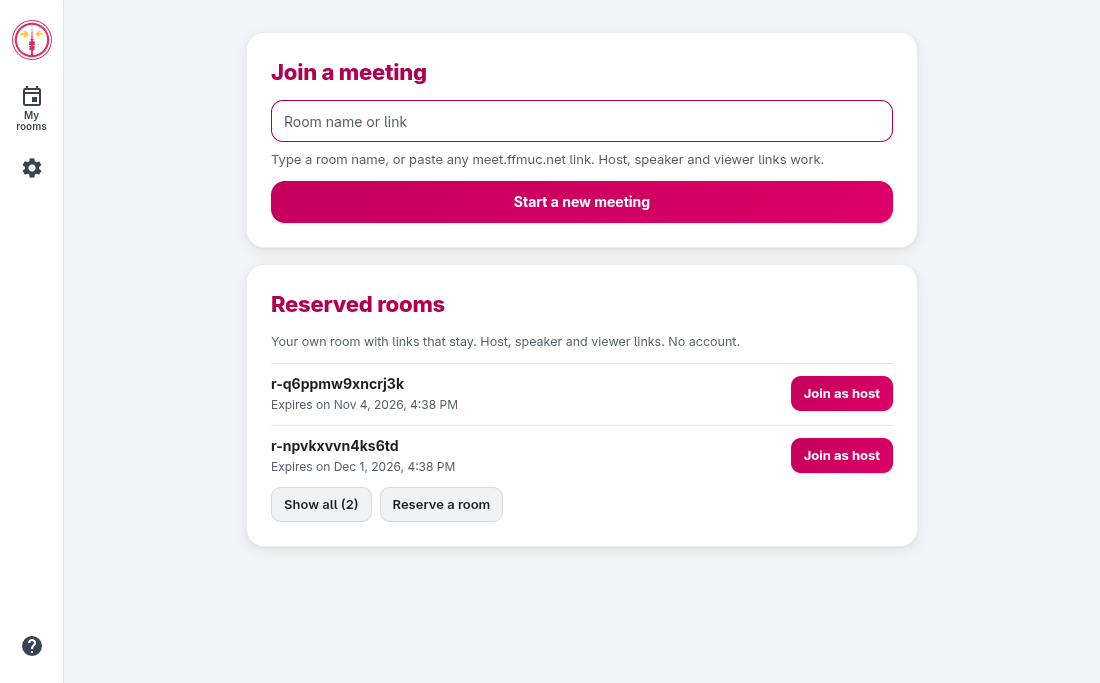
  <p>Die App sieht jetzt aus wie die Reservierungsseite. Auf der Startseite findest du drei Bereiche: <strong>Meeting beitreten</strong>, <strong>Reservierte Räume</strong> und <strong>Letzte Meetings</strong>. Räume, die du moderierst, sind dort mit einem <strong>Host</strong>-Abzeichen markiert.</p>

  <p><img src="/assets/posts/2026-11-01-meet-app-start-light.png" alt="Startseite mit reservierten Räumen" /></p>

  <p><strong>Jeden Link einfach einfügen</strong></p>

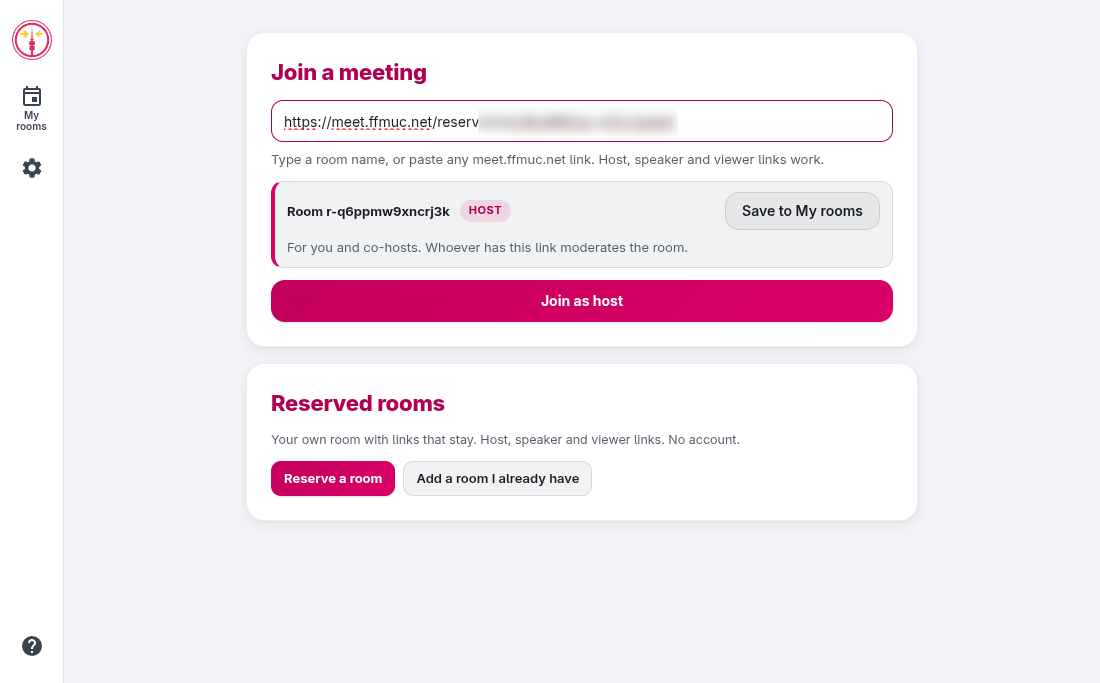
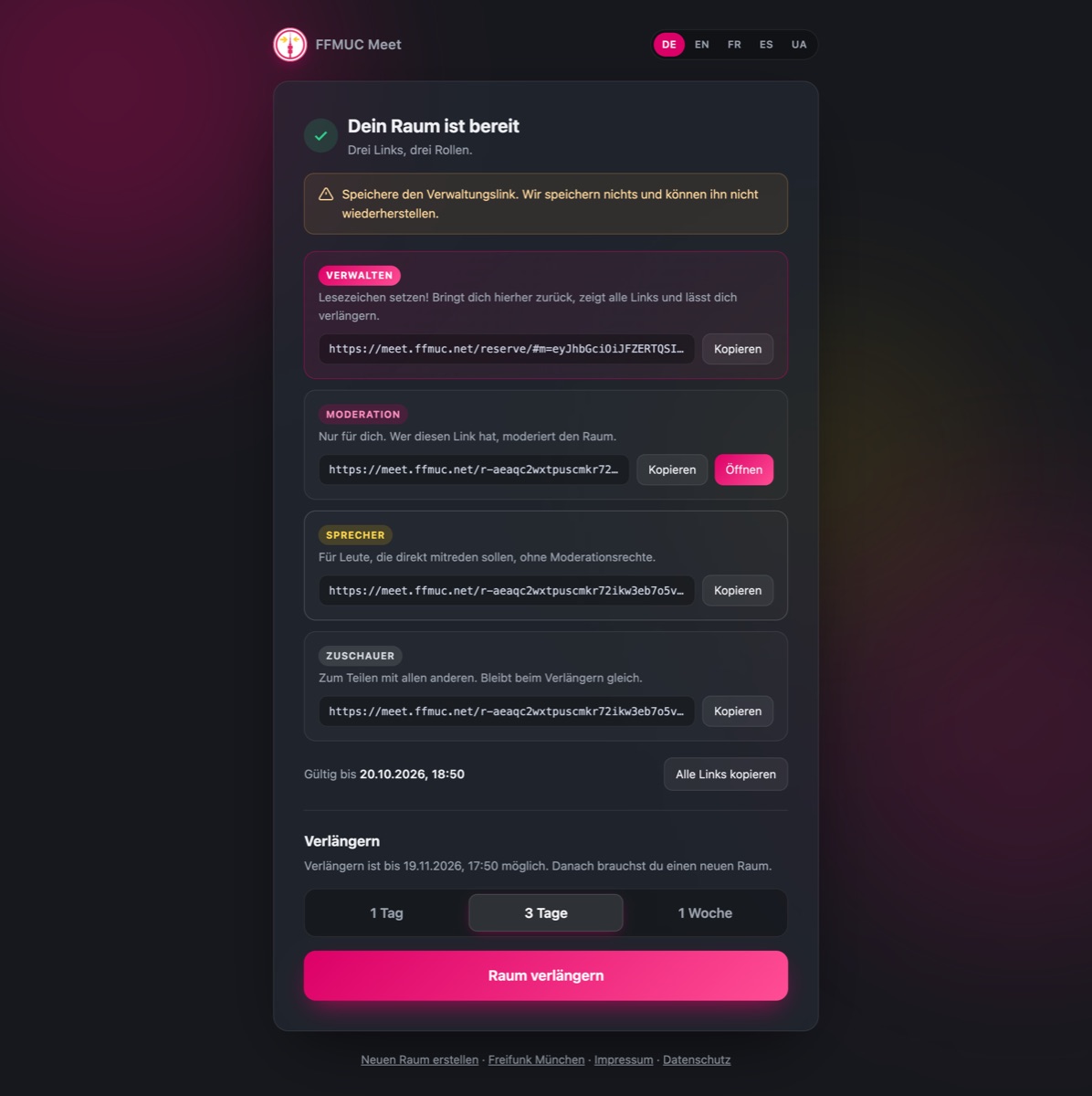
  <p>Ins Startfeld kannst du einen Raumnamen tippen oder jeden Link von meet.ffmuc.net einfügen, auch Moderations-, Sprecher- und Verwaltungslinks. Die App zeigt dir vor dem Beitritt, in welchen Raum und mit welcher Rolle du kommst. Mit <strong>In Meine Räume speichern</strong> merkt sich die App einen Moderations- oder Verwaltungslink für später.</p>

  <p><img src="/assets/posts/2026-11-01-meet-app-host-link-light.png" alt="Eingefügter Moderationslink mit Vorschau von Raum und Rolle" /></p>

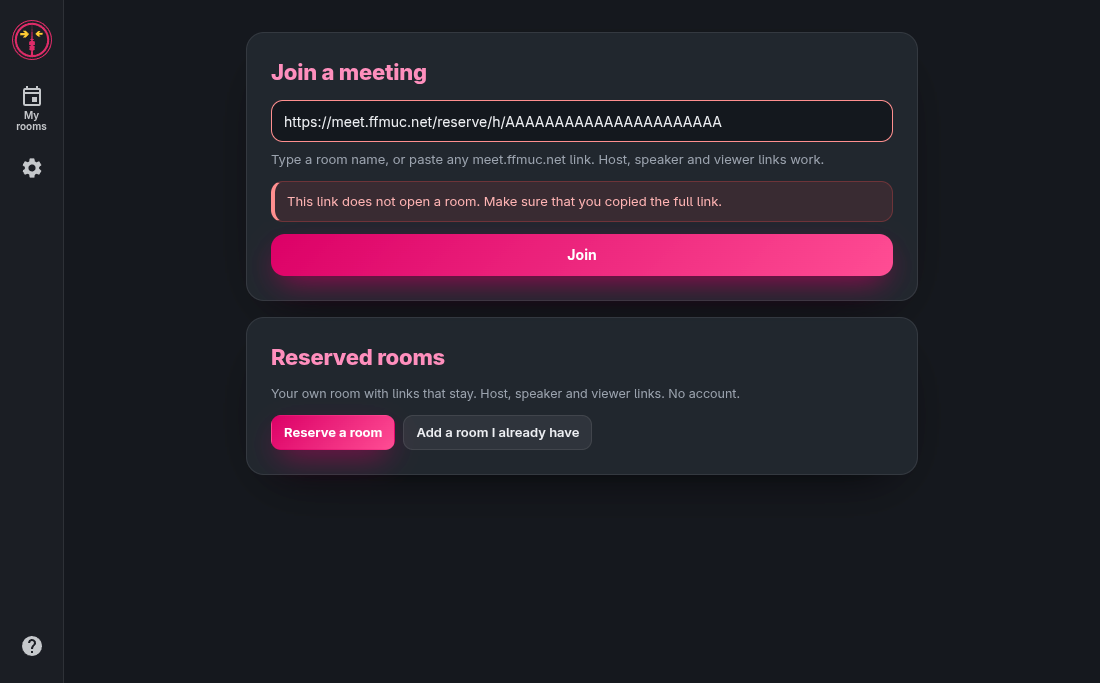
  <p>Ist ein Link abgelaufen, gelöscht oder durch neue Links ersetzt, sagt dir die App das in klaren Worten.</p>

  <p><img src="/assets/posts/2026-11-01-meet-app-invalid-link-dark.png" alt="Hinweis bei einem ungültigen Link im dunklen Modus" /></p>

  <p><strong>Meine Räume</strong></p>

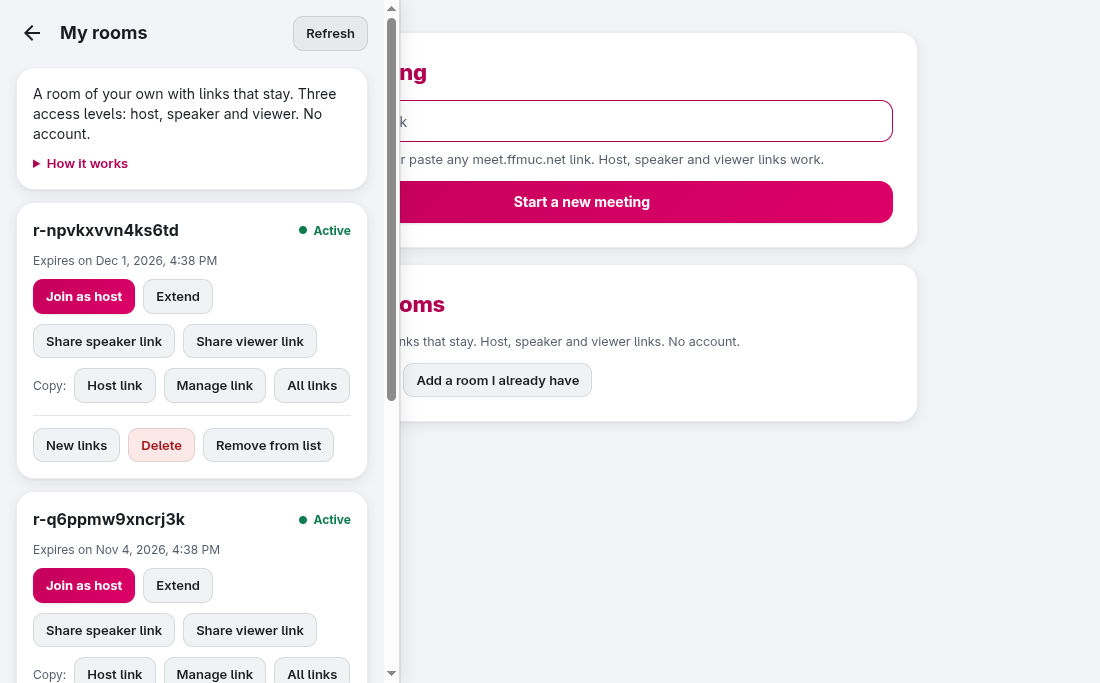
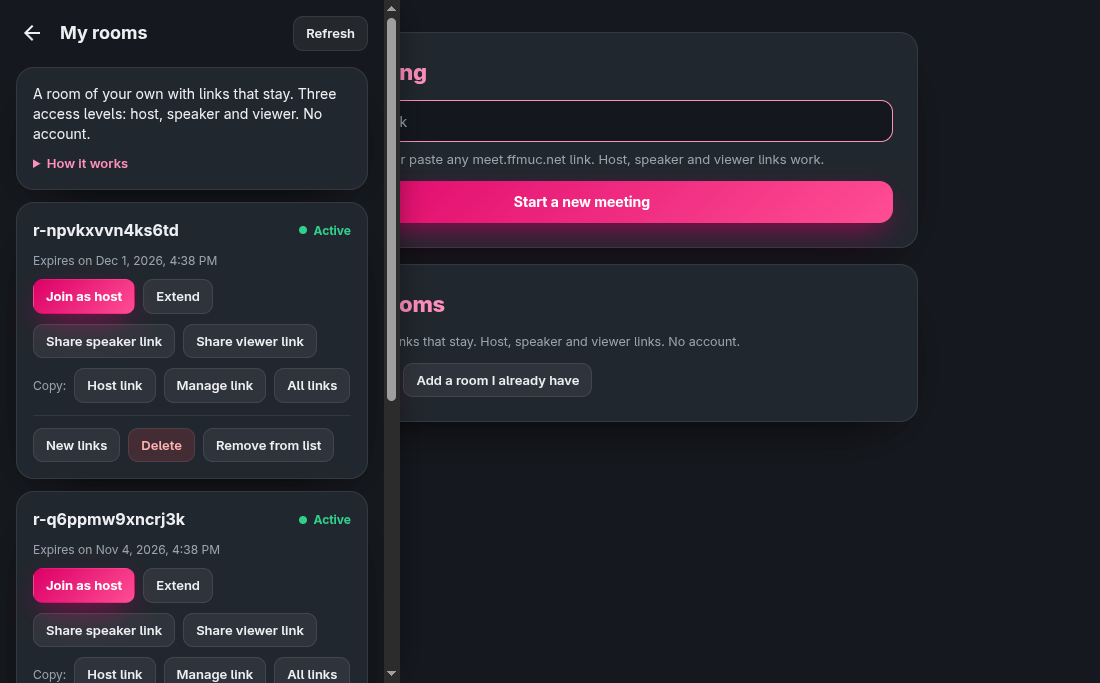
  <p>Unter <strong>Meine Räume</strong> verwaltest du deine reservierten Räume, ganz ohne Konto:</p>

  <ul>
    <li>einen neuen Raum <strong>reservieren</strong> oder einen vorhandenen Raum über seinen Moderations- oder Verwaltungslink <strong>hinzufügen</strong>,</li>
    <li><strong>als Moderator:in beitreten</strong>,</li>
    <li>Moderations-, Sprecher- und Zuschauerlinks <strong>kopieren oder teilen</strong>,</li>
    <li>den Raum <strong>verlängern</strong>, <strong>neue Links erstellen</strong> oder ihn <strong>löschen</strong>.</li>
  </ul>

  <p>Die App speichert den geheimen Teil deiner Links verschlüsselt im sicheren Schlüsselspeicher deines Betriebssystems. Gibt es keinen sicheren Schlüsselspeicher, speichert die App nichts.</p>

  <p><img src="/assets/posts/2026-11-01-meet-app-myrooms-light.png" alt="Meine Räume im hellen Modus" />
<img src="/assets/posts/2026-11-01-meet-app-myrooms-dark.png" alt="Meine Räume im dunklen Modus" /></p>

  <p><strong>Erinnerungen vor dem Ablauf</strong></p>

  <p>Damit dein Raum nicht abläuft, erinnert dich die App <strong>3 Tage</strong> und <strong>1 Tag</strong> vorher. Ein Klick auf die Meldung öffnet direkt die Optionen zum Verlängern.</p>

  <p><strong>Hell, dunkel oder wie das System</strong></p>

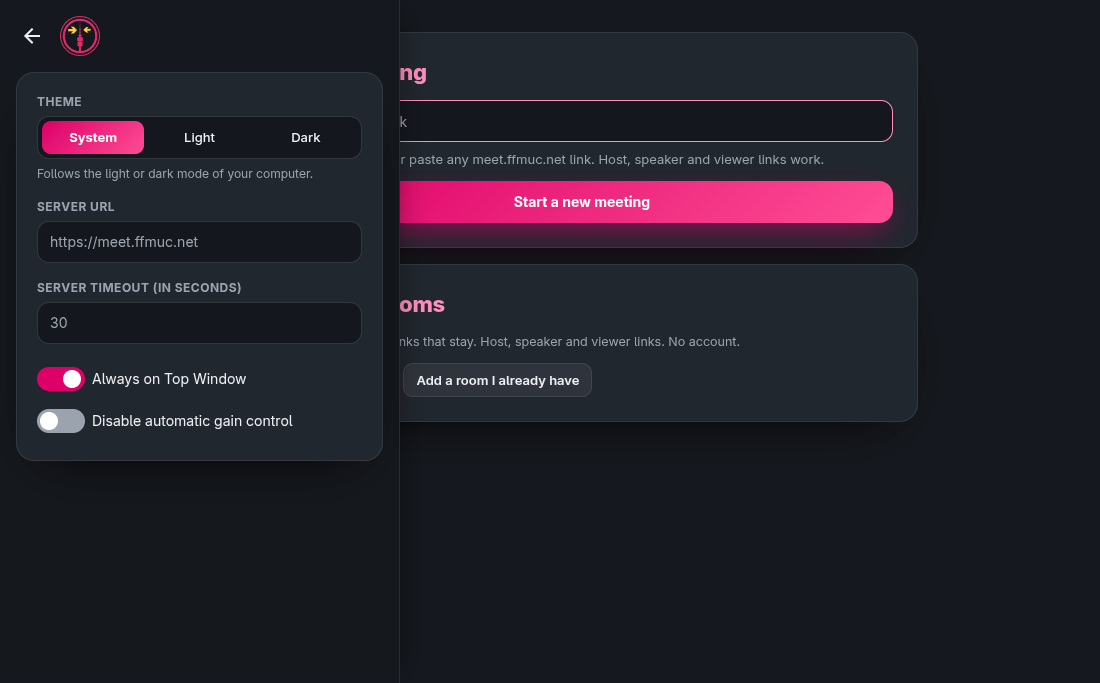
  <p>In den Einstellungen wählst du das Design: <strong>System</strong> (Standard), <strong>Hell</strong> oder <strong>Dunkel</strong>. Mit „System“ folgt die App dem Modus deines Computers.</p>

  <p><img src="/assets/posts/2026-11-01-meet-app-settings-dark.png" alt="Einstellungen mit Design-Auswahl" /></p>

  <p><strong>Links direkt in der App öffnen</strong></p>

  <p>Die App registriert die Links <code class="language-plaintext highlighter-rouge">ffmuc-meet://</code> (und weiterhin <code class="language-plaintext highlighter-rouge">jitsi-meet://</code>). Auch Reservierungslinks funktionieren so, zum Beispiel <code class="language-plaintext highlighter-rouge">ffmuc-meet://meet.ffmuc.net/reserve/h/…</code>.</p>

  <p><strong>Download</strong></p>

  <p>Die neue Version findest du auf der <a href="https://github.com/freifunkMUC/jitsi-meet-electron/releases">Release-Seite bei GitHub</a>, sobald sie veröffentlicht ist. Alternativ:</p>

  <ul>
    <li><strong>Windows</strong> (WinGet): <code class="language-plaintext highlighter-rouge">winget install --id freifunkMUC.FreifunkMeet</code></li>
    <li><strong>macOS</strong> (Homebrew): <code class="language-plaintext highlighter-rouge">brew install --cask freifunkMUC/freifunkmeet/freifunk-meet</code></li>
    <li><strong>Linux</strong>: AppImage und .deb für x86_64 und arm64 auf der Release-Seite</li>
  </ul>

  <p>Normale Räume funktionieren natürlich genau wie bisher. Mehr zu den Rollen und zum Zuschauer-Modus findest du in unseren Beiträgen zu <a href="/freifunkmuc/meet/2026/10/17/meet-zuschauer-raeume/">reservierten Räumen</a> und zu <a href="/freifunk/meet/dienste/2026/10/17/meet-untertitel-und-zuschauermodus/">Untertiteln und Zuschauermodus</a>. Wir freuen uns über euer Feedback, gerne auch als <a href="https://github.com/freifunkMUC/jitsi-meet-electron/issues">Issue auf GitHub</a>!</p>

</section>

<section data-lang="en" class="language-content">

  <p><strong>Dear Freifunk community,</strong></p>

  <p>Two weeks ago we launched <a href="/freifunkmuc/meet/2026/10/17/meet-zuschauer-raeume/">reserved rooms with viewer mode</a> at <a href="https://meet.ffmuc.net/reserve/">meet.ffmuc.net/reserve</a>. Now our <strong>desktop app for Windows, macOS and Linux</strong> can do this too. The new version <strong>v2026.10.100</strong> brings reserved rooms right into the app, a new look with light and dark mode, and many small improvements.</p>

  <p><strong>New start page</strong></p>

  <p>The app now looks like the reserve page. The start page has three cards: <strong>Join a meeting</strong>, <strong>Reserved rooms</strong> and <strong>Recent meetings</strong>. Rooms you host are marked with a <strong>Host</strong> badge.</p>

  <p><img src="/assets/posts/2026-11-01-meet-app-start-light.png" alt="Start page with reserved rooms" /></p>

  <p><strong>Just paste any link</strong></p>

  <p>In the start field, type a room name or paste any meet.ffmuc.net link, including host, speaker and manage links. Before you join, the app shows the room and your role. <strong>Save to My rooms</strong> keeps a host or manage link for later.</p>

  <p><img src="/assets/posts/2026-11-01-meet-app-host-link-light.png" alt="Pasted host link with room and role preview" /></p>

  <p>If a link has expired, was deleted or was replaced by new links, the app tells you in plain words.</p>

  <p><img src="/assets/posts/2026-11-01-meet-app-invalid-link-dark.png" alt="Message for a link that is not valid, dark mode" /></p>

  <p><strong>My rooms</strong></p>

  <p>In <strong>My rooms</strong> you manage your reserved rooms, no account needed:</p>

  <ul>
    <li><strong>reserve</strong> a new room, or <strong>add</strong> an existing room from its host or manage link,</li>
    <li><strong>join as host</strong>,</li>
    <li><strong>copy or share</strong> host, speaker and viewer links,</li>
    <li><strong>extend</strong> the room, <strong>make new links</strong> or <strong>delete</strong> it.</li>
  </ul>

  <p>The app stores the secret part of your links encrypted in the secure key store of your operating system. If there is no secure key store, the app stores nothing.</p>

  <p><img src="/assets/posts/2026-11-01-meet-app-myrooms-light.png" alt="My rooms in light mode" />
<img src="/assets/posts/2026-11-01-meet-app-myrooms-dark.png" alt="My rooms in dark mode" /></p>

  <p><strong>Reminders before a room expires</strong></p>

  <p>So your room does not expire, the app reminds you <strong>3 days</strong> and <strong>1 day</strong> before. Click the notification to go straight to the extend options.</p>

  <p><strong>Light, dark or system</strong></p>

  <p>In the settings you choose the theme: <strong>System</strong> (default), <strong>Light</strong> or <strong>Dark</strong>. With “System” the app follows the mode of your computer.</p>

  <p><img src="/assets/posts/2026-11-01-meet-app-settings-dark.png" alt="Settings with theme selection" /></p>

  <p><strong>Open links in the app</strong></p>

  <p>The app registers <code class="language-plaintext highlighter-rouge">ffmuc-meet://</code> links (and still <code class="language-plaintext highlighter-rouge">jitsi-meet://</code>). Reserve links work too, for example <code class="language-plaintext highlighter-rouge">ffmuc-meet://meet.ffmuc.net/reserve/h/…</code>.</p>

  <p><strong>Download</strong></p>

  <p>You will find the new version on the <a href="https://github.com/freifunkMUC/jitsi-meet-electron/releases">GitHub release page</a> as soon as it is published. Alternatively:</p>

  <ul>
    <li><strong>Windows</strong> (WinGet): <code class="language-plaintext highlighter-rouge">winget install --id freifunkMUC.FreifunkMeet</code></li>
    <li><strong>macOS</strong> (Homebrew): <code class="language-plaintext highlighter-rouge">brew install --cask freifunkMUC/freifunkmeet/freifunk-meet</code></li>
    <li><strong>Linux</strong>: AppImage and .deb for x86_64 and arm64 on the release page</li>
  </ul>

  <p>Regular rooms of course keep working exactly as before. More about roles and viewer mode is in our posts on <a href="/freifunkmuc/meet/2026/10/17/meet-zuschauer-raeume/">reserved rooms</a> and on <a href="/freifunk/meet/dienste/2026/10/17/meet-untertitel-und-zuschauermodus/">subtitles and viewer mode</a>. We look forward to your feedback, also as an <a href="https://github.com/freifunkMUC/jitsi-meet-electron/issues">issue on GitHub</a>!</p>

</section>

<section data-lang="fr" class="language-content">

  <p><strong>Chères Freifunkeuses, chers Freifunkeurs,</strong></p>

  <p>Il y a deux semaines, nous avons lancé les <a href="/freifunkmuc/meet/2026/10/17/meet-zuschauer-raeume/">salles réservées avec mode spectateur</a> sur <a href="https://meet.ffmuc.net/reserve/">meet.ffmuc.net/reserve</a>. Désormais, notre <strong>application de bureau pour Windows, macOS et Linux</strong> le peut aussi. La nouvelle version <strong>v2026.10.100</strong> intègre les salles réservées directement dans l’application, avec un nouveau design en mode clair et sombre et de nombreuses petites améliorations.</p>

  <p><strong>Nouvelle page d’accueil</strong></p>

  <p>L’application ressemble maintenant à la page de réservation. La page d’accueil comporte trois cartes : <strong>Rejoindre une réunion</strong>, <strong>Salles réservées</strong> et <strong>Réunions récentes</strong>. Les salles que vous animez portent un badge <strong>Hôte</strong>.</p>

  <p><img src="/assets/posts/2026-11-01-meet-app-start-light.png" alt="Page d'accueil avec salles réservées" /></p>

  <p><strong>Collez simplement n’importe quel lien</strong></p>

  <p>Dans le champ de départ, tapez un nom de salle ou collez n’importe quel lien meet.ffmuc.net, y compris les liens d’hôte, d’intervenant et de gestion. Avant de rejoindre, l’application affiche la salle et votre rôle. <strong>Enregistrer dans Mes salles</strong> garde un lien d’hôte ou de gestion pour plus tard.</p>

  <p><img src="/assets/posts/2026-11-01-meet-app-host-link-light.png" alt="Lien d'hôte collé avec aperçu de la salle et du rôle" /></p>

  <p>Si un lien a expiré, a été supprimé ou remplacé par de nouveaux liens, l’application vous le dit clairement.</p>

  <p><img src="/assets/posts/2026-11-01-meet-app-invalid-link-dark.png" alt="Message pour un lien non valide, mode sombre" /></p>

  <p><strong>Mes salles</strong></p>

  <p>Dans <strong>Mes salles</strong>, vous gérez vos salles réservées, sans compte :</p>

  <ul>
    <li><strong>réserver</strong> une nouvelle salle ou <strong>ajouter</strong> une salle existante via son lien d’hôte ou de gestion,</li>
    <li><strong>rejoindre en tant qu’hôte</strong>,</li>
    <li><strong>copier ou partager</strong> les liens d’hôte, d’intervenant et de spectateur,</li>
    <li><strong>prolonger</strong> la salle, <strong>créer de nouveaux liens</strong> ou la <strong>supprimer</strong>.</li>
  </ul>

  <p>L’application enregistre la partie secrète de vos liens de façon chiffrée dans le trousseau sécurisé de votre système. S’il n’y a pas de trousseau sécurisé, l’application n’enregistre rien.</p>

  <p><img src="/assets/posts/2026-11-01-meet-app-myrooms-light.png" alt="Mes salles en mode clair" />
<img src="/assets/posts/2026-11-01-meet-app-myrooms-dark.png" alt="Mes salles en mode sombre" /></p>

  <p><strong>Rappels avant l’expiration</strong></p>

  <p>Pour que votre salle n’expire pas, l’application vous le rappelle <strong>3 jours</strong> et <strong>1 jour</strong> avant. Un clic sur la notification ouvre directement les options de prolongation.</p>

  <p><strong>Clair, sombre ou selon le système</strong></p>

  <p>Dans les paramètres, vous choisissez le thème : <strong>Système</strong> (par défaut), <strong>Clair</strong> ou <strong>Sombre</strong>. Avec « Système », l’application suit le mode de votre ordinateur.</p>

  <p><img src="/assets/posts/2026-11-01-meet-app-settings-dark.png" alt="Paramètres avec choix du thème" /></p>

  <p><strong>Ouvrir les liens dans l’application</strong></p>

  <p>L’application enregistre les liens <code class="language-plaintext highlighter-rouge">ffmuc-meet://</code> (et toujours <code class="language-plaintext highlighter-rouge">jitsi-meet://</code>). Les liens de réservation fonctionnent aussi, par exemple <code class="language-plaintext highlighter-rouge">ffmuc-meet://meet.ffmuc.net/reserve/h/…</code>.</p>

  <p><strong>Téléchargement</strong></p>

  <p>Vous trouverez la nouvelle version sur la <a href="https://github.com/freifunkMUC/jitsi-meet-electron/releases">page des versions sur GitHub</a> dès sa publication. Sinon :</p>

  <ul>
    <li><strong>Windows</strong> (WinGet) : <code class="language-plaintext highlighter-rouge">winget install --id freifunkMUC.FreifunkMeet</code></li>
    <li><strong>macOS</strong> (Homebrew) : <code class="language-plaintext highlighter-rouge">brew install --cask freifunkMUC/freifunkmeet/freifunk-meet</code></li>
    <li><strong>Linux</strong> : AppImage et .deb pour x86_64 et arm64 sur la page des versions</li>
  </ul>

  <p>Les salles normales fonctionnent bien sûr comme avant. Pour en savoir plus sur les rôles et le mode spectateur, lisez nos articles sur les <a href="/freifunkmuc/meet/2026/10/17/meet-zuschauer-raeume/">salles réservées</a> et sur les <a href="/freifunk/meet/dienste/2026/10/17/meet-untertitel-und-zuschauermodus/">sous-titres et le mode spectateur</a>. Vos retours sont les bienvenus, aussi sous forme d’<a href="https://github.com/freifunkMUC/jitsi-meet-electron/issues">issue sur GitHub</a> !</p>

</section>

<section data-lang="es" class="language-content">

  <p><strong>Queridas y queridos freifunkers:</strong></p>

  <p>Hace dos semanas lanzamos las <a href="/freifunkmuc/meet/2026/10/17/meet-zuschauer-raeume/">salas reservadas con modo espectador</a> en <a href="https://meet.ffmuc.net/reserve/">meet.ffmuc.net/reserve</a>. Ahora nuestra <strong>aplicación de escritorio para Windows, macOS y Linux</strong> también lo puede hacer. La nueva versión <strong>v2026.10.100</strong> lleva las salas reservadas directamente a la aplicación, con un nuevo diseño en modo claro y oscuro y muchas pequeñas mejoras.</p>

  <p><strong>Nueva página de inicio</strong></p>

  <p>La aplicación ahora se parece a la página de reservas. La página de inicio tiene tres tarjetas: <strong>Unirse a una reunión</strong>, <strong>Salas reservadas</strong> y <strong>Reuniones recientes</strong>. Las salas que moderas llevan una insignia <strong>Host</strong>.</p>

  <p><img src="/assets/posts/2026-11-01-meet-app-start-light.png" alt="Página de inicio con salas reservadas" /></p>

  <p><strong>Pega cualquier enlace</strong></p>

  <p>En el campo de inicio, escribe un nombre de sala o pega cualquier enlace de meet.ffmuc.net, también enlaces de moderación, de ponente y de gestión. Antes de entrar, la aplicación te muestra la sala y tu rol. <strong>Guardar en Mis salas</strong> guarda un enlace de moderación o de gestión para más tarde.</p>

  <p><img src="/assets/posts/2026-11-01-meet-app-host-link-light.png" alt="Enlace de moderación pegado con vista previa de sala y rol" /></p>

  <p>Si un enlace ha caducado, se ha borrado o se ha sustituido por enlaces nuevos, la aplicación te lo dice con palabras claras.</p>

  <p><img src="/assets/posts/2026-11-01-meet-app-invalid-link-dark.png" alt="Aviso para un enlace no válido, modo oscuro" /></p>

  <p><strong>Mis salas</strong></p>

  <p>En <strong>Mis salas</strong> gestionas tus salas reservadas, sin cuenta:</p>

  <ul>
    <li><strong>reservar</strong> una sala nueva o <strong>añadir</strong> una sala existente con su enlace de moderación o de gestión,</li>
    <li><strong>entrar como moderador/a</strong>,</li>
    <li><strong>copiar o compartir</strong> los enlaces de moderación, de ponente y de espectador,</li>
    <li><strong>prolongar</strong> la sala, <strong>crear enlaces nuevos</strong> o <strong>borrarla</strong>.</li>
  </ul>

  <p>La aplicación guarda la parte secreta de tus enlaces cifrada en el almacén seguro de claves de tu sistema operativo. Si no hay un almacén seguro, la aplicación no guarda nada.</p>

  <p><img src="/assets/posts/2026-11-01-meet-app-myrooms-light.png" alt="Mis salas en modo claro" />
<img src="/assets/posts/2026-11-01-meet-app-myrooms-dark.png" alt="Mis salas en modo oscuro" /></p>

  <p><strong>Recordatorios antes de que caduque</strong></p>

  <p>Para que tu sala no caduque, la aplicación te avisa <strong>3 días</strong> y <strong>1 día</strong> antes. Un clic en el aviso abre directamente las opciones para prolongarla.</p>

  <p><strong>Claro, oscuro o según el sistema</strong></p>

  <p>En los ajustes eliges el tema: <strong>Sistema</strong> (predeterminado), <strong>Claro</strong> u <strong>Oscuro</strong>. Con «Sistema» la aplicación sigue el modo de tu ordenador.</p>

  <p><img src="/assets/posts/2026-11-01-meet-app-settings-dark.png" alt="Ajustes con selección de tema" /></p>

  <p><strong>Abrir enlaces en la aplicación</strong></p>

  <p>La aplicación registra los enlaces <code class="language-plaintext highlighter-rouge">ffmuc-meet://</code> (y sigue con <code class="language-plaintext highlighter-rouge">jitsi-meet://</code>). Los enlaces de reserva también funcionan, por ejemplo <code class="language-plaintext highlighter-rouge">ffmuc-meet://meet.ffmuc.net/reserve/h/…</code>.</p>

  <p><strong>Descarga</strong></p>

  <p>Encontrarás la nueva versión en la <a href="https://github.com/freifunkMUC/jitsi-meet-electron/releases">página de versiones de GitHub</a> en cuanto se publique. También puedes usar:</p>

  <ul>
    <li><strong>Windows</strong> (WinGet): <code class="language-plaintext highlighter-rouge">winget install --id freifunkMUC.FreifunkMeet</code></li>
    <li><strong>macOS</strong> (Homebrew): <code class="language-plaintext highlighter-rouge">brew install --cask freifunkMUC/freifunkmeet/freifunk-meet</code></li>
    <li><strong>Linux</strong>: AppImage y .deb para x86_64 y arm64 en la página de versiones</li>
  </ul>

  <p>Las salas normales, por supuesto, siguen funcionando igual que antes. Más sobre los roles y el modo espectador en nuestras entradas sobre <a href="/freifunkmuc/meet/2026/10/17/meet-zuschauer-raeume/">salas reservadas</a> y sobre <a href="/freifunk/meet/dienste/2026/10/17/meet-untertitel-und-zuschauermodus/">subtítulos y modo espectador</a>. ¡Esperamos vuestros comentarios, también como <a href="https://github.com/freifunkMUC/jitsi-meet-electron/issues">issue en GitHub</a>!</p>

</section>

<section data-lang="ua" class="language-content">

  <p><strong>Дорогі фрайфункерки та фрайфункери!</strong></p>

  <p>Два тижні тому ми запустили <a href="/freifunkmuc/meet/2026/10/17/meet-zuschauer-raeume/">зарезервовані кімнати з режимом глядача</a> на <a href="https://meet.ffmuc.net/reserve/">meet.ffmuc.net/reserve</a>. Тепер це вміє і наш <strong>десктопний застосунок для Windows, macOS і Linux</strong>. Нова версія <strong>v2026.10.100</strong> додає зарезервовані кімнати прямо в застосунок, новий дизайн зі світлою й темною темою та багато дрібних покращень.</p>

  <p><strong>Нова стартова сторінка</strong></p>

  <p>Застосунок тепер виглядає як сторінка резервування. На стартовій сторінці три картки: <strong>Приєднатися до зустрічі</strong>, <strong>Зарезервовані кімнати</strong> та <strong>Останні зустрічі</strong>. Кімнати, які ви модеруєте, мають позначку <strong>Host</strong>.</p>

  <p><img src="/assets/posts/2026-11-01-meet-app-start-light.png" alt="Стартова сторінка із зарезервованими кімнатами" /></p>

  <p><strong>Просто вставте будь-яке посилання</strong></p>

  <p>У стартове поле введіть назву кімнати або вставте будь-яке посилання meet.ffmuc.net, також посилання модератора, доповідача та керування. Перед входом застосунок показує кімнату та вашу роль. <strong>Зберегти в Мої кімнати</strong> запам’ятовує посилання модератора або керування на потім.</p>

  <p><img src="/assets/posts/2026-11-01-meet-app-host-link-light.png" alt="Вставлене посилання модератора з попереднім переглядом кімнати та ролі" /></p>

  <p>Якщо посилання застаріло, було видалене або замінене новими, застосунок скаже про це зрозумілими словами.</p>

  <p><img src="/assets/posts/2026-11-01-meet-app-invalid-link-dark.png" alt="Повідомлення про недійсне посилання, темна тема" /></p>

  <p><strong>Мої кімнати</strong></p>

  <p>У розділі <strong>Мої кімнати</strong> ви керуєте своїми зарезервованими кімнатами без облікового запису:</p>

  <ul>
    <li><strong>зарезервувати</strong> нову кімнату або <strong>додати</strong> наявну через посилання модератора чи керування,</li>
    <li><strong>увійти як модератор</strong>,</li>
    <li><strong>копіювати або поширити</strong> посилання модератора, доповідача та глядача,</li>
    <li><strong>продовжити</strong> кімнату, <strong>створити нові посилання</strong> або <strong>видалити</strong> її.</li>
  </ul>

  <p>Застосунок зберігає секретну частину ваших посилань у зашифрованому вигляді в захищеному сховищі ключів вашої операційної системи. Якщо захищеного сховища немає, застосунок нічого не зберігає.</p>

  <p><img src="/assets/posts/2026-11-01-meet-app-myrooms-light.png" alt="Мої кімнати у світлій темі" />
<img src="/assets/posts/2026-11-01-meet-app-myrooms-dark.png" alt="Мої кімнати в темній темі" /></p>

  <p><strong>Нагадування перед завершенням терміну</strong></p>

  <p>Щоб ваша кімната не зникла, застосунок нагадає за <strong>3 дні</strong> та за <strong>1 день</strong> до кінця терміну. Клік на сповіщення одразу відкриває варіанти продовження.</p>

  <p><strong>Світла, темна або як у системі</strong></p>

  <p>У налаштуваннях оберіть тему: <strong>Системна</strong> (за замовчуванням), <strong>Світла</strong> або <strong>Темна</strong>. Із «Системною» застосунок слідує режиму вашого комп’ютера.</p>

  <p><img src="/assets/posts/2026-11-01-meet-app-settings-dark.png" alt="Налаштування з вибором теми" /></p>

  <p><strong>Відкривайте посилання в застосунку</strong></p>

  <p>Застосунок реєструє посилання <code class="language-plaintext highlighter-rouge">ffmuc-meet://</code> (і, як і раніше, <code class="language-plaintext highlighter-rouge">jitsi-meet://</code>). Посилання на резервування теж працюють, наприклад <code class="language-plaintext highlighter-rouge">ffmuc-meet://meet.ffmuc.net/reserve/h/…</code>.</p>

  <p><strong>Завантаження</strong></p>

  <p>Нову версію ви знайдете на <a href="https://github.com/freifunkMUC/jitsi-meet-electron/releases">сторінці релізів на GitHub</a>, щойно її буде опубліковано. Також можна так:</p>

  <ul>
    <li><strong>Windows</strong> (WinGet): <code class="language-plaintext highlighter-rouge">winget install --id freifunkMUC.FreifunkMeet</code></li>
    <li><strong>macOS</strong> (Homebrew): <code class="language-plaintext highlighter-rouge">brew install --cask freifunkMUC/freifunkmeet/freifunk-meet</code></li>
    <li><strong>Linux</strong>: AppImage і .deb для x86_64 та arm64 на сторінці релізів</li>
  </ul>

  <p>Звичайні кімнати, звісно, працюють так само, як і раніше. Більше про ролі та режим глядача читайте в наших дописах про <a href="/freifunkmuc/meet/2026/10/17/meet-zuschauer-raeume/">зарезервовані кімнати</a> та про <a href="/freifunk/meet/dienste/2026/10/17/meet-untertitel-und-zuschauermodus/">субтитри й режим глядача</a>. Будемо раді вашим відгукам, також у вигляді <a href="https://github.com/freifunkMUC/jitsi-meet-electron/issues">issue на GitHub</a>!</p>

</section>]]></content><author><name>Freie Netze München e.V.</name><email>hilfe@ffmuc.bayern</email></author><category term="freifunkmuc" /><category term="meet" /><summary type="html"><![CDATA[]]></summary></entry><entry><title type="html">Digital Independence Day: Dein erster Schritt mit Freifunk München</title><link href="https://ffmuc.net/freifunkmuc/services/2026/11/01/digital-independence-day/" rel="alternate" type="text/html" title="Digital Independence Day: Dein erster Schritt mit Freifunk München" /><published>2026-11-01T10:00:00+01:00</published><updated>2026-11-01T10:00:00+01:00</updated><id>https://ffmuc.net/freifunkmuc/services/2026/11/01/digital-independence-day</id><content type="html" xml:base="https://ffmuc.net/freifunkmuc/services/2026/11/01/digital-independence-day/"><![CDATA[<section data-lang="de" class="language-content active">

  <p>Heute ist <strong>Digital Independence Day</strong> (<a href="https://di.day/de">DI.DAY</a>). Er ist jeden ersten Sonntag im Monat. Die Idee ist einfach: Wechsle an diesem Tag <strong>einen</strong> Dienst von einem großen Tech-Konzern zu einer freien Alternative. Nur einen. Nächsten Monat kommt der nächste.</p>

  <p>Der DI.DAY ist eine internationale Bewegung für mehr digitale Souveränität. <a href="https://savesocial.eu/de/was-wir-machen/diday">Save Social</a> organisiert ihn zusammen mit vielen Partnern, zum Beispiel Digitalcourage, The Document Foundation und lokalen Gruppen des Chaos Computer Clubs. Es gibt Wechselcafés, Workshops und lokale Treffen. Im <a href="https://di.day/de">Veranstaltungskalender auf di.day</a> findest du Termine in deiner Nähe oder trägst selbst einen ein.</p>

  <p>Du musst dafür kein Technik-Profi sein. Diese Seite zeigt dir, was wir als Freifunk München anbieten und wie du in wenigen Minuten anfängst.</p>

  <p><strong>Alle unsere Dienste sind:</strong></p>

  <ul>
    <li>kostenlos</li>
    <li>ohne Konto und ohne Anmeldung (wo möglich)</li>
    <li>ohne Werbung und ohne Tracking</li>
    <li>auf eigenen Servern in Deutschland</li>
    <li>ehrenamtlich betrieben und durch Spenden finanziert</li>
  </ul>

  <hr />

  <h2 id="schritt-1-videokonferenzen-ohne-zoom-und-teams">Schritt 1: Videokonferenzen ohne Zoom und Teams</h2>

  <p><strong><a href="https://meet.ffmuc.net">meet.ffmuc.net</a></strong> ist unser Videokonferenz-Dienst. Er basiert auf der freien Software Jitsi Meet. Du brauchst nur einen Browser.</p>

  <p><strong>So startest du deine erste Konferenz:</strong></p>

  <ol>
    <li>Öffne <a href="https://meet.ffmuc.net">meet.ffmuc.net</a>.</li>
    <li>Gib einen Raumnamen ein, zum Beispiel <code class="language-plaintext highlighter-rouge">Gartentreff-GiraffeWolke</code>. Klicke auf <strong>Konferenz starten</strong>.</li>
    <li>Gib deinen Namen ein. Klicke auf <strong>Konferenz beitreten</strong>.</li>
    <li>Kopiere die Adresse aus der Adresszeile. Schicke sie an alle, die mitmachen sollen.</li>
  </ol>

  <p>Fertig. Mehr musst du nicht wissen.</p>

  <p><strong>Tipp:</strong> Nimm einen Raumnamen mit ein oder zwei zufälligen Wörtern. Dann findet niemand euren Raum zufällig.</p>

  <h3 id="neu-die-anleitung-fr-meet">Neu: Die Anleitung für Meet</h3>

  <p>Wir haben eine neue, ausführliche Anleitung geschrieben. Sie ist für Einsteiger gemacht und erklärt jeden Knopf.</p>

  <p><strong><a href="https://ffmuc.net/wiki/knb:meet">Zur Anleitung: Freifunk München Meet</a></strong></p>

  <p>Die Anleitung gibt es auf Deutsch, Englisch, Italienisch, Französisch, Spanisch und Griechisch. Sie erklärt unter anderem:</p>

  <ul>
    <li>die Bedienleiste, Knopf für Knopf</li>
    <li>wie du Leute einlädst, auch per Telefon</li>
    <li>wie du einen Raum mit Lobby oder Passwort schützt</li>
    <li>Whiteboard, gemeinsames Dokument, Umfragen und Untertitel</li>
    <li>häufige Fragen und Probleme mit Bild und Ton</li>
  </ul>

  <h3 id="neu-reservierte-rume">Neu: Reservierte Räume</h3>

  <p>Ihr trefft euch regelmäßig? Als Verein, Schulklasse oder Team? Dann reserviere einen festen Raum:</p>

  <p><strong><a href="https://meet.ffmuc.net/reserve/">meet.ffmuc.net/reserve</a></strong></p>

  <ul>
    <li>Wähle eine Laufzeit von 3 Tagen bis 1 Jahr.</li>
    <li>Du bekommst Links für Moderation, Sprecher:innen und Zuschauer:innen.</li>
    <li>Du brauchst kein Konto. Wir speichern keine Namen, E-Mail- oder IP-Adressen.</li>
    <li>Die Links bleiben gleich, auch wenn du den Raum verlängerst.</li>
  </ul>

  <p><strong>Wichtig:</strong> Speichere den Verwaltungslink. Wir können ihn nicht wiederherstellen.</p>

  <h3 id="apps">Apps</h3>

  <p>Meet läuft im Browser am besten in Chrome, Chromium, Edge oder einem aktuellen Firefox. Für den Computer gibt es auch unsere fertige App:
<a href="https://github.com/freifunkMUC/jitsi-meet-electron/releases/latest/download/ffmuc-meet.exe">Windows</a> ·
<a href="https://github.com/freifunkMUC/jitsi-meet-electron/releases/latest/download/ffmuc-meet.dmg">macOS</a> ·
<a href="https://github.com/freifunkMUC/jitsi-meet-electron/releases/latest/download/ffmuc-meet-x86_64.AppImage">Linux</a></p>

  <p>Am Handy nimmst du die Jitsi-Meet-App. Fragt die App nach einem Server, trage <code class="language-plaintext highlighter-rouge">https://meet.ffmuc.net/</code> ein.</p>

  <hr />

  <h2 id="schritt-2-gemeinsam-schreiben-ohne-google-docs">Schritt 2: Gemeinsam schreiben ohne Google Docs</h2>

  <p>Ihr wollt zusammen an einem Text arbeiten? Öffne eine Seite, schicke den Link, fertig.</p>

  <table>
    <thead>
      <tr>
        <th>Dienst</th>
        <th>Wofür?</th>
      </tr>
    </thead>
    <tbody>
      <tr>
        <td><a href="https://ffmuc.net/pad/">Etherpad</a></td>
        <td>Einfache Texte gemeinsam schreiben, z. B. Protokolle und Einkaufslisten</td>
      </tr>
      <tr>
        <td><a href="https://hedgedoc.ffmuc.net/">HedgeDoc</a></td>
        <td>Notizen und Dokumente mit Formatierung (Markdown)</td>
      </tr>
      <tr>
        <td><a href="https://cryptpad.ffmuc.net/">CryptPad</a></td>
        <td>Texte, Tabellen, Präsentationen und Formulare, Ende-zu-Ende-verschlüsselt</td>
      </tr>
    </tbody>
  </table>

  <p><strong>Für Einsteiger empfehlen wir CryptPad.</strong> Es sieht aus wie ein normales Office-Programm.</p>

  <hr />

  <h2 id="schritt-3-sicherer-surfen-mit-unserem-dns">Schritt 3: Sicherer surfen mit unserem DNS</h2>

  <p>Jedes Mal, wenn du eine Webseite öffnest, fragt dein Gerät einen DNS-Server nach dem Weg. Meist ist das ein Server deines Anbieters oder eines US-Konzerns.</p>

  <p>Unsere DNS-Server stehen in der EU, sind verschlüsselt und speichern keine Profile. Die Einrichtung dauert wenige Minuten. Die Anleitung zeigt dir jeden Schritt für Handy, Computer und Router:</p>

  <p><strong><a href="https://dns-setup.ffmuc.net/">dns-setup.ffmuc.net</a></strong></p>

  <hr />

  <h2 id="schritt-4-soziale-medien-ohne-konzern">Schritt 4: Soziale Medien ohne Konzern</h2>

  <p>Wir betreiben eine eigene Mastodon-Instanz im Fediverse. Mastodon ist wie Twitter/X, aber ohne Konzern und ohne Algorithmus. Folge uns: <strong><a href="https://social.ffmuc.net/@freifunkMUC">@freifunkMUC@social.ffmuc.net</a></strong></p>

  <hr />

  <h2 id="schritt-5-freies-wlan-fr-alle">Schritt 5: Freies WLAN für alle</h2>

  <p>Unser Kern ist das freie WLAN „muenchen.freifunk.net”. Du kannst selbst einen Freifunk-Router aufstellen und das Netz größer machen. So geht’s: <a href="/router-flashen/">Router flashen</a> und <a href="/mitmachen/">Mitmachen</a>.</p>

  <hr />

  <h2 id="hilfe-und-kontakt">Hilfe und Kontakt</h2>

  <ul>
    <li>Du kommst nicht weiter? Schreib uns: <strong>hilfe@ffmuc.bayern</strong> oder über die <a href="/kontakt/">Kontaktseite</a>.</li>
    <li>Komm zu unserem Online-Treffen: jeden letzten Mittwoch im Monat um 19:30 Uhr auf <a href="https://meet.ffmuc.net/ffmuctreffen">meet.ffmuc.net/ffmuctreffen</a>.</li>
    <li>Alle Dienste auf einen Blick: <a href="/dienste/">ffmuc.net/dienste</a></li>
    <li>Mehr Wechsel-Anleitungen von anderen Projekten: <a href="https://di.day/de/wechselrezepte">Wechselrezepte auf di.day</a></li>
  </ul>

  <hr />

  <h2 id="untersttze-uns">Unterstütze uns</h2>

  <p>Alle Dienste sind kostenlos, aber nicht umsonst. Server und Datenverkehr bezahlen wir als Verein aus Spenden. Wenn dir unsere Dienste helfen, freuen wir uns über deine <a href="https://spende.ffmuc.net">Spende</a>.</p>

  <p>Hast du heute einen Dienst gewechselt? Erzähl es weiter, zum Beispiel mit <strong>#DIDit</strong>.</p>

</section>

<section data-lang="en" class="language-content">

  <p>Today is <strong>Digital Independence Day</strong> (<a href="https://di.day/en">DI.DAY</a>). It is on the first Sunday of every month. The idea is simple: on this day, move <strong>one</strong> service from a big tech company to a free alternative. Only one. Next month, do the next one.</p>

  <p>DI.DAY is an international movement for more digital sovereignty. <a href="https://savesocial.eu/en/what-we-do/diday">Save Social</a> organises it together with many partners, for example Digitalcourage, The Document Foundation and local Chaos Computer Club groups. There are switching cafés, workshops and local meetings. Use the <a href="https://di.day/en">event calendar on di.day</a> to find events near you or to add your own.</p>

  <p>You do not need to be a tech expert. This page shows what Freifunk München offers and how you start in a few minutes.</p>

  <p><strong>All our services are:</strong></p>

  <ul>
    <li>free of charge</li>
    <li>without an account and without sign-up (where possible)</li>
    <li>without ads and without tracking</li>
    <li>on our own servers in Germany</li>
    <li>run by volunteers and paid for by donations</li>
  </ul>

  <hr />

  <h2 id="step-1-video-calls-without-zoom-and-teams">Step 1: Video calls without Zoom and Teams</h2>

  <p><strong><a href="https://meet.ffmuc.net">meet.ffmuc.net</a></strong> is our video conferencing service. It uses the free software Jitsi Meet. You only need a browser.</p>

  <p><strong>Start your first meeting:</strong></p>

  <ol>
    <li>Open <a href="https://meet.ffmuc.net">meet.ffmuc.net</a>.</li>
    <li>Type a room name, for example <code class="language-plaintext highlighter-rouge">GardenClub-GiraffeCloud</code>. Click <strong>Start meeting</strong>.</li>
    <li>Type your name. Click <strong>Join meeting</strong>.</li>
    <li>Copy the address from the address bar. Send it to all people who must join.</li>
  </ol>

  <p>Done. That is all you need to know.</p>

  <p><strong>Tip:</strong> Use a room name with one or two random words. Then nobody finds your room by accident.</p>

  <h3 id="new-the-meet-guide">New: The Meet guide</h3>

  <p>We wrote a new and complete guide. It is for beginners and explains every button.</p>

  <p><strong><a href="https://ffmuc.net/wiki/knb:meet">Open the guide: Freifunk München Meet</a></strong></p>

  <p>The guide is available in German, English, Italian, French, Spanish and Greek. It explains:</p>

  <ul>
    <li>the toolbar, button by button</li>
    <li>how to invite people, also by phone</li>
    <li>how to protect a room with a lobby or a password</li>
    <li>whiteboard, shared document, polls and subtitles</li>
    <li>frequent questions and audio or video problems</li>
  </ul>

  <h3 id="new-reserved-rooms">New: Reserved rooms</h3>

  <p>Do you meet regularly? As a club, a school class or a team? Then reserve a fixed room:</p>

  <p><strong><a href="https://meet.ffmuc.net/reserve/">meet.ffmuc.net/reserve</a></strong></p>

  <ul>
    <li>Select a duration from 3 days to 1 year.</li>
    <li>You get links for moderators, speakers and viewers.</li>
    <li>You do not need an account. We do not store names, email addresses or IP addresses.</li>
    <li>The links stay the same when you extend the room.</li>
  </ul>

  <p><strong>Important:</strong> Save the management link. We cannot recover it.</p>

  <h3 id="apps-1">Apps</h3>

  <p>In the browser, Meet works best in Chrome, Chromium, Edge or a current Firefox. For your computer, you can also use our ready-made app:
<a href="https://github.com/freifunkMUC/jitsi-meet-electron/releases/latest/download/ffmuc-meet.exe">Windows</a> ·
<a href="https://github.com/freifunkMUC/jitsi-meet-electron/releases/latest/download/ffmuc-meet.dmg">macOS</a> ·
<a href="https://github.com/freifunkMUC/jitsi-meet-electron/releases/latest/download/ffmuc-meet-x86_64.AppImage">Linux</a></p>

  <p>On your phone, use the Jitsi Meet app. If the app asks for a server, enter <code class="language-plaintext highlighter-rouge">https://meet.ffmuc.net/</code>.</p>

  <hr />

  <h2 id="step-2-write-together-without-google-docs">Step 2: Write together without Google Docs</h2>

  <p>Do you want to work on a text together? Open a page, send the link, done.</p>

  <table>
    <thead>
      <tr>
        <th>Service</th>
        <th>For what?</th>
      </tr>
    </thead>
    <tbody>
      <tr>
        <td><a href="https://ffmuc.net/pad/">Etherpad</a></td>
        <td>Write simple texts together, e.g. meeting notes and shopping lists</td>
      </tr>
      <tr>
        <td><a href="https://hedgedoc.ffmuc.net/">HedgeDoc</a></td>
        <td>Notes and documents with formatting (Markdown)</td>
      </tr>
      <tr>
        <td><a href="https://cryptpad.ffmuc.net/">CryptPad</a></td>
        <td>Texts, spreadsheets, slides and forms, end-to-end encrypted</td>
      </tr>
    </tbody>
  </table>

  <p><strong>For beginners, we recommend CryptPad.</strong> It looks like a normal office program.</p>

  <hr />

  <h2 id="step-3-safer-browsing-with-our-dns">Step 3: Safer browsing with our DNS</h2>

  <p>Each time you open a website, your device asks a DNS server for the way. Usually, this is a server of your provider or of a US company.</p>

  <p>Our DNS servers are in the EU, use encryption and do not keep profiles. The setup takes a few minutes. The guide shows each step for phone, computer and router:</p>

  <p><strong><a href="https://dns-setup.ffmuc.net/">dns-setup.ffmuc.net</a></strong></p>

  <hr />

  <h2 id="step-4-social-media-without-a-corporation">Step 4: Social media without a corporation</h2>

  <p>We run our own Mastodon instance in the Fediverse. Mastodon is like Twitter/X, but without a corporation and without an algorithm. Follow us: <strong><a href="https://social.ffmuc.net/@freifunkMUC">@freifunkMUC@social.ffmuc.net</a></strong></p>

  <hr />

  <h2 id="step-5-free-wi-fi-for-everyone">Step 5: Free Wi-Fi for everyone</h2>

  <p>Our core is the free Wi-Fi network “muenchen.freifunk.net”. You can set up your own Freifunk router and make the network bigger. Here is how: <a href="/router-flashen/">Flash a router</a> and <a href="/mitmachen/">Get involved</a>.</p>

  <hr />

  <h2 id="help-and-contact">Help and contact</h2>

  <ul>
    <li>Are you stuck? Write to us: <strong>hilfe@ffmuc.bayern</strong> or use the <a href="/kontakt/">contact page</a>.</li>
    <li>Join our online meeting: every last Wednesday of the month at 7:30 PM on <a href="https://meet.ffmuc.net/ffmuctreffen">meet.ffmuc.net/ffmuctreffen</a>.</li>
    <li>All services at a glance: <a href="/dienste/">ffmuc.net/dienste</a></li>
    <li>More switching guides from other projects: <a href="https://di.day/en">Switching recipes on di.day</a></li>
  </ul>

  <hr />

  <h2 id="support-us">Support us</h2>

  <p>All services are free of charge, but they are not free to run. As an association, we pay for servers and traffic with donations. If our services help you, please <a href="https://spende.ffmuc.net">donate</a>.</p>

  <p>Did you switch a service today? Tell others, for example with <strong>#DIDit</strong>.</p>

</section>

<section data-lang="fr" class="language-content">

  <p>Aujourd’hui, c’est le <strong>Digital Independence Day</strong> (<a href="https://di.day/en">DI.DAY</a>). Il a lieu le premier dimanche de chaque mois. L’idée est simple : ce jour-là, remplace <strong>un</strong> service d’une grande entreprise technologique par une alternative libre. Un seul. Le mois prochain, tu fais le suivant.</p>

  <p>Le DI.DAY est un mouvement international pour plus de souveraineté numérique. <a href="https://savesocial.eu/en/what-we-do/diday">Save Social</a> l’organise avec de nombreux partenaires, par exemple Digitalcourage, The Document Foundation et des groupes locaux du Chaos Computer Club. Il y a des cafés de migration, des ateliers et des rencontres locales. Dans le <a href="https://di.day/en">calendrier des événements sur di.day</a>, tu trouves des événements près de chez toi ou tu ajoutes le tien.</p>

  <p>Tu n’as pas besoin d’être expert en technique. Cette page montre ce que Freifunk München propose et comment commencer en quelques minutes.</p>

  <p><strong>Tous nos services sont :</strong></p>

  <ul>
    <li>gratuits</li>
    <li>sans compte et sans inscription (si possible)</li>
    <li>sans publicité et sans pistage</li>
    <li>sur nos propres serveurs en Allemagne</li>
    <li>gérés par des bénévoles et financés par des dons</li>
  </ul>

  <hr />

  <h2 id="tape-1--visioconfrences-sans-zoom-ni-teams">Étape 1 : Visioconférences sans Zoom ni Teams</h2>

  <p><strong><a href="https://meet.ffmuc.net">meet.ffmuc.net</a></strong> est notre service de visioconférence. Il utilise le logiciel libre Jitsi Meet. Tu as seulement besoin d’un navigateur.</p>

  <p><strong>Démarre ta première réunion :</strong></p>

  <ol>
    <li>Ouvre <a href="https://meet.ffmuc.net">meet.ffmuc.net</a>.</li>
    <li>Saisis un nom de salle, par exemple <code class="language-plaintext highlighter-rouge">ClubJardin-GirafeNuage</code>. Clique sur <strong>Démarrer la réunion</strong>.</li>
    <li>Saisis ton nom. Clique sur <strong>Rejoindre la réunion</strong>.</li>
    <li>Copie l’adresse dans la barre d’adresse. Envoie-la à toutes les personnes qui doivent participer.</li>
  </ol>

  <p>C’est fait. Tu n’as pas besoin d’en savoir plus.</p>

  <p><strong>Astuce :</strong> Utilise un nom de salle avec un ou deux mots aléatoires. Ainsi, personne ne trouve ta salle par hasard.</p>

  <h3 id="nouveau--le-guide-de-meet">Nouveau : Le guide de Meet</h3>

  <p>Nous avons écrit un nouveau guide complet. Il est fait pour les débutants et explique chaque bouton.</p>

  <p><strong><a href="https://ffmuc.net/wiki/knb:meet">Ouvrir le guide : Freifunk München Meet</a></strong></p>

  <p>Le guide existe en allemand, anglais, italien, français, espagnol et grec. Il explique :</p>

  <ul>
    <li>la barre d’outils, bouton par bouton</li>
    <li>comment inviter des personnes, aussi par téléphone</li>
    <li>comment protéger une salle avec une salle d’attente ou un mot de passe</li>
    <li>tableau blanc, document partagé, sondages et sous-titres</li>
    <li>questions fréquentes et problèmes d’image ou de son</li>
  </ul>

  <h3 id="nouveau--salles-rserves">Nouveau : Salles réservées</h3>

  <p>Vous vous réunissez régulièrement ? En association, en classe ou en équipe ? Alors réserve une salle fixe :</p>

  <p><strong><a href="https://meet.ffmuc.net/reserve/">meet.ffmuc.net/reserve</a></strong></p>

  <ul>
    <li>Choisis une durée de 3 jours à 1 an.</li>
    <li>Tu reçois des liens pour la modération, les intervenant·e·s et le public.</li>
    <li>Tu n’as pas besoin de compte. Nous n’enregistrons ni noms, ni adresses e-mail, ni adresses IP.</li>
    <li>Les liens restent les mêmes quand tu prolonges la salle.</li>
  </ul>

  <p><strong>Important :</strong> Enregistre le lien de gestion. Nous ne pouvons pas le récupérer.</p>

  <h3 id="applications">Applications</h3>

  <p>Dans le navigateur, Meet fonctionne le mieux avec Chrome, Chromium, Edge ou un Firefox récent. Pour ton ordinateur, tu peux aussi utiliser notre application prête à l’emploi :
<a href="https://github.com/freifunkMUC/jitsi-meet-electron/releases/latest/download/ffmuc-meet.exe">Windows</a> ·
<a href="https://github.com/freifunkMUC/jitsi-meet-electron/releases/latest/download/ffmuc-meet.dmg">macOS</a> ·
<a href="https://github.com/freifunkMUC/jitsi-meet-electron/releases/latest/download/ffmuc-meet-x86_64.AppImage">Linux</a></p>

  <p>Sur ton téléphone, utilise l’application Jitsi Meet. Si l’application demande un serveur, saisis <code class="language-plaintext highlighter-rouge">https://meet.ffmuc.net/</code>.</p>

  <hr />

  <h2 id="tape-2--crire-ensemble-sans-google-docs">Étape 2 : Écrire ensemble sans Google Docs</h2>

  <p>Vous voulez travailler ensemble sur un texte ? Ouvre une page, envoie le lien, c’est fait.</p>

  <table>
    <thead>
      <tr>
        <th>Service</th>
        <th>Pour quoi ?</th>
      </tr>
    </thead>
    <tbody>
      <tr>
        <td><a href="https://ffmuc.net/pad/">Etherpad</a></td>
        <td>Écrire ensemble des textes simples, p. ex. comptes rendus et listes de courses</td>
      </tr>
      <tr>
        <td><a href="https://hedgedoc.ffmuc.net/">HedgeDoc</a></td>
        <td>Notes et documents avec mise en forme (Markdown)</td>
      </tr>
      <tr>
        <td><a href="https://cryptpad.ffmuc.net/">CryptPad</a></td>
        <td>Textes, tableurs, présentations et formulaires, chiffrés de bout en bout</td>
      </tr>
    </tbody>
  </table>

  <p><strong>Pour les débutants, nous recommandons CryptPad.</strong> Il ressemble à un logiciel de bureautique normal.</p>

  <hr />

  <h2 id="tape-3--naviguer-plus-srement-avec-notre-dns">Étape 3 : Naviguer plus sûrement avec notre DNS</h2>

  <p>Chaque fois que tu ouvres un site web, ton appareil demande le chemin à un serveur DNS. En général, c’est un serveur de ton fournisseur d’accès ou d’une entreprise américaine.</p>

  <p>Nos serveurs DNS sont dans l’UE, utilisent le chiffrement et ne créent pas de profils. La configuration prend quelques minutes. Le guide montre chaque étape pour le téléphone, l’ordinateur et le routeur :</p>

  <p><strong><a href="https://dns-setup.ffmuc.net/">dns-setup.ffmuc.net</a></strong></p>

  <hr />

  <h2 id="tape-4--rseaux-sociaux-sans-multinationale">Étape 4 : Réseaux sociaux sans multinationale</h2>

  <p>Nous gérons notre propre instance Mastodon dans le Fédivers. Mastodon ressemble à Twitter/X, mais sans multinationale et sans algorithme. Suis-nous : <strong><a href="https://social.ffmuc.net/@freifunkMUC">@freifunkMUC@social.ffmuc.net</a></strong></p>

  <hr />

  <h2 id="tape-5--wi-fi-gratuit-pour-tout-le-monde">Étape 5 : Wi-Fi gratuit pour tout le monde</h2>

  <p>Notre cœur est le réseau Wi-Fi libre « muenchen.freifunk.net ». Tu peux installer ton propre routeur Freifunk et agrandir le réseau. Voici comment : <a href="/router-flashen/">Flasher un routeur</a> et <a href="/mitmachen/">Participer</a>.</p>

  <hr />

  <h2 id="aide-et-contact">Aide et contact</h2>

  <ul>
    <li>Tu es bloqué·e ? Écris-nous : <strong>hilfe@ffmuc.bayern</strong> ou utilise la <a href="/kontakt/">page de contact</a>.</li>
    <li>Rejoins notre rencontre en ligne : chaque dernier mercredi du mois à 19h30 sur <a href="https://meet.ffmuc.net/ffmuctreffen">meet.ffmuc.net/ffmuctreffen</a>.</li>
    <li>Tous les services en un coup d’œil : <a href="/dienste/">ffmuc.net/dienste</a></li>
    <li>Plus de guides de migration d’autres projets : <a href="https://di.day/en">Recettes de migration sur di.day</a></li>
  </ul>

  <hr />

  <h2 id="soutiens-nous">Soutiens-nous</h2>

  <p>Tous les services sont gratuits, mais leur fonctionnement a un coût. En tant qu’association, nous payons les serveurs et le trafic avec des dons. Si nos services t’aident, merci de <a href="https://spende.ffmuc.net">faire un don</a>.</p>

  <p>As-tu changé un service aujourd’hui ? Parles-en autour de toi, par exemple avec <strong>#DIDit</strong>.</p>

</section>

<section data-lang="es" class="language-content">

  <p>Hoy es el <strong>Digital Independence Day</strong> (<a href="https://di.day/en">DI.DAY</a>). Es el primer domingo de cada mes. La idea es sencilla: ese día, cambia <strong>un</strong> servicio de una gran empresa tecnológica por una alternativa libre. Solo uno. El mes que viene, el siguiente.</p>

  <p>El DI.DAY es un movimiento internacional por más soberanía digital. <a href="https://savesocial.eu/en/what-we-do/diday">Save Social</a> lo organiza junto con muchos socios, por ejemplo Digitalcourage, The Document Foundation y grupos locales del Chaos Computer Club. Hay cafés de cambio, talleres y encuentros locales. En el <a href="https://di.day/en">calendario de eventos de di.day</a> encuentras eventos cerca de ti o añades el tuyo.</p>

  <p>No necesitas ser experto en tecnología. Esta página muestra lo que ofrece Freifunk München y cómo empezar en pocos minutos.</p>

  <p><strong>Todos nuestros servicios son:</strong></p>

  <ul>
    <li>gratuitos</li>
    <li>sin cuenta y sin registro (cuando es posible)</li>
    <li>sin publicidad y sin rastreo</li>
    <li>en nuestros propios servidores en Alemania</li>
    <li>gestionados por voluntarios y financiados con donaciones</li>
  </ul>

  <hr />

  <h2 id="paso-1-videollamadas-sin-zoom-ni-teams">Paso 1: Videollamadas sin Zoom ni Teams</h2>

  <p><strong><a href="https://meet.ffmuc.net">meet.ffmuc.net</a></strong> es nuestro servicio de videoconferencias. Usa el software libre Jitsi Meet. Solo necesitas un navegador.</p>

  <p><strong>Empieza tu primera reunión:</strong></p>

  <ol>
    <li>Abre <a href="https://meet.ffmuc.net">meet.ffmuc.net</a>.</li>
    <li>Escribe un nombre de sala, por ejemplo <code class="language-plaintext highlighter-rouge">ClubJardin-JirafaNube</code>. Haz clic en <strong>Iniciar reunión</strong>.</li>
    <li>Escribe tu nombre. Haz clic en <strong>Unirse a la reunión</strong>.</li>
    <li>Copia la dirección de la barra de direcciones. Envíala a todas las personas que deben participar.</li>
  </ol>

  <p>Listo. No necesitas saber más.</p>

  <p><strong>Consejo:</strong> Usa un nombre de sala con una o dos palabras aleatorias. Así nadie encuentra tu sala por casualidad.</p>

  <h3 id="nuevo-la-gua-de-meet">Nuevo: La guía de Meet</h3>

  <p>Hemos escrito una guía nueva y completa. Está hecha para principiantes y explica cada botón.</p>

  <p><strong><a href="https://ffmuc.net/wiki/knb:meet">Abrir la guía: Freifunk München Meet</a></strong></p>

  <p>La guía está disponible en alemán, inglés, italiano, francés, español y griego. Explica:</p>

  <ul>
    <li>la barra de herramientas, botón por botón</li>
    <li>cómo invitar a personas, también por teléfono</li>
    <li>cómo proteger una sala con sala de espera o contraseña</li>
    <li>pizarra, documento compartido, encuestas y subtítulos</li>
    <li>preguntas frecuentes y problemas de imagen o sonido</li>
  </ul>

  <h3 id="nuevo-salas-reservadas">Nuevo: Salas reservadas</h3>

  <p>¿Os reunís con regularidad? ¿Como asociación, clase o equipo? Entonces reserva una sala fija:</p>

  <p><strong><a href="https://meet.ffmuc.net/reserve/">meet.ffmuc.net/reserve</a></strong></p>

  <ul>
    <li>Elige una duración de 3 días a 1 año.</li>
    <li>Recibes enlaces para moderación, ponentes y público.</li>
    <li>No necesitas cuenta. No guardamos nombres, direcciones de correo ni direcciones IP.</li>
    <li>Los enlaces no cambian cuando prolongas la sala.</li>
  </ul>

  <p><strong>Importante:</strong> Guarda el enlace de gestión. No podemos recuperarlo.</p>

  <h3 id="aplicaciones">Aplicaciones</h3>

  <p>En el navegador, Meet funciona mejor en Chrome, Chromium, Edge o un Firefox actual. Para tu ordenador, también puedes usar nuestra aplicación lista para usar:
<a href="https://github.com/freifunkMUC/jitsi-meet-electron/releases/latest/download/ffmuc-meet.exe">Windows</a> ·
<a href="https://github.com/freifunkMUC/jitsi-meet-electron/releases/latest/download/ffmuc-meet.dmg">macOS</a> ·
<a href="https://github.com/freifunkMUC/jitsi-meet-electron/releases/latest/download/ffmuc-meet-x86_64.AppImage">Linux</a></p>

  <p>En el móvil, usa la aplicación Jitsi Meet. Si la aplicación pide un servidor, escribe <code class="language-plaintext highlighter-rouge">https://meet.ffmuc.net/</code>.</p>

  <hr />

  <h2 id="paso-2-escribir-juntos-sin-google-docs">Paso 2: Escribir juntos sin Google Docs</h2>

  <p>¿Queréis trabajar juntos en un texto? Abre una página, envía el enlace, listo.</p>

  <table>
    <thead>
      <tr>
        <th>Servicio</th>
        <th>¿Para qué?</th>
      </tr>
    </thead>
    <tbody>
      <tr>
        <td><a href="https://ffmuc.net/pad/">Etherpad</a></td>
        <td>Escribir juntos textos sencillos, p. ej. actas y listas de la compra</td>
      </tr>
      <tr>
        <td><a href="https://hedgedoc.ffmuc.net/">HedgeDoc</a></td>
        <td>Notas y documentos con formato (Markdown)</td>
      </tr>
      <tr>
        <td><a href="https://cryptpad.ffmuc.net/">CryptPad</a></td>
        <td>Textos, hojas de cálculo, presentaciones y formularios, cifrados de extremo a extremo</td>
      </tr>
    </tbody>
  </table>

  <p><strong>Para principiantes, recomendamos CryptPad.</strong> Parece un programa de oficina normal.</p>

  <hr />

  <h2 id="paso-3-navegar-ms-seguro-con-nuestro-dns">Paso 3: Navegar más seguro con nuestro DNS</h2>

  <p>Cada vez que abres una web, tu dispositivo pregunta el camino a un servidor DNS. Normalmente es un servidor de tu proveedor o de una empresa estadounidense.</p>

  <p>Nuestros servidores DNS están en la UE, usan cifrado y no crean perfiles. La configuración tarda pocos minutos. La guía muestra cada paso para móvil, ordenador y router:</p>

  <p><strong><a href="https://dns-setup.ffmuc.net/">dns-setup.ffmuc.net</a></strong></p>

  <hr />

  <h2 id="paso-4-redes-sociales-sin-multinacionales">Paso 4: Redes sociales sin multinacionales</h2>

  <p>Gestionamos nuestra propia instancia de Mastodon en el Fediverso. Mastodon es como Twitter/X, pero sin multinacional y sin algoritmo. Síguenos: <strong><a href="https://social.ffmuc.net/@freifunkMUC">@freifunkMUC@social.ffmuc.net</a></strong></p>

  <hr />

  <h2 id="paso-5-wi-fi-gratis-para-todos">Paso 5: Wi-Fi gratis para todos</h2>

  <p>Nuestro núcleo es la red Wi-Fi libre «muenchen.freifunk.net». Puedes instalar tu propio router Freifunk y hacer la red más grande. Así se hace: <a href="/router-flashen/">Flashear un router</a> y <a href="/mitmachen/">Participar</a>.</p>

  <hr />

  <h2 id="ayuda-y-contacto">Ayuda y contacto</h2>

  <ul>
    <li>¿No avanzas? Escríbenos: <strong>hilfe@ffmuc.bayern</strong> o usa la <a href="/kontakt/">página de contacto</a>.</li>
    <li>Ven a nuestro encuentro en línea: cada último miércoles del mes a las 19:30 en <a href="https://meet.ffmuc.net/ffmuctreffen">meet.ffmuc.net/ffmuctreffen</a>.</li>
    <li>Todos los servicios de un vistazo: <a href="/dienste/">ffmuc.net/dienste</a></li>
    <li>Más guías de cambio de otros proyectos: <a href="https://di.day/en">Recetas de cambio en di.day</a></li>
  </ul>

  <hr />

  <h2 id="apyanos">Apóyanos</h2>

  <p>Todos los servicios son gratuitos, pero mantenerlos cuesta dinero. Como asociación, pagamos los servidores y el tráfico con donaciones. Si nuestros servicios te ayudan, por favor <a href="https://spende.ffmuc.net">haz una donación</a>.</p>

  <p>¿Has cambiado un servicio hoy? Cuéntalo, por ejemplo con <strong>#DIDit</strong>.</p>

</section>

<section data-lang="ua" class="language-content">

  <p>Сьогодні <strong>Digital Independence Day</strong> (<a href="https://di.day/en">DI.DAY</a>) — День цифрової незалежності. Він відбувається щопершої неділі місяця. Ідея проста: цього дня заміни <strong>один</strong> сервіс великої технологічної компанії на вільну альтернативу. Лише один. Наступного місяця — наступний.</p>

  <p>DI.DAY — це міжнародний рух за більшу цифрову суверенність. <a href="https://savesocial.eu/en/what-we-do/diday">Save Social</a> організовує його разом із багатьма партнерами, наприклад Digitalcourage, The Document Foundation та місцевими групами Chaos Computer Club. Є кафе для переходу, воркшопи та місцеві зустрічі. У <a href="https://di.day/en">календарі подій на di.day</a> ти знайдеш події поруч або додаси власну.</p>

  <p>Тобі не потрібно бути експертом у техніці. Ця сторінка показує, що пропонує Freifunk München і як почати за кілька хвилин.</p>

  <p><strong>Усі наші сервіси:</strong></p>

  <ul>
    <li>безкоштовні</li>
    <li>без облікового запису та без реєстрації (де можливо)</li>
    <li>без реклами та без стеження</li>
    <li>на власних серверах у Німеччині</li>
    <li>працюють завдяки волонтерам і фінансуються з пожертв</li>
  </ul>

  <hr />

  <h2 id="zoom--teams">Крок 1: Відеодзвінки без Zoom і Teams</h2>

  <p><strong><a href="https://meet.ffmuc.net">meet.ffmuc.net</a></strong> — наш сервіс відеоконференцій. Він використовує вільне програмне забезпечення Jitsi Meet. Тобі потрібен лише браузер.</p>

  <p><strong>Почни свою першу зустріч:</strong></p>

  <ol>
    <li>Відкрий <a href="https://meet.ffmuc.net">meet.ffmuc.net</a>.</li>
    <li>Введи назву кімнати, наприклад <code class="language-plaintext highlighter-rouge">SadovyiKlub-ZhyrafKhmara</code>. Натисни <strong>Розпочати зустріч</strong>.</li>
    <li>Введи своє ім’я. Натисни <strong>Приєднатися до зустрічі</strong>.</li>
    <li>Скопіюй адресу з адресного рядка. Надішли її всім, хто має приєднатися.</li>
  </ol>

  <p>Готово. Більше нічого знати не потрібно.</p>

  <p><strong>Порада:</strong> Використовуй назву кімнати з одним або двома випадковими словами. Тоді ніхто не знайде вашу кімнату випадково.</p>

  <h3 id="meet">Нове: Посібник для Meet</h3>

  <p>Ми написали новий повний посібник. Він для початківців і пояснює кожну кнопку.</p>

  <p><strong><a href="https://ffmuc.net/wiki/knb:meet">Відкрити посібник: Freifunk München Meet</a></strong></p>

  <p>Посібник доступний німецькою, англійською, італійською, французькою, іспанською та грецькою мовами. Він пояснює:</p>

  <ul>
    <li>панель інструментів, кнопку за кнопкою</li>
    <li>як запросити людей, також телефоном</li>
    <li>як захистити кімнату лобі або паролем</li>
    <li>дошку, спільний документ, опитування та субтитри</li>
    <li>часті запитання та проблеми з зображенням або звуком</li>
  </ul>

  <h3 id="section">Нове: Зарезервовані кімнати</h3>

  <p>Ви зустрічаєтеся регулярно? Як клуб, шкільний клас або команда? Тоді зарезервуй постійну кімнату:</p>

  <p><strong><a href="https://meet.ffmuc.net/reserve/">meet.ffmuc.net/reserve</a></strong></p>

  <ul>
    <li>Обери тривалість від 3 днів до 1 року.</li>
    <li>Ти отримаєш посилання для модераторів, доповідачів і глядачів.</li>
    <li>Обліковий запис не потрібен. Ми не зберігаємо імена, адреси електронної пошти чи IP-адреси.</li>
    <li>Посилання не змінюються, коли ти продовжуєш кімнату.</li>
  </ul>

  <p><strong>Важливо:</strong> Збережи посилання для керування. Ми не можемо його відновити.</p>

  <h3 id="section-1">Застосунки</h3>

  <p>У браузері Meet найкраще працює в Chrome, Chromium, Edge або актуальному Firefox. Для комп’ютера також є наш готовий застосунок:
<a href="https://github.com/freifunkMUC/jitsi-meet-electron/releases/latest/download/ffmuc-meet.exe">Windows</a> ·
<a href="https://github.com/freifunkMUC/jitsi-meet-electron/releases/latest/download/ffmuc-meet.dmg">macOS</a> ·
<a href="https://github.com/freifunkMUC/jitsi-meet-electron/releases/latest/download/ffmuc-meet-x86_64.AppImage">Linux</a></p>

  <p>На телефоні використовуй застосунок Jitsi Meet. Якщо застосунок запитує сервер, введи <code class="language-plaintext highlighter-rouge">https://meet.ffmuc.net/</code>.</p>

  <hr />

  <h2 id="google-docs">Крок 2: Писати разом без Google Docs</h2>

  <p>Хочете разом працювати над текстом? Відкрий сторінку, надішли посилання — готово.</p>

  <table>
    <thead>
      <tr>
        <th>Сервіс</th>
        <th>Для чого?</th>
      </tr>
    </thead>
    <tbody>
      <tr>
        <td><a href="https://ffmuc.net/pad/">Etherpad</a></td>
        <td>Разом писати прості тексти, напр. протоколи та списки покупок</td>
      </tr>
      <tr>
        <td><a href="https://hedgedoc.ffmuc.net/">HedgeDoc</a></td>
        <td>Нотатки та документи з форматуванням (Markdown)</td>
      </tr>
      <tr>
        <td><a href="https://cryptpad.ffmuc.net/">CryptPad</a></td>
        <td>Тексти, таблиці, презентації та форми з наскрізним шифруванням</td>
      </tr>
    </tbody>
  </table>

  <p><strong>Для початківців ми радимо CryptPad.</strong> Він схожий на звичайну офісну програму.</p>

  <hr />

  <h2 id="dns">Крок 3: Безпечніший інтернет з нашим DNS</h2>

  <p>Щоразу, коли ти відкриваєш вебсайт, твій пристрій запитує дорогу в DNS-сервера. Зазвичай це сервер твого провайдера або американської компанії.</p>

  <p>Наші DNS-сервери розташовані в ЄС, використовують шифрування і не створюють профілів. Налаштування займає кілька хвилин. Посібник показує кожен крок для телефона, комп’ютера та роутера:</p>

  <p><strong><a href="https://dns-setup.ffmuc.net/">dns-setup.ffmuc.net</a></strong></p>

  <hr />

  <h2 id="section-2">Крок 4: Соцмережі без корпорацій</h2>

  <p>Ми маємо власний сервер Mastodon у Федиверсі. Mastodon схожий на Twitter/X, але без корпорації та без алгоритму. Стеж за нами: <strong><a href="https://social.ffmuc.net/@freifunkMUC">@freifunkMUC@social.ffmuc.net</a></strong></p>

  <hr />

  <h2 id="wi-fi--">Крок 5: Безкоштовний Wi-Fi для всіх</h2>

  <p>Наша основа — вільна мережа Wi-Fi «muenchen.freifunk.net». Ти можеш встановити власний роутер Freifunk і зробити мережу більшою. Ось як: <a href="/router-flashen/">Прошити роутер</a> і <a href="/mitmachen/">Долучитися</a>.</p>

  <hr />

  <h2 id="section-3">Допомога та контакт</h2>

  <ul>
    <li>Щось не виходить? Напиши нам: <strong>hilfe@ffmuc.bayern</strong> або скористайся <a href="/kontakt/">сторінкою контактів</a>.</li>
    <li>Приходь на нашу онлайн-зустріч: щоостанньої середи місяця о 19:30 на <a href="https://meet.ffmuc.net/ffmuctreffen">meet.ffmuc.net/ffmuctreffen</a>.</li>
    <li>Усі сервіси на одній сторінці: <a href="/dienste/">ffmuc.net/dienste</a></li>
    <li>Більше посібників для переходу від інших проєктів: <a href="https://di.day/en">Рецепти переходу на di.day</a></li>
  </ul>

  <hr />

  <h2 id="section-4">Підтримай нас</h2>

  <p>Усі сервіси безкоштовні для тебе, але їхня робота коштує грошей. Як об’єднання, ми оплачуємо сервери та трафік із пожертв. Якщо наші сервіси тобі допомагають, будь ласка, <a href="https://spende.ffmuc.net">зроби пожертву</a>.</p>

  <p>Ти сьогодні змінив сервіс? Розкажи іншим, наприклад з <strong>#DIDit</strong>.</p>

</section>]]></content><author><name>Freie Netze München e.V.</name><email>hilfe@ffmuc.bayern</email></author><category term="freifunkmuc" /><category term="services" /><summary type="html"><![CDATA[]]></summary></entry><entry><title type="html">PHP2Shell: PHP-basierte Dienste vorsorglich offline</title><link href="https://ffmuc.net/services/security/2026/10/21/php2shell-dienste-offline/" rel="alternate" type="text/html" title="PHP2Shell: PHP-basierte Dienste vorsorglich offline" /><published>2026-10-21T12:00:00+02:00</published><updated>2026-10-21T12:00:00+02:00</updated><id>https://ffmuc.net/services/security/2026/10/21/php2shell-dienste-offline</id><content type="html" xml:base="https://ffmuc.net/services/security/2026/10/21/php2shell-dienste-offline/"><![CDATA[<section data-lang="de" class="language-content active">

  <h2 id="php2shell-php-basierte-dienste-vorsorglich-offline">PHP2Shell: PHP-basierte Dienste vorsorglich offline</h2>

  <p>Heute Morgen (21. Oktober 2026, ca. 09:00 Uhr) haben wir vorsorglich <strong>alle unsere PHP-basierten Dienste vom Netz genommen</strong>, bis gepatchte PHP-Versionen eingespielt sind.</p>

  <p><strong>Nur vier PHP-Dienste sind offline (siehe unten). Das Freifunk-Netz und alle anderen Dienste sind nicht betroffen.</strong></p>

  <h2 id="hintergrund">Hintergrund</h2>

  <p>Am 20. Oktober 2026 hat das PHP-Projekt zwei kritische Sicherheitslücken im PHP-Kern vorangekündigt: <strong>CVE-2026-109618</strong> und <strong>CVE-2026-109619</strong>, Spitzname „PHP2Shell“, jeweils mit CVSS v4 9.2 bewertet. Sie erlauben <strong>Remote Code Execution ohne Authentifizierung</strong>.</p>

  <ul>
    <li>Details sind bereits vor dem Patch durchgesickert; laut dem CTO von Cloudflare gab es am 21. Oktober erste Angriffe „in the wild“.</li>
    <li>Gepatchte Releases sind für den 21. Oktober 2026, 14:00 UTC angekündigt. Fixes gibt es nur für PHP 8.2 und neuer.</li>
    <li>Berichten zufolge liegt der Fehler in der Verarbeitung von Session-Upload-Progress bzw. Multipart-Requests und ist erreichbar, <strong>bevor irgendein Anwendungscode läuft</strong>. Schutzmaßnahmen auf Anwendungsebene helfen daher nicht.</li>
    <li>Die PHP-Core-Entwickler:innen sagen: Die einzige echte Gegenmaßnahme ist das Patchen. Wer kann, nimmt Server bis dahin besser vom Netz.</li>
  </ul>

  <h2 id="was-wir-gemacht-haben">Was wir gemacht haben</h2>

  <p>Folgende Dienste sind vorübergehend offline:</p>

  <ul>
    <li><strong>cloud.ffmuc.net</strong> (Nextcloud, auch cloud.freifunk-muenchen.de): Der Nextcloud-PHP-Container wurde gestoppt</li>
    <li><strong>matomo.ffmuc.net</strong> (Web-Analytics)</li>
    <li><strong>uisp.ffmuc.net</strong> (UISP)</li>
    <li><strong>Wiki</strong> unter <a href="https://ffmuc.net/wiki/">ffmuc.net/wiki/</a> (DokuWiki)</li>
  </ul>

  <p>Auf unseren HAProxy-Webfrontends beantwortet HAProxy Anfragen an die betroffenen Hostnamen/Pfade direkt mit einer <strong>HTTP-503-Wartungsseite</strong> (inkl. <code class="language-plaintext highlighter-rouge">Retry-After</code>). Die Requests erreichen PHP also gar nicht erst. Workarounds wie das Abschalten einzelner Einstellungen in der <code class="language-plaintext highlighter-rouge">php.ini</code> haben wir nicht als ausreichend angesehen, da bisher nur der Patch als wirksam bestätigt ist.</p>

  <h2 id="nicht-betroffen">Nicht betroffen</h2>

  <p><strong>Alles andere läuft ganz normal weiter:</strong></p>

  <ul>
    <li>das <strong>Freifunk-Netz selbst</strong> (Router, Gateways, VPN und Internetzugang), siehe <a href="https://map.ffmuc.net">Knotenkarte</a></li>
    <li><strong><a href="https://meet.ffmuc.net">meet.ffmuc.net</a></strong></li>
    <li>unsere <strong>DNS-Resolver</strong> (<a href="https://dns-setup.ffmuc.net">dns-setup.ffmuc.net</a>)</li>
    <li>der <strong>Chat</strong> (<a href="https://chat.ffmuc.net">chat.ffmuc.net</a>)</li>
    <li>alle weiteren Dienste ohne PHP</li>
  </ul>

  <p>Den aktuellen Status unserer Dienste findet ihr unter <a href="https://stats.ffmuc.net">stats.ffmuc.net</a>.</p>

  <h2 id="wie-es-weitergeht">Wie es weitergeht</h2>

  <p>Sobald gepatchte PHP-Pakete bzw. -Container verfügbar sind, aktualisieren wir, prüfen alles und schalten die Dienste wieder ein. Statusupdates gibt es auf <a href="https://social.ffmuc.net/@freifunkMUC">Mastodon</a>.</p>

  <p><strong>An alle, die selbst PHP betreiben:</strong> Patcht so schnell wie möglich und überlegt, eure PHP-Seiten bis dahin offline zu nehmen.</p>

  <h2 id="quellen">Quellen</h2>

  <ul>
    <li><a href="https://news-web.php.net/php.announce/509">PHP Announce</a></li>
    <li><a href="https://www.php.net/archive/2026.php#2026-10-20-1">php.net News</a></li>
    <li><a href="https://sansec.io/research/php2shell">Sansec: PHP2Shell</a></li>
    <li><a href="https://cert.europa.eu/publications/security-advisories/2026-018/">CERT-EU Advisory 2026-018</a></li>
    <li><a href="https://ma.ttias.be/php-cve-2026-109618-early-mitigation/">Mattias Geniar: Early mitigation</a></li>
  </ul>

  <hr />

  <p>Bei Fragen meldet euch gern im Chat: <a href="https://chat.ffmuc.net">https://chat.ffmuc.net</a> oder auf Mastodon: <a href="https://social.ffmuc.net/@freifunkMUC">https://social.ffmuc.net/@freifunkMUC</a></p>

</section>

<section data-lang="en" class="language-content">

  <h2 id="php2shell-php-based-services-taken-offline-as-a-precaution">PHP2Shell: PHP-based services taken offline as a precaution</h2>

  <p>This morning (21 October 2026, around 09:00 CEST) we took <strong>all our PHP-based services offline</strong> as a precaution until patched PHP versions are deployed.</p>

  <p><strong>Only four PHP services are offline (see below). The Freifunk network and all other services are not affected.</strong></p>

  <h2 id="background">Background</h2>

  <p>On 20 October 2026 the PHP project pre-announced two critical vulnerabilities in PHP core: <strong>CVE-2026-109618</strong> and <strong>CVE-2026-109619</strong>, nicknamed “PHP2Shell”, each rated CVSS v4 9.2. They allow <strong>unauthenticated remote code execution</strong>.</p>

  <ul>
    <li>Details leaked before the patch; Cloudflare’s CTO reported early attacks in the wild on 21 October.</li>
    <li>Patched releases are announced for 21 October 2026, 14:00 UTC. Fixes are only provided for PHP 8.2 and newer.</li>
    <li>Reportedly the bug sits in PHP’s session upload-progress / multipart request handling and is reachable <strong>before any application code runs</strong>, so application-level protections don’t help.</li>
    <li>The PHP core developers said the only real mitigation is patching, and taking servers offline is the sensible choice if possible.</li>
  </ul>

  <h2 id="what-we-did">What we did</h2>

  <p>The following services are temporarily offline:</p>

  <ul>
    <li><strong>cloud.ffmuc.net</strong> (Nextcloud, also cloud.freifunk-muenchen.de): the Nextcloud PHP container was stopped</li>
    <li><strong>matomo.ffmuc.net</strong> (web analytics)</li>
    <li><strong>uisp.ffmuc.net</strong> (UISP)</li>
    <li><strong>Wiki</strong> at <a href="https://ffmuc.net/wiki/">ffmuc.net/wiki/</a> (DokuWiki)</li>
  </ul>

  <p>On our HAProxy web frontends, requests to the affected hostnames/paths are answered directly by HAProxy with an <strong>HTTP 503 maintenance page</strong> (including <code class="language-plaintext highlighter-rouge">Retry-After</code>), so they never reach PHP at all. We did not consider workarounds such as disabling settings in <code class="language-plaintext highlighter-rouge">php.ini</code> sufficient, since nothing except the patch is confirmed to fix the issue.</p>

  <h2 id="not-affected">Not affected</h2>

  <p><strong>Everything else keeps running normally:</strong></p>

  <ul>
    <li>the <strong>Freifunk network itself</strong> (routers, gateways, VPN and internet access), see the <a href="https://map.ffmuc.net">node map</a></li>
    <li><strong><a href="https://meet.ffmuc.net">meet.ffmuc.net</a></strong></li>
    <li>our <strong>DNS resolvers</strong> (<a href="https://dns-setup.ffmuc.net">dns-setup.ffmuc.net</a>)</li>
    <li>the <strong>chat</strong> (<a href="https://chat.ffmuc.net">chat.ffmuc.net</a>)</li>
    <li>all other non-PHP services</li>
  </ul>

  <p>You can find the current status of our services at <a href="https://stats.ffmuc.net">stats.ffmuc.net</a>.</p>

  <h2 id="next-steps">Next steps</h2>

  <p>As soon as patched PHP packages/containers are available, we will update, verify and bring the services back. Status updates are posted on <a href="https://social.ffmuc.net/@freifunkMUC">Mastodon</a>.</p>

  <p><strong>To everyone running PHP themselves:</strong> patch as soon as possible and consider taking your PHP sites offline until then.</p>

  <h2 id="sources">Sources</h2>

  <ul>
    <li><a href="https://news-web.php.net/php.announce/509">PHP Announce</a></li>
    <li><a href="https://www.php.net/archive/2026.php#2026-10-20-1">php.net News</a></li>
    <li><a href="https://sansec.io/research/php2shell">Sansec: PHP2Shell</a></li>
    <li><a href="https://cert.europa.eu/publications/security-advisories/2026-018/">CERT-EU Advisory 2026-018</a></li>
    <li><a href="https://ma.ttias.be/php-cve-2026-109618-early-mitigation/">Mattias Geniar: Early mitigation</a></li>
  </ul>

  <hr />

  <p>If you have questions, reach out in our chat: <a href="https://chat.ffmuc.net">https://chat.ffmuc.net</a> or on Mastodon: <a href="https://social.ffmuc.net/@freifunkMUC">https://social.ffmuc.net/@freifunkMUC</a></p>

</section>

<section data-lang="fr" class="language-content">

  <h2 id="php2shell--services-php-mis-hors-ligne-par-prcaution">PHP2Shell : services PHP mis hors ligne par précaution</h2>

  <p>Ce matin (21 octobre 2026, vers 09h00 CEST), nous avons mis <strong>tous nos services basés sur PHP hors ligne</strong> par précaution, jusqu’au déploiement de versions corrigées de PHP.</p>

  <p><strong>Seuls quatre services PHP sont hors ligne (voir ci-dessous). Le réseau Freifunk et tous les autres services ne sont pas concernés.</strong></p>

  <h2 id="contexte">Contexte</h2>

  <p>Le 20 octobre 2026, le projet PHP a pré-annoncé deux vulnérabilités critiques dans le cœur de PHP : <strong>CVE-2026-109618</strong> et <strong>CVE-2026-109619</strong>, surnommées « PHP2Shell », chacune notée CVSS v4 9.2. Elles permettent une <strong>exécution de code à distance sans authentification</strong>.</p>

  <ul>
    <li>Des détails ont fuité avant le correctif ; le CTO de Cloudflare a signalé les premières attaques réelles le 21 octobre.</li>
    <li>Les versions corrigées sont annoncées pour le 21 octobre 2026 à 14h00 UTC, uniquement pour PHP 8.2 et versions ultérieures.</li>
    <li>Selon les rapports, le bug se situe dans le traitement de la progression d’upload des sessions / des requêtes multipart et est atteignable <strong>avant l’exécution de tout code applicatif</strong> ; les protections au niveau de l’application n’aident donc pas.</li>
    <li>Les développeurs du cœur de PHP indiquent que la seule vraie mesure est d’appliquer le correctif, et que mettre les serveurs hors ligne est le choix raisonnable si possible.</li>
  </ul>

  <h2 id="ce-que-nous-avons-fait">Ce que nous avons fait</h2>

  <p>Les services suivants sont temporairement hors ligne :</p>

  <ul>
    <li><strong>cloud.ffmuc.net</strong> (Nextcloud, aussi cloud.freifunk-muenchen.de) : le conteneur PHP de Nextcloud a été arrêté</li>
    <li><strong>matomo.ffmuc.net</strong> (statistiques web)</li>
    <li><strong>uisp.ffmuc.net</strong> (UISP)</li>
    <li><strong>Wiki</strong> sur <a href="https://ffmuc.net/wiki/">ffmuc.net/wiki/</a> (DokuWiki)</li>
  </ul>

  <p>Sur nos frontaux web HAProxy, les requêtes vers les noms d’hôte/chemins concernés reçoivent directement de HAProxy une <strong>page de maintenance HTTP 503</strong> (avec <code class="language-plaintext highlighter-rouge">Retry-After</code>) ; elles n’atteignent donc jamais PHP. Nous n’avons pas jugé suffisantes des solutions comme la désactivation de paramètres dans <code class="language-plaintext highlighter-rouge">php.ini</code>, car seul le correctif est confirmé comme efficace.</p>

  <h2 id="non-concerns">Non concernés</h2>

  <p><strong>Tout le reste continue de fonctionner normalement :</strong></p>

  <ul>
    <li>le <strong>réseau Freifunk lui-même</strong> (routeurs, passerelles, VPN et accès Internet), voir la <a href="https://map.ffmuc.net">carte des nœuds</a></li>
    <li><strong><a href="https://meet.ffmuc.net">meet.ffmuc.net</a></strong></li>
    <li>nos <strong>résolveurs DNS</strong> (<a href="https://dns-setup.ffmuc.net">dns-setup.ffmuc.net</a>)</li>
    <li>le <strong>chat</strong> (<a href="https://chat.ffmuc.net">chat.ffmuc.net</a>)</li>
    <li>tous les autres services sans PHP</li>
  </ul>

  <p>L’état actuel de nos services est disponible sur <a href="https://stats.ffmuc.net">stats.ffmuc.net</a>.</p>

  <h2 id="prochaines-tapes">Prochaines étapes</h2>

  <p>Dès que des paquets/conteneurs PHP corrigés seront disponibles, nous mettrons à jour, vérifierons et remettrons les services en ligne. Les mises à jour de statut sont publiées sur <a href="https://social.ffmuc.net/@freifunkMUC">Mastodon</a>.</p>

  <p><strong>À toutes celles et ceux qui exploitent PHP :</strong> appliquez le correctif au plus vite et envisagez de mettre vos sites PHP hors ligne d’ici là.</p>

  <h2 id="sources-1">Sources</h2>

  <ul>
    <li><a href="https://news-web.php.net/php.announce/509">PHP Announce</a></li>
    <li><a href="https://www.php.net/archive/2026.php#2026-10-20-1">php.net News</a></li>
    <li><a href="https://sansec.io/research/php2shell">Sansec : PHP2Shell</a></li>
    <li><a href="https://cert.europa.eu/publications/security-advisories/2026-018/">CERT-EU Advisory 2026-018</a></li>
    <li><a href="https://ma.ttias.be/php-cve-2026-109618-early-mitigation/">Mattias Geniar : Early mitigation</a></li>
  </ul>

  <hr />

  <p>Pour toute question, contactez-nous dans notre chat : <a href="https://chat.ffmuc.net">https://chat.ffmuc.net</a> ou sur Mastodon : <a href="https://social.ffmuc.net/@freifunkMUC">https://social.ffmuc.net/@freifunkMUC</a></p>

</section>

<section data-lang="es" class="language-content">

  <h2 id="php2shell-servicios-basados-en-php-desconectados-por-precaucin">PHP2Shell: servicios basados en PHP desconectados por precaución</h2>

  <p>Esta mañana (21 de octubre de 2026, hacia las 09:00 CEST) hemos desconectado por precaución <strong>todos nuestros servicios basados en PHP</strong> hasta que se desplieguen versiones de PHP corregidas.</p>

  <p><strong>Solo cuatro servicios PHP están desconectados (ver abajo). La red Freifunk y todos los demás servicios no están afectados.</strong></p>

  <h2 id="contexto">Contexto</h2>

  <p>El 20 de octubre de 2026, el proyecto PHP preanunció dos vulnerabilidades críticas en el núcleo de PHP: <strong>CVE-2026-109618</strong> y <strong>CVE-2026-109619</strong>, apodadas «PHP2Shell», ambas con una puntuación CVSS v4 de 9.2. Permiten la <strong>ejecución remota de código sin autenticación</strong>.</p>

  <ul>
    <li>Los detalles se filtraron antes del parche; el CTO de Cloudflare informó de los primeros ataques reales el 21 de octubre.</li>
    <li>Las versiones corregidas están anunciadas para el 21 de octubre de 2026 a las 14:00 UTC; solo PHP 8.2 y posteriores reciben correcciones.</li>
    <li>Según los informes, el fallo está en el manejo del progreso de subida de sesiones / peticiones multipart y es alcanzable <strong>antes de que se ejecute cualquier código de la aplicación</strong>, por lo que las protecciones a nivel de aplicación no ayudan.</li>
    <li>Los desarrolladores del núcleo de PHP indicaron que la única mitigación real es aplicar el parche, y que desconectar los servidores es la opción sensata si es posible.</li>
  </ul>

  <h2 id="qu-hemos-hecho">Qué hemos hecho</h2>

  <p>Los siguientes servicios están temporalmente desconectados:</p>

  <ul>
    <li><strong>cloud.ffmuc.net</strong> (Nextcloud, también cloud.freifunk-muenchen.de): se detuvo el contenedor PHP de Nextcloud</li>
    <li><strong>matomo.ffmuc.net</strong> (analítica web)</li>
    <li><strong>uisp.ffmuc.net</strong> (UISP)</li>
    <li><strong>Wiki</strong> en <a href="https://ffmuc.net/wiki/">ffmuc.net/wiki/</a> (DokuWiki)</li>
  </ul>

  <p>En nuestros frontales web HAProxy, las peticiones a los nombres de host/rutas afectados reciben directamente de HAProxy una <strong>página de mantenimiento HTTP 503</strong> (con <code class="language-plaintext highlighter-rouge">Retry-After</code>), de modo que nunca llegan a PHP. No consideramos suficientes medidas como desactivar ajustes en <code class="language-plaintext highlighter-rouge">php.ini</code>, ya que solo el parche está confirmado como solución.</p>

  <h2 id="no-afectados">No afectados</h2>

  <p><strong>Todo lo demás sigue funcionando con normalidad:</strong></p>

  <ul>
    <li>la <strong>propia red Freifunk</strong> (routers, gateways, VPN y acceso a Internet), ver el <a href="https://map.ffmuc.net">mapa de nodos</a></li>
    <li><strong><a href="https://meet.ffmuc.net">meet.ffmuc.net</a></strong></li>
    <li>nuestros <strong>resolutores DNS</strong> (<a href="https://dns-setup.ffmuc.net">dns-setup.ffmuc.net</a>)</li>
    <li>el <strong>chat</strong> (<a href="https://chat.ffmuc.net">chat.ffmuc.net</a>)</li>
    <li>todos los demás servicios sin PHP</li>
  </ul>

  <p>El estado actual de nuestros servicios está en <a href="https://stats.ffmuc.net">stats.ffmuc.net</a>.</p>

  <h2 id="prximos-pasos">Próximos pasos</h2>

  <p>En cuanto haya paquetes/contenedores de PHP corregidos, actualizaremos, verificaremos y volveremos a poner en marcha los servicios. Publicaremos actualizaciones de estado en <a href="https://social.ffmuc.net/@freifunkMUC">Mastodon</a>.</p>

  <p><strong>A quienes administren PHP:</strong> aplicad el parche lo antes posible y considerad desconectar vuestros sitios PHP hasta entonces.</p>

  <h2 id="fuentes">Fuentes</h2>

  <ul>
    <li><a href="https://news-web.php.net/php.announce/509">PHP Announce</a></li>
    <li><a href="https://www.php.net/archive/2026.php#2026-10-20-1">php.net News</a></li>
    <li><a href="https://sansec.io/research/php2shell">Sansec: PHP2Shell</a></li>
    <li><a href="https://cert.europa.eu/publications/security-advisories/2026-018/">CERT-EU Advisory 2026-018</a></li>
    <li><a href="https://ma.ttias.be/php-cve-2026-109618-early-mitigation/">Mattias Geniar: Early mitigation</a></li>
  </ul>

  <hr />

  <p>Si tienes preguntas, contáctanos en nuestro chat: <a href="https://chat.ffmuc.net">https://chat.ffmuc.net</a> o en Mastodon: <a href="https://social.ffmuc.net/@freifunkMUC">https://social.ffmuc.net/@freifunkMUC</a></p>

</section>

<section data-lang="ua" class="language-content">

  <h2 id="php2shell---php-----">PHP2Shell: сервіси на PHP тимчасово вимкнено з міркувань безпеки</h2>

  <p>Сьогодні вранці (21 жовтня 2026 року, близько 09:00 CEST) ми з міркувань безпеки <strong>вимкнули всі наші сервіси на базі PHP</strong> до розгортання виправлених версій PHP.</p>

  <p><strong>Вимкнено лише чотири PHP-сервіси (див. нижче). Мережа Freifunk і всі інші сервіси не постраждали.</strong></p>

  <h2 id="section">Передісторія</h2>

  <p>20 жовтня 2026 року проєкт PHP заздалегідь оголосив про дві критичні вразливості в ядрі PHP: <strong>CVE-2026-109618</strong> та <strong>CVE-2026-109619</strong> під назвою «PHP2Shell», кожна з оцінкою CVSS v4 9.2. Вони дозволяють <strong>віддалене виконання коду без автентифікації</strong>.</p>

  <ul>
    <li>Подробиці потрапили в мережу ще до виходу патча; технічний директор Cloudflare повідомив про перші реальні атаки 21 жовтня.</li>
    <li>Виправлені релізи оголошено на 21 жовтня 2026 року, 14:00 UTC; виправлення отримають лише PHP 8.2 і новіші.</li>
    <li>За повідомленнями, помилка знаходиться в обробці прогресу завантаження сесій / multipart-запитів і доступна <strong>ще до виконання будь-якого коду застосунку</strong>, тому захист на рівні застосунку не допомагає.</li>
    <li>Розробники ядра PHP заявили, що єдиний справжній захист: це оновлення, а вимкнення серверів є розумним рішенням, якщо це можливо.</li>
  </ul>

  <h2 id="section-1">Що ми зробили</h2>

  <p>Тимчасово вимкнено такі сервіси:</p>

  <ul>
    <li><strong>cloud.ffmuc.net</strong> (Nextcloud, також cloud.freifunk-muenchen.de): PHP-контейнер Nextcloud зупинено</li>
    <li><strong>matomo.ffmuc.net</strong> (веб-аналітика)</li>
    <li><strong>uisp.ffmuc.net</strong> (UISP)</li>
    <li><strong>Wiki</strong> за адресою <a href="https://ffmuc.net/wiki/">ffmuc.net/wiki/</a> (DokuWiki)</li>
  </ul>

  <p>На наших вебфронтендах HAProxy запити до відповідних хостів/шляхів отримують від HAProxy безпосередньо <strong>сторінку обслуговування HTTP 503</strong> (з <code class="language-plaintext highlighter-rouge">Retry-After</code>), тож вони взагалі не доходять до PHP. Обхідні рішення, як-от вимкнення налаштувань у <code class="language-plaintext highlighter-rouge">php.ini</code>, ми не вважали достатніми, оскільки підтверджено ефективним лише патч.</p>

  <h2 id="section-2">Не постраждали</h2>

  <p><strong>Усе інше працює у звичайному режимі:</strong></p>

  <ul>
    <li><strong>сама мережа Freifunk</strong> (роутери, шлюзи, VPN і доступ до Інтернету), див. <a href="https://map.ffmuc.net">карту вузлів</a></li>
    <li><strong><a href="https://meet.ffmuc.net">meet.ffmuc.net</a></strong></li>
    <li>наші <strong>DNS-резолвери</strong> (<a href="https://dns-setup.ffmuc.net">dns-setup.ffmuc.net</a>)</li>
    <li><strong>чат</strong> (<a href="https://chat.ffmuc.net">chat.ffmuc.net</a>)</li>
    <li>усі інші сервіси без PHP</li>
  </ul>

  <p>Актуальний статус наших сервісів дивіться на <a href="https://stats.ffmuc.net">stats.ffmuc.net</a>.</p>

  <h2 id="section-3">Подальші кроки</h2>

  <p>Щойно з’являться виправлені пакети/контейнери PHP, ми оновимо, перевіримо та знову ввімкнемо сервіси. Оновлення статусу публікуємо в <a href="https://social.ffmuc.net/@freifunkMUC">Mastodon</a>.</p>

  <p><strong>Усім, хто сам адмініструє PHP:</strong> оновлюйтеся якомога швидше і розгляньте можливість вимкнути свої PHP-сайти до того часу.</p>

  <h2 id="section-4">Джерела</h2>

  <ul>
    <li><a href="https://news-web.php.net/php.announce/509">PHP Announce</a></li>
    <li><a href="https://www.php.net/archive/2026.php#2026-10-20-1">php.net News</a></li>
    <li><a href="https://sansec.io/research/php2shell">Sansec: PHP2Shell</a></li>
    <li><a href="https://cert.europa.eu/publications/security-advisories/2026-018/">CERT-EU Advisory 2026-018</a></li>
    <li><a href="https://ma.ttias.be/php-cve-2026-109618-early-mitigation/">Mattias Geniar: Early mitigation</a></li>
  </ul>

  <hr />

  <p>Якщо у вас є запитання, пишіть нам у чат: <a href="https://chat.ffmuc.net">https://chat.ffmuc.net</a> або в Mastodon: <a href="https://social.ffmuc.net/@freifunkMUC">https://social.ffmuc.net/@freifunkMUC</a></p>

</section>]]></content><author><name>Freie Netze München e.V.</name><email>hilfe@ffmuc.bayern</email></author><category term="services" /><category term="security" /><summary type="html"><![CDATA[]]></summary></entry><entry><title type="html">Freifunk Meet: Reservierte Räume mit Zuschauer-Modus, ganz ohne Anmeldung</title><link href="https://ffmuc.net/freifunkmuc/meet/2026/10/17/meet-zuschauer-raeume/" rel="alternate" type="text/html" title="Freifunk Meet: Reservierte Räume mit Zuschauer-Modus, ganz ohne Anmeldung" /><published>2026-10-17T20:00:00+02:00</published><updated>2026-10-17T20:00:00+02:00</updated><id>https://ffmuc.net/freifunkmuc/meet/2026/10/17/meet-zuschauer-raeume</id><content type="html" xml:base="https://ffmuc.net/freifunkmuc/meet/2026/10/17/meet-zuschauer-raeume/"><![CDATA[<section data-lang="de" class="language-content active">

  <blockquote>
    <p><strong>Update 19.10.2026:</strong> Reservierte Räume lassen sich jetzt bis zu ein Jahr im Voraus verlängern, und die Links bleiben dabei gleich. Neu sind außerdem kürzere Links, eine Kalendererinnerung, neue Links per Klick und das Löschen von Räumen. Bestehende Links funktionieren weiter.</p>
  </blockquote>

  <p><strong>Liebe Freifunkerinnen und Freifunker,</strong></p>

  <p>ihr habt euch das schon lange gewünscht: <strong>reservierte Räume</strong> auf <a href="https://meet.ffmuc.net">meet.ffmuc.net</a>. Einen eigenen Raum, in dem du sicher die Moderation hast und den dir niemand wegnehmen kann. Mit Co-Moderator:innen, mit festen Rollen für alle, die mitreden, und auf Wunsch mit Zuschauer:innen, die nur zuschauen. Perfekt für Teammeetings, Vorträge, Webinare, Vereinssitzungen, Elternabende und regelmäßige Treffen wie Stammtische oder User Groups.</p>

  <p>Andere Anbieter lösen das mit Benutzerkonten. Das wollten wir nie: Wer bei uns eine Konferenz startet, soll sich nicht registrieren, keine E-Mail-Adresse angeben und keine Spuren bei uns hinterlassen müssen. Deshalb gab es reservierte Räume bei uns bisher nicht.</p>

  <p><strong>Jetzt haben wir eine Lösung gefunden, die ohne Anmeldung auskommt.</strong></p>

  <p>Unter <strong><a href="https://meet.ffmuc.net/reserve/">meet.ffmuc.net/reserve</a></strong> reservierst du mit einem Klick deinen eigenen Raum. Nur wer deinen Moderationslink hat, wird Moderator, und Zuschauer kommen nur so weit rein, wie du es erlaubst. Du bekommst drei Links, also drei Zugangsstufen:</p>

  <ul>
    <li><strong>Moderation</strong>: für dich und deine Co-Moderator:innen. Alle mit diesem Link moderieren den Raum.</li>
    <li><strong>Sprecher</strong>: für alle, die mitreden sollen, zum Beispiel dein Team.</li>
    <li><strong>Zuschauer</strong>: zum Teilen mit allen anderen. Sie sehen und hören zu und können sich per Handzeichen melden; du entscheidest, wer aufs Podium darf.</li>
  </ul>

  <p><img src="/assets/posts/2026-10-17-meet-reserve-de-1-start.jpg" alt="Raum erstellen" />
<img src="/assets/posts/2026-10-17-meet-reserve-de-3-created.jpg" alt="Dein Raum ist bereit" /></p>

  <p>Dazu kommt ein vierter Link, der <strong>Verwaltungslink</strong>. Er gehört nur dir, also unbedingt als Lesezeichen speichern! Darüber findest du später alle Links wieder und kannst:</p>

  <ul>
    <li><strong>verlängern</strong>: Ein Raum läuft 3 Tage, 7 Tage, 1 Monat, 3 Monate oder 1 Jahr. Verlängern kannst du, so oft du willst, jeweils bis zu ein Jahr im Voraus. Alle Links bleiben dabei gleich, du kannst sie also in Einladungen, Kalendern oder auf eurer Webseite stehen lassen. Ideal für monatliche Treffen.</li>
    <li><strong>neue Links erstellen</strong>: Ist ein Moderations- oder Sprecherlink in falsche Hände geraten, gelten die alten Links nach einem Klick nicht mehr. Der Zuschauerlink bleibt.</li>
    <li><strong>löschen</strong>: Braucht ihr den Raum nicht mehr, beendest du ihn endgültig.</li>
  </ul>

  <p>Damit du das Verlängern nicht vergisst, lädst du mit <strong>Erinnerung (.ics)</strong> einen Kalendereintrag herunter. Er meldet sich eine Woche vor Ablauf und enthält den Verwaltungslink. Teile diesen Eintrag deshalb nicht mit anderen.</p>

  <p><img src="/assets/posts/2026-10-17-meet-reserve-host.jpg" alt="Handzeichen eines Zuschauers in der Moderationsansicht" />
<img src="/assets/posts/2026-10-17-meet-reserve-viewer.jpg" alt="Ansicht als Zuschauer" /></p>

  <p><strong>Wie geht das ohne Konto?</strong></p>

  <p>Wir speichern so wenig wie möglich: den zufälligen Raumnamen, das Ablaufdatum und Prüfsummen deiner Links. Keine Namen, keine E-Mail-Adressen, keine IP-Adressen. Aus den Prüfsummen lassen sich die Links nicht zurückrechnen, deshalb können auch wir verlorene Links nicht wiederherstellen. Die Einträge liegen auf vier unserer Server, die sich gegenseitig abgleichen, damit dein Raum auch dann funktioniert, wenn einer davon ausfällt. Abgelaufene Räume vergessen wir nach 30 Tagen. Von gelöschten Räumen bleibt nur der Name, damit ihn niemand wieder öffnen kann. Gegen Missbrauch rechnet dein Browser beim Erstellen kurz eine kleine Aufgabe (Proof of Work), ganz ohne Captcha und ohne Tracking.</p>

  <p>Links aus der ersten Version funktionieren weiter. Öffnest du einen alten Verwaltungslink, wird der Raum automatisch übernommen und lässt sich dann ebenfalls bis zu ein Jahr verlängern.</p>

  <p>Normale Räume auf meet.ffmuc.net funktionieren natürlich weiterhin genau wie bisher.</p>

  <p>Wie viele Räume gerade reserviert sind, siehst du auf unserem <a href="https://stats.ffmuc.net/d/meet-reserve">Statistik-Dashboard</a>.</p>

  <p>Die Seite gibt es auf Deutsch, Englisch, Französisch, Spanisch und Ukrainisch, und sie funktioniert auch auf dem Handy. Wir freuen uns über euer Feedback!</p>

  <p><img src="/assets/posts/2026-10-17-meet-reserve-mobile.jpg" alt="Mobile Ansicht" /></p>

</section>

<section data-lang="en" class="language-content">

  <blockquote>
    <p><strong>Update 19 Oct 2026:</strong> Reserved rooms can now be extended up to a year ahead, and the links stay the same. Also new: shorter links, a calendar reminder, new links in one click and deleting rooms. Existing links keep working.</p>
  </blockquote>

  <p><strong>Dear Freifunk community,</strong></p>

  <p>You have asked for this for a long time: <strong>reserved rooms</strong> on <a href="https://meet.ffmuc.net">meet.ffmuc.net</a>. A room of your own where you are guaranteed to be the host and nobody else can take over. With co-hosts, fixed roles for everyone who takes part, and optionally viewers who just watch. Perfect for team meetings, talks, webinars, club meetings, parents’ evenings and regular meetups like user groups.</p>

  <p>Other services solve this with user accounts. We never wanted that: starting a conference with us should not require signing up, handing over an e-mail address or leaving any traces. That’s why we haven’t offered reserved rooms until now.</p>

  <p><strong>Now we have found a solution that works without any sign-up.</strong></p>

  <p>At <strong><a href="https://meet.ffmuc.net/reserve/">meet.ffmuc.net/reserve</a></strong> you reserve your own room with a single click. Only people with your host link become moderators, and viewers only get as far as you let them. You get three links, meaning three access levels:</p>

  <ul>
    <li><strong>Host</strong>: for you and your co-hosts. Everyone with this link moderates the room.</li>
    <li><strong>Speaker</strong>: for everyone who should be able to talk, for example your team.</li>
    <li><strong>Viewer</strong>: to share with everyone else. Viewers watch and listen and can raise their hand; you decide who joins the stage.</li>
  </ul>

  <p><img src="/assets/posts/2026-10-17-meet-reserve-en-1-start.jpg" alt="Create a room" />
<img src="/assets/posts/2026-10-17-meet-reserve-en-3-created.jpg" alt="Your room is ready" /></p>

  <p>On top of that you get a fourth link, the <strong>manage link</strong>. It is just for you, so bookmark it! It brings back all links later and lets you:</p>

  <ul>
    <li><strong>extend</strong>: a room runs for 3 days, 7 days, 1 month, 3 months or 1 year. You can extend as often as you like, up to a year ahead each time. All links stay the same, so you can leave them in invitations, calendars or on your website. Ideal for monthly meetups.</li>
    <li><strong>create new links</strong>: if a host or speaker link ended up in the wrong hands, one click voids the old links. The viewer link stays.</li>
    <li><strong>delete</strong>: when you no longer need the room, you end it for good.</li>
  </ul>

  <p>So you don’t forget to extend, <strong>Reminder (.ics)</strong> downloads a calendar entry. It pops up one week before the room expires and contains the manage link, so don’t share that entry with others.</p>

  <p><img src="/assets/posts/2026-10-17-meet-reserve-host.jpg" alt="A viewer's raised hand in the host view" />
<img src="/assets/posts/2026-10-17-meet-reserve-viewer.jpg" alt="The viewer's view" /></p>

  <p><strong>How does this work without an account?</strong></p>

  <p>We store as little as possible: the random room name, the expiry date and checksums of your links. No names, no e-mail addresses, no IP addresses. The links cannot be recovered from the checksums, so we cannot restore lost links either. The entries live on four of our servers that keep each other in sync, so your room keeps working even if one of them fails. Expired rooms are forgotten after 30 days. Of deleted rooms only the name is kept, so nobody can open them again. To prevent abuse, your browser solves a small puzzle (proof of work) when creating a room, no captcha, no tracking.</p>

  <p>Links from the first version keep working. When you open an old manage link, the room is taken over automatically and can then be extended up to a year as well.</p>

  <p>Regular rooms on meet.ffmuc.net of course keep working exactly as before.</p>

  <p>You can see how many rooms are currently reserved on our <a href="https://stats.ffmuc.net/d/meet-reserve">statistics dashboard</a>.</p>

  <p>The page is available in German, English, French, Spanish and Ukrainian and works on mobile, too. We look forward to your feedback!</p>

</section>

<section data-lang="fr" class="language-content">

  <blockquote>
    <p><strong>Mise à jour du 19/10/2026 :</strong> les salles réservées peuvent désormais être prolongées jusqu’à un an à l’avance, et les liens restent les mêmes. Nouveau aussi : des liens plus courts, un rappel dans le calendrier, de nouveaux liens en un clic et la suppression des salles. Les liens existants continuent de fonctionner.</p>
  </blockquote>

  <p><strong>Chère communauté Freifunk,</strong></p>

  <p>Vous nous le demandiez depuis longtemps : des <strong>salles réservées</strong> sur <a href="https://meet.ffmuc.net">meet.ffmuc.net</a>. Une salle à vous, dont vous êtes à coup sûr l’animateur et que personne ne peut vous prendre. Avec des co-animateurs, des rôles fixes pour tous les participants et, si tu le souhaites, des spectateurs qui regardent simplement. Parfait pour les réunions d’équipe, conférences, webinaires, réunions d’association, réunions de parents et rencontres régulières comme les groupes d’utilisateurs.</p>

  <p>D’autres services utilisent pour cela des comptes utilisateur. Nous ne l’avons jamais voulu : lancer une conférence chez nous ne doit exiger ni inscription, ni adresse e-mail, ni laisser de traces. C’est pourquoi nous ne proposions pas encore de salles réservées.</p>

  <p><strong>Nous avons maintenant trouvé une solution sans aucune inscription.</strong></p>

  <p>Sur <strong><a href="https://meet.ffmuc.net/reserve/">meet.ffmuc.net/reserve</a></strong>, tu réserves ta propre salle en un clic. Seules les personnes ayant ton lien d’animation deviennent modérateurs, et les spectateurs n’entrent que dans la mesure où tu le permets. Tu reçois trois liens, donc trois niveaux d’accès :</p>

  <ul>
    <li><strong>Modération</strong> : pour toi et tes co-animateurs. Toutes les personnes ayant ce lien modèrent la salle.</li>
    <li><strong>Intervenant</strong> : pour toutes les personnes qui doivent pouvoir parler, par exemple ton équipe.</li>
    <li><strong>Spectateur</strong> : à partager avec tous les autres. Ils regardent, écoutent et peuvent lever la main ; tu décides qui monte sur scène.</li>
  </ul>

  <p><img src="/assets/posts/2026-10-17-meet-reserve-fr-1-start.jpg" alt="Créer une salle" />
<img src="/assets/posts/2026-10-17-meet-reserve-fr-3-created.jpg" alt="Ta salle est prête" /></p>

  <p>En plus, tu reçois un quatrième lien, le <strong>lien de gestion</strong>. Il n’est que pour toi, ajoute-le donc à tes favoris ! Il te permet de retrouver plus tard tous les liens et de :</p>

  <ul>
    <li><strong>prolonger</strong> : une salle dure 3 jours, 7 jours, 1 mois, 3 mois ou 1 an. Tu peux prolonger aussi souvent que tu veux, à chaque fois jusqu’à un an à l’avance. Tous les liens restent les mêmes, tu peux donc les laisser dans tes invitations, calendriers ou sur ton site web. Idéal pour les rencontres mensuelles.</li>
    <li><strong>créer de nouveaux liens</strong> : si un lien d’animation ou d’intervenant est tombé entre de mauvaises mains, un clic rend les anciens liens invalides. Le lien spectateur reste le même.</li>
    <li><strong>supprimer</strong> : quand tu n’as plus besoin de la salle, tu la fermes définitivement.</li>
  </ul>

  <p>Pour ne pas oublier de prolonger, <strong>Rappel (.ics)</strong> télécharge un événement de calendrier. Il te prévient une semaine avant l’expiration et contient le lien de gestion : ne partage donc pas cet événement.</p>

  <p><strong>Comment est-ce possible sans compte ?</strong></p>

  <p>Nous enregistrons le moins possible : le nom aléatoire de la salle, la date d’expiration et des sommes de contrôle de tes liens. Pas de noms, pas d’adresses e-mail, pas d’adresses IP. Les liens ne peuvent pas être retrouvés à partir des sommes de contrôle, nous ne pouvons donc pas non plus récupérer des liens perdus. Ces données se trouvent sur quatre de nos serveurs qui se synchronisent entre eux, pour que ta salle fonctionne même si l’un d’eux tombe en panne. Les salles expirées sont oubliées après 30 jours. Des salles supprimées, seul le nom est conservé, pour que personne ne puisse les rouvrir. Pour éviter les abus, ton navigateur résout un petit calcul (proof of work) lors de la création, sans captcha ni pistage.</p>

  <p>Les liens de la première version continuent de fonctionner. Si tu ouvres un ancien lien de gestion, la salle est reprise automatiquement et peut elle aussi être prolongée jusqu’à un an.</p>

  <p>Les salles normales sur meet.ffmuc.net fonctionnent bien sûr exactement comme avant. Le nombre de salles actuellement réservées est visible sur notre <a href="https://stats.ffmuc.net/d/meet-reserve">tableau de bord statistique</a>. Nous attendons vos retours avec impatience !</p>

</section>

<section data-lang="es" class="language-content">

  <blockquote>
    <p><strong>Actualización del 19/10/2026:</strong> las salas reservadas ahora se pueden ampliar hasta un año por adelantado, y los enlaces no cambian. Además hay enlaces más cortos, un recordatorio para el calendario, enlaces nuevos con un clic y la opción de borrar salas. Los enlaces existentes siguen funcionando.</p>
  </blockquote>

  <p><strong>Querida comunidad Freifunk:</strong></p>

  <p>Lo llevabais pidiendo mucho tiempo: <strong>salas reservadas</strong> en <a href="https://meet.ffmuc.net">meet.ffmuc.net</a>. Una sala propia en la que tú eres siempre quien modera y que nadie te puede quitar. Con co-moderadores, roles fijos para quienes participan y, si quieres, espectadores que solo miran. Perfecta para reuniones de equipo, charlas, webinars, reuniones de asociaciones, reuniones de padres y encuentros periódicos como grupos de usuarios.</p>

  <p>Otros servicios lo resuelven con cuentas de usuario. Eso nunca lo quisimos: iniciar una videoconferencia con nosotros no debe exigir registro, ni dirección de correo, ni dejar rastro. Por eso hasta ahora no ofrecíamos salas reservadas.</p>

  <p><strong>Ahora hemos encontrado una solución sin ningún registro.</strong></p>

  <p>En <strong><a href="https://meet.ffmuc.net/reserve/">meet.ffmuc.net/reserve</a></strong> reservas tu propia sala con un clic. Solo quien tenga tu enlace de moderación será moderador, y los espectadores solo entran hasta donde tú lo permitas. Recibes tres enlaces, es decir, tres niveles de acceso:</p>

  <ul>
    <li><strong>Moderación</strong>: para ti y quienes co-moderan contigo. Todas las personas con este enlace moderan la sala.</li>
    <li><strong>Ponente</strong>: para quienes deben poder hablar, por ejemplo tu equipo.</li>
    <li><strong>Espectador</strong>: para compartir con todos los demás. Miran, escuchan y pueden levantar la mano; tú decides quién sube al escenario.</li>
  </ul>

  <p><img src="/assets/posts/2026-10-17-meet-reserve-es-1-start.jpg" alt="Crear una sala" />
<img src="/assets/posts/2026-10-17-meet-reserve-es-3-created.jpg" alt="Tu sala está lista" /></p>

  <p>Además recibes un cuarto enlace, el <strong>enlace de gestión</strong>. Es solo para ti, ¡guárdalo en favoritos! Con él recuperas más tarde todos los enlaces y puedes:</p>

  <ul>
    <li><strong>ampliar</strong>: una sala dura 3 días, 7 días, 1 mes, 3 meses o 1 año. Puedes ampliarla tantas veces como quieras, cada vez hasta un año por adelantado. Todos los enlaces siguen siendo los mismos, así que puedes dejarlos en invitaciones, calendarios o en vuestra web. Ideal para encuentros mensuales.</li>
    <li><strong>crear enlaces nuevos</strong>: si un enlace de moderación o de ponente ha caído en malas manos, con un clic los enlaces antiguos dejan de valer. El enlace de espectador no cambia.</li>
    <li><strong>borrar</strong>: cuando ya no necesitéis la sala, la cierras definitivamente.</li>
  </ul>

  <p>Para que no se te olvide ampliarla, <strong>Recordatorio (.ics)</strong> descarga una cita de calendario. Te avisa una semana antes de que caduque y contiene el enlace de gestión, así que no compartas esa cita con nadie.</p>

  <p><strong>¿Cómo funciona sin cuenta?</strong></p>

  <p>Guardamos lo mínimo posible: el nombre aleatorio de la sala, la fecha de caducidad y sumas de comprobación de tus enlaces. Ni nombres, ni direcciones de correo, ni direcciones IP. A partir de las sumas de comprobación no se pueden reconstruir los enlaces, por eso tampoco podemos recuperar enlaces perdidos. Los datos están en cuatro de nuestros servidores, que se sincronizan entre sí para que tu sala funcione aunque uno de ellos falle. Las salas caducadas se olvidan a los 30 días. De las salas borradas solo se guarda el nombre, para que nadie pueda volver a abrirlas. Para evitar abusos, tu navegador resuelve una pequeña tarea (proof of work) al crear la sala, sin captcha ni rastreo.</p>

  <p>Los enlaces de la primera versión siguen funcionando. Si abres un enlace de gestión antiguo, la sala se adopta automáticamente y después también se puede ampliar hasta un año.</p>

  <p>Las salas normales de meet.ffmuc.net siguen funcionando exactamente igual. Cuántas salas hay reservadas ahora mismo lo puedes ver en nuestro <a href="https://stats.ffmuc.net/d/meet-reserve">panel de estadísticas</a>. ¡Esperamos vuestros comentarios!</p>

</section>

<section data-lang="ua" class="language-content">

  <blockquote>
    <p><strong>Оновлення від 19.10.2026:</strong> зарезервовані кімнати тепер можна продовжувати до року наперед, і посилання при цьому не змінюються. Також нове: коротші посилання, нагадування в календарі, нові посилання одним кліком і видалення кімнат. Наявні посилання й далі працюють.</p>
  </blockquote>

  <p><strong>Дорога спільното Freifunk!</strong></p>

  <p>Ви давно про це просили: <strong>зарезервовані кімнати</strong> на <a href="https://meet.ffmuc.net">meet.ffmuc.net</a>. Власна кімната, де модератором гарантовано є ви і яку ніхто не може у вас забрати. Зі співмодераторами, чіткими ролями для всіх учасників і, за бажання, з глядачами, які лише дивляться. Ідеально для командних нарад, доповідей, вебінарів, зборів об’єднань, батьківських зборів і регулярних зустрічей, як-от груп користувачів.</p>

  <p>Інші сервіси вирішують це за допомогою облікових записів. Ми цього ніколи не хотіли: щоб почати конференцію у нас, не потрібно реєструватися, вказувати e-mail чи залишати будь-які сліди. Тому досі ми не пропонували зарезервованих кімнат.</p>

  <p><strong>Тепер ми знайшли рішення, яке працює без жодної реєстрації.</strong></p>

  <p>На <strong><a href="https://meet.ffmuc.net/reserve/">meet.ffmuc.net/reserve</a></strong> ти одним кліком резервуєш власну кімнату. Модераторами стають лише ті, хто має твоє посилання модератора, а глядачі отримують лише той доступ, який ти дозволиш. Ти отримуєш три посилання, тобто три рівні доступу:</p>

  <ul>
    <li><strong>Модерація</strong>: для тебе і твоїх співмодераторів. Усі з цим посиланням модерують кімнату.</li>
    <li><strong>Спікер</strong>: для всіх, хто має говорити, наприклад твоєї команди.</li>
    <li><strong>Глядач</strong>: щоб поділитися з усіма іншими. Глядачі дивляться, слухають і можуть підняти руку; ти вирішуєш, хто вийде на сцену.</li>
  </ul>

  <p><img src="/assets/posts/2026-10-17-meet-reserve-uk-1-start.jpg" alt="Створити кімнату" />
<img src="/assets/posts/2026-10-17-meet-reserve-uk-3-created.jpg" alt="Твоя кімната готова" /></p>

  <p>Крім того, ти отримуєш четверте посилання, <strong>посилання для керування</strong>. Воно лише для тебе, тож обов’язково додай його в закладки! Через нього ти пізніше знайдеш усі посилання і зможеш:</p>

  <ul>
    <li><strong>продовжити</strong>: кімната діє 3 дні, 7 днів, 1 місяць, 3 місяці або 1 рік. Продовжувати можна скільки завгодно, щоразу до року наперед. Усі посилання залишаються тими самими, тож їх можна лишити в запрошеннях, календарях чи на вашому сайті. Ідеально для щомісячних зустрічей.</li>
    <li><strong>створити нові посилання</strong>: якщо посилання модератора чи спікера потрапило не в ті руки, один клік робить старі посилання недійсними. Посилання для глядачів не змінюється.</li>
    <li><strong>видалити</strong>: коли кімната більше не потрібна, ти закриваєш її назавжди.</li>
  </ul>

  <p>Щоб не забути продовжити, кнопка <strong>Нагадування (.ics)</strong> завантажує подію для календаря. Вона нагадає за тиждень до завершення і містить посилання для керування, тому не діліться цією подією з іншими.</p>

  <p><strong>Як це працює без облікового запису?</strong></p>

  <p>Ми зберігаємо якомога менше: випадкову назву кімнати, дату завершення та контрольні суми твоїх посилань. Жодних імен, адрес e-mail чи IP-адрес. З контрольних сум неможливо відновити посилання, тому ми також не можемо повернути втрачені посилання. Ці дані зберігаються на чотирьох наших серверах, які синхронізуються між собою, щоб твоя кімната працювала, навіть якщо один із них вийде з ладу. Завершені кімнати ми забуваємо через 30 днів. Від видалених кімнат залишається лише назва, щоб ніхто не зміг відкрити їх знову. Для захисту від зловживань твій браузер під час створення розв’язує невелике завдання (proof of work): без капчі й без стеження.</p>

  <p>Посилання з першої версії й далі працюють. Якщо відкрити старе посилання для керування, кімната автоматично переноситься і її теж можна продовжити до року.</p>

  <p>Звичайні кімнати на meet.ffmuc.net, звісно, працюють так само, як і раніше. Скільки кімнат зараз зарезервовано, можна побачити на нашій <a href="https://stats.ffmuc.net/d/meet-reserve">панелі статистики</a>. Чекаємо на ваші відгуки!</p>

</section>]]></content><author><name>Freie Netze München e.V.</name><email>hilfe@ffmuc.bayern</email></author><category term="freifunkmuc" /><category term="meet" /><summary type="html"><![CDATA[]]></summary></entry><entry><title type="html">Neu bei meet.ffmuc.net: Live-Untertitel und Zuschauermodus</title><link href="https://ffmuc.net/freifunk/meet/dienste/2026/10/17/meet-untertitel-und-zuschauermodus/" rel="alternate" type="text/html" title="Neu bei meet.ffmuc.net: Live-Untertitel und Zuschauermodus" /><published>2026-10-17T12:00:00+02:00</published><updated>2026-10-17T12:00:00+02:00</updated><id>https://ffmuc.net/freifunk/meet/dienste/2026/10/17/meet-untertitel-und-zuschauermodus</id><content type="html" xml:base="https://ffmuc.net/freifunk/meet/dienste/2026/10/17/meet-untertitel-und-zuschauermodus/"><![CDATA[<section data-lang="de" class="language-content active">

  <h2 id="neu-bei-meetffmucnet-live-untertitel-und-zuschauermodus">Neu bei meet.ffmuc.net: Live-Untertitel und Zuschauermodus</h2>

  <p>Wir haben <a href="https://meet.ffmuc.net">meet.ffmuc.net</a> auf <strong>Jitsi Meet Release 11248</strong> aktualisiert und dabei auch die Betriebssysteme aller Server auf den neuesten Stand gebracht. Mit dem Update kommen zwei neue Funktionen: <strong>Live-Untertitel</strong> und ein <strong>Zuschauermodus</strong> für große Veranstaltungen.</p>

  <h3 id="live-untertitel-transkription">Live-Untertitel (Transkription)</h3>

  <p>Gesprochenes kann jetzt live als Text mitgeschrieben werden. Die Spracherkennung läuft <strong>komplett auf unseren eigenen Servern</strong> mit <a href="https://alphacephei.com/vosk/">Vosk</a>, einer Open-Source-Spracherkennung. <strong>Es werden keine Audiodaten an externe Dienste geschickt.</strong></p>

  <p>Aktuell nutzen wir ein <strong>deutsches Sprachmodell</strong>. Die Qualität ist ordentlich, aber nicht perfekt: Es ist ein kleines Modell, Fachbegriffe und Namen gehen schon mal daneben.</p>

  <p><strong>So geht’s:</strong></p>

  <ol>
    <li>
      <p>Unten in der Leiste auf <strong>⋯ (Weitere Aktionen)</strong> klicken und <strong>Untertitel</strong> (<em>Closed captions</em>) wählen.</p>

      <p><img src="/assets/media/meet-2026-10/meet-menu-captions.png" alt="Menü „Weitere Aktionen“ mit den Einträgen Untertitel und Aufnahme &amp; Transkription" /></p>
    </li>
    <li>
      <p>In der Seitenleiste öffnet sich der Reiter <strong>CC</strong>. Dort auf <strong>Untertitel starten</strong> (<em>Start closed captions</em>) klicken.</p>

      <p><img src="/assets/media/meet-2026-10/meet-captions-start.png" alt="CC-Reiter in der Seitenleiste mit der Schaltfläche „Untertitel starten“" /></p>
    </li>
    <li>
      <p>Ab jetzt erscheint das Transkript live im CC-Reiter. Weitere Teilnehmende können die Untertitel auf demselben Weg für sich einblenden.</p>

      <p><img src="/assets/media/meet-2026-10/meet-captions-live.png" alt="Live-Transkript auf Deutsch im CC-Reiter, mit den Testpersonen Anna, Clara und Ben" /></p>
    </li>
  </ol>

  <h3 id="zuschauermodus-fr-groe-meetings">Zuschauermodus für große Meetings</h3>

  <p>Sobald ein Meeting <strong>mehr als 50 Teilnehmende</strong> hat, werden alle weiteren automatisch zu <strong>Zuschauer*innen</strong>: Sie sehen und hören das Meeting, senden aber selbst kein Audio und Video. Dadurch funktionieren auch sehr große Veranstaltungen mit Hunderten Zuschauer*innen.</p>

  <p><img src="/assets/media/meet-2026-10/meet-visitor-join.png" alt="Ansicht beim Beitreten als Zuschauer: Hinweis „Du bist derzeit Zuschauer“ und Möglichkeit, die Hand zu heben" /></p>

  <p>Zuschauer*innen können <strong>die Hand heben</strong>, um sich zu Wort zu melden. Moderator*innen können sie dann zulassen, und sie nehmen anschließend als ganz normale Teilnehmende am Meeting teil.</p>

  <p><img src="/assets/media/meet-2026-10/meet-visitor-promoted.png" alt="Nach dem Handheben wurde Ben zugelassen und ist jetzt normaler Teilnehmer neben Anna (Moderation) und Clara" /></p>

  <h3 id="tipp-zuschauer-link">Tipp: Zuschauer-Link</h3>

  <p>Hängt man <code class="language-plaintext highlighter-rouge">#config.preferVisitor=true</code> an einen Meeting-Link an, treten Personen, die diesen Link nutzen, direkt als Zuschauer*innen bei:</p>

  <div class="language-plaintext highlighter-rouge"><div class="highlight"><pre class="highlight"><code>https://meet.ffmuc.net/MeinRaum#config.preferVisitor=true
</code></pre></div>  </div>

  <p>Das ist praktisch, wenn ihr z. B. einen Vortrag streamt und den Link öffentlich teilt.</p>

  <p><strong>Wichtig:</strong> Das ist nur eine <strong>Komfortfunktion, keine Zugriffskontrolle</strong>. Jede*r kann den Zusatz einfach entfernen und normal beitreten. Moderator*innen können den Zuschauermodus auch nicht für alle erzwingen. Wenn ihr steuern wollt, wer reinkommt, nutzt die <strong>Lobby</strong> oder ein <strong>Passwort</strong>.</p>

  <h3 id="danke">Danke!</h3>

  <p><a href="https://meet.ffmuc.net">meet.ffmuc.net</a> wird ehrenamtlich betrieben und durch Spenden finanziert, ohne Werbung und ohne Tracking. Wenn euch der Dienst hilft, freuen wir uns über Unterstützung:</p>

  <ul>
    <li>Spenden: <a href="https://spende.ffmuc.net">https://spende.ffmuc.net</a></li>
    <li>Mitglied werden: <a href="https://mitglieder.ffmuc.net">https://mitglieder.ffmuc.net</a></li>
    <li>Alle Dienste im Überblick: <a href="/dienste/">/dienste/</a></li>
  </ul>

</section>

<section data-lang="en" class="language-content">

  <h2 id="new-on-meetffmucnet-live-subtitles-and-visitor-mode">New on meet.ffmuc.net: live subtitles and visitor mode</h2>

  <p>We have upgraded <a href="https://meet.ffmuc.net">meet.ffmuc.net</a> to <strong>Jitsi Meet release 11248</strong> and also brought the operating systems of all servers up to date. The update brings two new features: <strong>live subtitles</strong> and a <strong>visitor mode</strong> for large events.</p>

  <h3 id="live-subtitles-transcription">Live subtitles (transcription)</h3>

  <p>Speech can now be transcribed live. Speech recognition runs <strong>entirely on our own servers</strong> using <a href="https://alphacephei.com/vosk/">Vosk</a>, an open source speech recognition toolkit. <strong>No audio is sent to external services.</strong></p>

  <p>We currently use a <strong>German speech model</strong>. The quality is decent but not perfect: it is a small model, so technical terms and names are sometimes off.</p>

  <p><strong>How to use it:</strong></p>

  <ol>
    <li>
      <p>In the toolbar, click <strong>⋯ (More actions)</strong> and choose <strong>Closed captions</strong>.</p>

      <p><img src="/assets/media/meet-2026-10/meet-menu-captions.png" alt="“More actions” menu with the entries Closed captions and Record &amp; Transcribe" /></p>
    </li>
    <li>
      <p>The <strong>CC</strong> tab opens in the side panel. Click <strong>Start closed captions</strong>.</p>

      <p><img src="/assets/media/meet-2026-10/meet-captions-start.png" alt="CC tab in the side panel with the “Start closed captions” button" /></p>
    </li>
    <li>
      <p>The transcript now appears live in the CC tab. Other participants can turn on subtitles for themselves the same way.</p>

      <p><img src="/assets/media/meet-2026-10/meet-captions-live.png" alt="Live German transcript in the CC tab, with the test users Anna, Clara and Ben" /></p>
    </li>
  </ol>

  <h3 id="visitor-mode-for-large-meetings">Visitor mode for large meetings</h3>

  <p>Once a meeting has <strong>more than 50 participants</strong>, everyone joining after that automatically becomes a <strong>visitor</strong>: visitors see and hear the meeting but do not send audio or video themselves. This makes very large events with hundreds of viewers possible.</p>

  <p><img src="/assets/media/meet-2026-10/meet-visitor-join.png" alt="View when joining as a visitor: “You're currently a viewer” notice and the option to raise your hand" /></p>

  <p>Visitors can <strong>raise their hand</strong> to ask to speak. Moderators can then admit them, and they join the meeting as normal participants.</p>

  <p><img src="/assets/media/meet-2026-10/meet-visitor-promoted.png" alt="After raising his hand, Ben was admitted and is now a normal participant next to Anna (moderator) and Clara" /></p>

  <h3 id="tip-visitor-link">Tip: visitor link</h3>

  <p>If you append <code class="language-plaintext highlighter-rouge">#config.preferVisitor=true</code> to a meeting link, people using that link join directly as visitors:</p>

  <div class="language-plaintext highlighter-rouge"><div class="highlight"><pre class="highlight"><code>https://meet.ffmuc.net/MyRoom#config.preferVisitor=true
</code></pre></div>  </div>

  <p>This is handy if you are streaming a talk and sharing the link publicly.</p>

  <p><strong>Important:</strong> this is just a <strong>convenience, not access control</strong>. Anyone can simply remove the suffix and join normally. Moderators also cannot force visitor mode for everyone. If you want to control who gets in, use the <strong>lobby</strong> or a <strong>password</strong>.</p>

  <h3 id="thank-you">Thank you!</h3>

  <p><a href="https://meet.ffmuc.net">meet.ffmuc.net</a> is run by volunteers and funded by donations, without ads and without tracking. If the service helps you, we appreciate your support:</p>

  <ul>
    <li>Donate: <a href="https://spende.ffmuc.net">https://spende.ffmuc.net</a></li>
    <li>Become a member: <a href="https://mitglieder.ffmuc.net">https://mitglieder.ffmuc.net</a></li>
    <li>All our services: <a href="/dienste/">/dienste/</a></li>
  </ul>

</section>

<section data-lang="fr" class="language-content">

  <h2 id="nouveau-sur-meetffmucnet--sous-titres-en-direct-et-mode-spectateur">Nouveau sur meet.ffmuc.net : sous-titres en direct et mode spectateur</h2>

  <p>Nous avons mis à jour <a href="https://meet.ffmuc.net">meet.ffmuc.net</a> vers <strong>Jitsi Meet release 11248</strong> et mis à jour les systèmes d’exploitation de tous les serveurs. Cette mise à jour apporte deux nouvelles fonctionnalités : les <strong>sous-titres en direct</strong> et un <strong>mode spectateur</strong> pour les grands événements.</p>

  <h3 id="sous-titres-en-direct-transcription">Sous-titres en direct (transcription)</h3>

  <p>La parole peut désormais être transcrite en direct. La reconnaissance vocale fonctionne <strong>entièrement sur nos propres serveurs</strong> avec <a href="https://alphacephei.com/vosk/">Vosk</a>, un outil de reconnaissance vocale open source. <strong>Aucun audio n’est envoyé à des services externes.</strong></p>

  <p>Nous utilisons actuellement un <strong>modèle de langue allemand</strong>. La qualité est correcte mais pas parfaite : c’est un petit modèle, les termes techniques et les noms ne sont pas toujours bien reconnus.</p>

  <p><strong>Mode d’emploi :</strong></p>

  <ol>
    <li>
      <p>Dans la barre d’outils, cliquez sur <strong>⋯ (Plus d’actions)</strong> et choisissez <strong>Sous-titres</strong> (<em>Closed captions</em>).</p>

      <p><img src="/assets/media/meet-2026-10/meet-menu-captions.png" alt="Menu « Plus d'actions » avec les entrées Sous-titres et Enregistrer et transcrire" /></p>
    </li>
    <li>
      <p>L’onglet <strong>CC</strong> s’ouvre dans le panneau latéral. Cliquez sur <strong>Démarrer les sous-titres</strong> (<em>Start closed captions</em>).</p>

      <p><img src="/assets/media/meet-2026-10/meet-captions-start.png" alt="Onglet CC du panneau latéral avec le bouton « Démarrer les sous-titres »" /></p>
    </li>
    <li>
      <p>La transcription apparaît maintenant en direct dans l’onglet CC. Les autres participants peuvent activer les sous-titres de la même manière.</p>

      <p><img src="/assets/media/meet-2026-10/meet-captions-live.png" alt="Transcription allemande en direct dans l'onglet CC, avec les utilisateurs de test Anna, Clara et Ben" /></p>
    </li>
  </ol>

  <h3 id="mode-spectateur-pour-les-grandes-runions">Mode spectateur pour les grandes réunions</h3>

  <p>Dès qu’une réunion compte <strong>plus de 50 participants</strong>, toutes les personnes qui rejoignent ensuite deviennent automatiquement des <strong>spectateurs</strong> : ils voient et entendent la réunion, mais n’envoient ni audio ni vidéo. Cela permet d’organiser de très grands événements avec des centaines de spectateurs.</p>

  <p><img src="/assets/media/meet-2026-10/meet-visitor-join.png" alt="Vue lors de l'arrivée en tant que spectateur : message « Vous êtes actuellement spectateur » et possibilité de lever la main" /></p>

  <p>Les spectateurs peuvent <strong>lever la main</strong> pour demander la parole. Les modérateurs peuvent alors les admettre, et ils rejoignent la réunion comme participants normaux.</p>

  <p><img src="/assets/media/meet-2026-10/meet-visitor-promoted.png" alt="Après avoir levé la main, Ben a été admis et est maintenant participant normal à côté d'Anna (modération) et Clara" /></p>

  <h3 id="astuce--lien-spectateur">Astuce : lien spectateur</h3>

  <p>Si vous ajoutez <code class="language-plaintext highlighter-rouge">#config.preferVisitor=true</code> à un lien de réunion, les personnes qui utilisent ce lien rejoignent directement en tant que spectateurs :</p>

  <div class="language-plaintext highlighter-rouge"><div class="highlight"><pre class="highlight"><code>https://meet.ffmuc.net/MaSalle#config.preferVisitor=true
</code></pre></div>  </div>

  <p>C’est pratique si vous diffusez une conférence et partagez le lien publiquement.</p>

  <p><strong>Important :</strong> il s’agit seulement d’une <strong>commodité, pas d’un contrôle d’accès</strong>. N’importe qui peut supprimer ce suffixe et rejoindre normalement. Les modérateurs ne peuvent pas non plus imposer le mode spectateur à tout le monde. Pour contrôler qui entre, utilisez la <strong>salle d’attente</strong> (lobby) ou un <strong>mot de passe</strong>.</p>

  <h3 id="merci-">Merci !</h3>

  <p><a href="https://meet.ffmuc.net">meet.ffmuc.net</a> est géré par des bénévoles et financé par des dons, sans publicité ni pistage. Si le service vous est utile, votre soutien est le bienvenu :</p>

  <ul>
    <li>Faire un don : <a href="https://spende.ffmuc.net">https://spende.ffmuc.net</a></li>
    <li>Devenir membre : <a href="https://mitglieder.ffmuc.net">https://mitglieder.ffmuc.net</a></li>
    <li>Tous nos services : <a href="/dienste/">/dienste/</a></li>
  </ul>

</section>

<section data-lang="es" class="language-content">

  <h2 id="novedades-en-meetffmucnet-subttulos-en-directo-y-modo-espectador">Novedades en meet.ffmuc.net: subtítulos en directo y modo espectador</h2>

  <p>Hemos actualizado <a href="https://meet.ffmuc.net">meet.ffmuc.net</a> a <strong>Jitsi Meet release 11248</strong> y también hemos actualizado los sistemas operativos de todos los servidores. La actualización trae dos nuevas funciones: <strong>subtítulos en directo</strong> y un <strong>modo espectador</strong> para eventos grandes.</p>

  <h3 id="subttulos-en-directo-transcripcin">Subtítulos en directo (transcripción)</h3>

  <p>Ahora lo que se dice puede transcribirse en directo. El reconocimiento de voz funciona <strong>íntegramente en nuestros propios servidores</strong> con <a href="https://alphacephei.com/vosk/">Vosk</a>, un sistema de reconocimiento de voz de código abierto. <strong>No se envía audio a servicios externos.</strong></p>

  <p>Actualmente usamos un <strong>modelo de idioma alemán</strong>. La calidad es aceptable pero no perfecta: es un modelo pequeño, y a veces falla con términos técnicos y nombres.</p>

  <p><strong>Cómo usarlo:</strong></p>

  <ol>
    <li>
      <p>En la barra de herramientas, haz clic en <strong>⋯ (Más acciones)</strong> y elige <strong>Subtítulos</strong> (<em>Closed captions</em>).</p>

      <p><img src="/assets/media/meet-2026-10/meet-menu-captions.png" alt="Menú «Más acciones» con las entradas Subtítulos y Grabar y transcribir" /></p>
    </li>
    <li>
      <p>Se abre la pestaña <strong>CC</strong> en el panel lateral. Haz clic en <strong>Iniciar subtítulos</strong> (<em>Start closed captions</em>).</p>

      <p><img src="/assets/media/meet-2026-10/meet-captions-start.png" alt="Pestaña CC del panel lateral con el botón «Iniciar subtítulos»" /></p>
    </li>
    <li>
      <p>A partir de ahora la transcripción aparece en directo en la pestaña CC. Los demás participantes pueden activar los subtítulos de la misma manera.</p>

      <p><img src="/assets/media/meet-2026-10/meet-captions-live.png" alt="Transcripción en alemán en directo en la pestaña CC, con los usuarios de prueba Anna, Clara y Ben" /></p>
    </li>
  </ol>

  <h3 id="modo-espectador-para-reuniones-grandes">Modo espectador para reuniones grandes</h3>

  <p>En cuanto una reunión tiene <strong>más de 50 participantes</strong>, todas las personas que se unen después pasan automáticamente a ser <strong>espectadores</strong>: ven y oyen la reunión, pero no envían audio ni vídeo. Así funcionan incluso eventos muy grandes con cientos de espectadores.</p>

  <p><img src="/assets/media/meet-2026-10/meet-visitor-join.png" alt="Vista al unirse como espectador: aviso «Actualmente eres espectador» y la opción de levantar la mano" /></p>

  <p>Los espectadores pueden <strong>levantar la mano</strong> para pedir la palabra. Los moderadores pueden entonces admitirlos, y pasan a participar en la reunión como participantes normales.</p>

  <p><img src="/assets/media/meet-2026-10/meet-visitor-promoted.png" alt="Tras levantar la mano, Ben fue admitido y ahora es un participante normal junto a Anna (moderación) y Clara" /></p>

  <h3 id="consejo-enlace-de-espectador">Consejo: enlace de espectador</h3>

  <p>Si añades <code class="language-plaintext highlighter-rouge">#config.preferVisitor=true</code> a un enlace de reunión, las personas que usen ese enlace se unen directamente como espectadores:</p>

  <div class="language-plaintext highlighter-rouge"><div class="highlight"><pre class="highlight"><code>https://meet.ffmuc.net/MiSala#config.preferVisitor=true
</code></pre></div>  </div>

  <p>Es práctico si retransmites una charla y compartes el enlace públicamente.</p>

  <p><strong>Importante:</strong> es solo una <strong>comodidad, no un control de acceso</strong>. Cualquiera puede quitar el sufijo y unirse normalmente. Los moderadores tampoco pueden imponer el modo espectador a todo el mundo. Si quieres controlar quién entra, usa la <strong>sala de espera</strong> (lobby) o una <strong>contraseña</strong>.</p>

  <h3 id="gracias">¡Gracias!</h3>

  <p><a href="https://meet.ffmuc.net">meet.ffmuc.net</a> lo gestionan voluntarios y se financia con donaciones, sin publicidad ni rastreo. Si el servicio te resulta útil, agradecemos tu apoyo:</p>

  <ul>
    <li>Donar: <a href="https://spende.ffmuc.net">https://spende.ffmuc.net</a></li>
    <li>Hacerse miembro: <a href="https://mitglieder.ffmuc.net">https://mitglieder.ffmuc.net</a></li>
    <li>Todos nuestros servicios: <a href="/dienste/">/dienste/</a></li>
  </ul>

</section>

<section data-lang="ua" class="language-content">

  <h2 id="meetffmucnet-------">Нове на meet.ffmuc.net: субтитри в реальному часі та режим глядача</h2>

  <p>Ми оновили <a href="https://meet.ffmuc.net">meet.ffmuc.net</a> до <strong>Jitsi Meet release 11248</strong> і також оновили операційні системи на всіх серверах. Оновлення принесло дві нові функції: <strong>субтитри в реальному часі</strong> та <strong>режим глядача</strong> для великих заходів.</p>

  <h3 id="section">Субтитри в реальному часі (транскрипція)</h3>

  <p>Тепер мовлення можна транскрибувати наживо. Розпізнавання мовлення працює <strong>повністю на наших власних серверах</strong> за допомогою <a href="https://alphacephei.com/vosk/">Vosk</a> — системи розпізнавання мовлення з відкритим кодом. <strong>Жодне аудіо не надсилається зовнішнім сервісам.</strong></p>

  <p>Наразі ми використовуємо <strong>німецьку мовну модель</strong>. Якість прийнятна, але не ідеальна: це невелика модель, тож технічні терміни та імена інколи розпізнаються неточно.</p>

  <p><strong>Як користуватися:</strong></p>

  <ol>
    <li>
      <p>На панелі інструментів натисніть <strong>⋯ (Більше дій)</strong> і виберіть <strong>Субтитри</strong> (<em>Closed captions</em>).</p>

      <p><img src="/assets/media/meet-2026-10/meet-menu-captions.png" alt="Меню «Більше дій» з пунктами «Субтитри» та «Запис і транскрипція»" /></p>
    </li>
    <li>
      <p>На бічній панелі відкриється вкладка <strong>CC</strong>. Натисніть <strong>Увімкнути субтитри</strong> (<em>Start closed captions</em>).</p>

      <p><img src="/assets/media/meet-2026-10/meet-captions-start.png" alt="Вкладка CC на бічній панелі з кнопкою «Увімкнути субтитри»" /></p>
    </li>
    <li>
      <p>Тепер транскрипт з’являється наживо у вкладці CC. Інші учасники можуть увімкнути субтитри для себе так само.</p>

      <p><img src="/assets/media/meet-2026-10/meet-captions-live.png" alt="Транскрипт німецькою мовою наживо у вкладці CC з тестовими користувачами Anna, Clara та Ben" /></p>
    </li>
  </ol>

  <h3 id="section-1">Режим глядача для великих зустрічей</h3>

  <p>Щойно у зустрічі стає <strong>понад 50 учасників</strong>, усі, хто приєднується далі, автоматично стають <strong>глядачами</strong>: вони бачать і чують зустріч, але самі не надсилають аудіо та відео. Завдяки цьому працюють навіть дуже великі заходи із сотнями глядачів.</p>

  <p><img src="/assets/media/meet-2026-10/meet-visitor-join.png" alt="Вигляд під час приєднання як глядач: повідомлення «Ви зараз глядач» і можливість підняти руку" /></p>

  <p>Глядачі можуть <strong>підняти руку</strong>, щоб попросити слово. Модератори можуть їх допустити, і тоді вони беруть участь у зустрічі як звичайні учасники.</p>

  <p><img src="/assets/media/meet-2026-10/meet-visitor-promoted.png" alt="Після піднятої руки Ben був допущений і тепер є звичайним учасником поруч з Anna (модерація) та Clara" /></p>

  <h3 id="section-2">Порада: посилання для глядачів</h3>

  <p>Якщо додати <code class="language-plaintext highlighter-rouge">#config.preferVisitor=true</code> до посилання на зустріч, люди, які скористаються цим посиланням, приєднаються одразу як глядачі:</p>

  <div class="language-plaintext highlighter-rouge"><div class="highlight"><pre class="highlight"><code>https://meet.ffmuc.net/MoyaKimnata#config.preferVisitor=true
</code></pre></div>  </div>

  <p>Це зручно, якщо ви транслюєте доповідь і публічно поширюєте посилання.</p>

  <p><strong>Важливо:</strong> це лише <strong>зручність, а не контроль доступу</strong>. Будь-хто може просто прибрати цей суфікс і приєднатися звичайним чином. Модератори також не можуть примусово увімкнути режим глядача для всіх. Якщо ви хочете контролювати, хто заходить, використовуйте <strong>лобі</strong> або <strong>пароль</strong>.</p>

  <h3 id="section-3">Дякуємо!</h3>

  <p><a href="https://meet.ffmuc.net">meet.ffmuc.net</a> підтримується волонтерами та фінансується з пожертв, без реклами та без стеження. Якщо сервіс вам корисний, ми будемо вдячні за підтримку:</p>

  <ul>
    <li>Пожертва: <a href="https://spende.ffmuc.net">https://spende.ffmuc.net</a></li>
    <li>Стати членом: <a href="https://mitglieder.ffmuc.net">https://mitglieder.ffmuc.net</a></li>
    <li>Усі наші сервіси: <a href="/dienste/">/dienste/</a></li>
  </ul>

</section>]]></content><author><name>Freie Netze München e.V.</name><email>hilfe@ffmuc.bayern</email></author><category term="freifunk" /><category term="meet" /><category term="dienste" /><summary type="html"><![CDATA[]]></summary></entry><entry><title type="html">Besucht uns auf dem Corso Leopold am 12.-13.09.2026</title><link href="https://ffmuc.net/events/2026/09/12/corso-leopold/" rel="alternate" type="text/html" title="Besucht uns auf dem Corso Leopold am 12.-13.09.2026" /><published>2026-09-12T12:00:00+02:00</published><updated>2026-09-12T12:00:00+02:00</updated><id>https://ffmuc.net/events/2026/09/12/corso-leopold</id><content type="html" xml:base="https://ffmuc.net/events/2026/09/12/corso-leopold/"><![CDATA[<p>Auch dieses Mal wird Freifunk München auf dem Corso Leopold am 12. und 13. September mit einem Stand vertreten sein! An diesen beiden Tagen laden wir euch herzlich ein, uns zu besuchen und mit uns auszutauschen.</p>

<p>Der Corso Leopold ist eine ideale Gelegenheit, um etwas über Freifunk zu erfahren und Fragen zu stellen, oder für bereits teilnehmende Knotenbetreiber sich mit Gleichgesinnten zu treffen. Oder auch einfach nur um das in der Umgebung des Standes ausgestrahlte freie WLAN zu nutzen.</p>

<p>Außerdem haben wir einige <a href="https://openwrt.org/toh/aruba/ap-325">Aruba AP-325/Siemens Scalance W1750D-2IA</a> dabei, die wir gegen alte (bisher aktive!) 4/32er oder Spende tauschen.</p>

<p>Kommt am 12. September im laufe des Abends ab 16:00 Uhr oder am 13. September ab 11:00 Uhr bis 18:00 Uhr vorbei, und besucht unseren Stand auf Höhe der Leopoldstraße 45:</p>

<ul>
  <li><a href="https://map.ffmuc.net/#/de/map/a6b49ff98efc">https://map.ffmuc.net/#/de/map/a6b49ff98efc</a></li>
  <li><a href="https://osm.org/go/0JAf9kKQ-?m">https://osm.org/go/0JAf9kKQ-?m</a></li>
  <li><a href="geo:48.160110,11.584834?z=18">geo:48.160110,11.584834?z=18</a></li>
</ul>

<p>Wir freuen uns auf euch!</p>]]></content><author><name>Freie Netze München e.V.</name><email>hilfe@ffmuc.bayern</email></author><category term="events" /><summary type="html"><![CDATA[Auch dieses Mal wird Freifunk München auf dem Corso Leopold am 12. und 13. September mit einem Stand vertreten sein! An diesen beiden Tagen laden wir euch herzlich ein, uns zu besuchen und mit uns auszutauschen.]]></summary></entry><entry><title type="html">Stellungnahme zur Wiedereinführung der anlasslosen Chatkontrolle durch das EU-Parlament</title><link href="https://ffmuc.net/politik/freifunk/gesetzgebung/2026/07/12/stellungnahme-chatkontrolle/" rel="alternate" type="text/html" title="Stellungnahme zur Wiedereinführung der anlasslosen Chatkontrolle durch das EU-Parlament" /><published>2026-07-12T16:00:00+02:00</published><updated>2026-07-12T16:00:00+02:00</updated><id>https://ffmuc.net/politik/freifunk/gesetzgebung/2026/07/12/stellungnahme-chatkontrolle</id><content type="html" xml:base="https://ffmuc.net/politik/freifunk/gesetzgebung/2026/07/12/stellungnahme-chatkontrolle/"><![CDATA[<h2 id="vorbemerkung">Vorbemerkung</h2>

<p>Der Verein Freie Netze München e.V. betreibt unter dem Namen <strong>Freifunk München</strong> eines der größten ehrenamtlich getragenen, gemeinnützigen WLAN-Netze in Deutschland. Das Netz steht der Allgemeinheit offen – ohne Registrierung, ohne Anmeldung, ohne personenbezogene Datenerhebung. Als gemeinnütziger Verein setzen wir uns über den reinen Netzbetrieb hinaus für digitale Teilhabe und für die Freiheits- und Grundrechte im Internet ein.</p>

<p>Am <strong>9. Juli 2026</strong> hat das Europäische Parlament in einem umstrittenen Eilverfahren die Wiedereinführung der sogenannten „Chatkontrolle 1.0” beschlossen – jener Ausnahmeregelung (Verordnung (EU) 2021/1232), die es Anbietern von Kommunikations- und Hostingdiensten erlaubt, die Inhalte ihrer Nutzerinnen und Nutzer anlasslos und automatisiert zu durchsuchen. Wir nehmen hierzu Stellung.</p>

<p>Bereits in unseren Stellungnahmen zur <a href="/politik/freifunk/gesetzgebung/2025/11/10/stellungnahme-mindestspeicherung">Mindestspeicherung von IP-Adressen</a> (November 2025) und zum <a href="/politik/freifunk/gesetzgebung/2026/02/11/weitere-stellungnahme">Referentenentwurf zur IP-Adressspeicherung</a> (Februar 2026) haben wir vor anlassloser Massenüberwachung gewarnt. Die Chatkontrolle folgt derselben verfehlten Logik – und geht noch einen Schritt weiter: Sie greift nicht nur auf Verkehrsdaten, sondern auf die <strong>Inhalte vertraulicher Kommunikation</strong> zu.</p>

<hr />

<h2 id="i-zusammenfassung">I. Zusammenfassung</h2>

<p>Das EU-Parlament hat die im April 2026 ausgelaufene Ausnahme vom Fernmeldegeheimnis reaktiviert. Sie erlaubt Anbietern wie Google, Meta oder Microsoft, <strong>unverschlüsselte</strong> Nachrichten, E-Mails und Cloud-Inhalte freiwillig und anlasslos nach bekanntem und unbekanntem Missbrauchsmaterial zu durchsuchen. Ende-zu-Ende-verschlüsselte Kommunikation wurde durch einen Änderungsantrag ausdrücklich ausgenommen.</p>

<p>Wir lehnen diesen Beschluss ab – sowohl in der Sache als auch wegen des Verfahrens, mit dem er zustande kam. Er normalisiert die anlasslose Durchleuchtung privater Kommunikation, missachtet einen mehrfach geäußerten gegenteiligen Willen des Parlaments und schwächt die Verhandlungsposition gegen die weit gefährlichere verpflichtende „Chatkontrolle 2.0”. Wir fordern eine grundrechtskonforme, zielgerichtete Alternative statt anlassloser Massenüberwachung.</p>

<hr />

<h2 id="ii-warum-uns-die-chatkontrolle-betrifft">II. Warum uns die Chatkontrolle betrifft</h2>

<p>Man könnte einwenden, die Chatkontrolle richte sich an Messenger- und Plattformanbieter, nicht an einen WLAN-Betreiber. Das ist formal richtig – und dennoch betrifft sie uns unmittelbar:</p>

<ul>
  <li><strong>Wir tragen dieselbe Grundüberzeugung.</strong> Vertrauliche, unbeobachtete Kommunikation ist eine Grundvoraussetzung freier Netze. Ein Zugang zum Internet ist wenig wert, wenn das, was über ihn läuft, anlasslos durchleuchtet wird.</li>
  <li><strong>Wir versorgen genau die Menschen, die auf Vertraulichkeit angewiesen sind.</strong> Über unser Netz kommunizieren täglich Geflüchtete, Wohnungslose, Betroffene häuslicher Gewalt, Journalist:innen und Menschen in Beratungssituationen – auch an Standorten wie Frauenhäusern, Beratungsstellen und Flüchtlingsunterkünften. Für sie ist der Schutz ihrer Nachrichten kein Komfort, sondern eine Frage der Sicherheit.</li>
  <li><strong>Konsequenz unserer eigenen Position.</strong> Wir haben die anlasslose Speicherung von Verkehrsdaten als schwerwiegenden Grundrechtseingriff abgelehnt. Das anlasslose Scannen von Kommunikations­inhalten ist ein noch tieferer Eingriff. Alles andere als eine klare Ablehnung wäre inkonsequent.</li>
</ul>

<hr />

<h2 id="iii-grundrechtliche-bedenken">III. Grundrechtliche Bedenken</h2>

<h3 id="1-anlasslose-massenüberwachung-der-kommunikation">1. Anlasslose Massenüberwachung der Kommunikation</h3>

<p>Die Chatkontrolle setzt kein Fehlverhalten und keinen Verdacht voraus. Sie durchsucht die Kommunikation <strong>aller</strong> – auch derjenigen, gegen die nichts vorliegt. Ein solches anlassloses Scannen vertraulicher Inhalte greift in die Artikel 7 (Achtung des Privatlebens und der Kommunikation) und 8 (Schutz personenbezogener Daten) der EU-Grundrechtecharta sowie in die Meinungs- und Informationsfreiheit (Art. 11) ein. Der Europäische Gerichtshof hat wiederholt klargestellt, dass anlasslose und unterschiedslose Überwachungsmaßnahmen das „absolut Notwendige” nicht überschreiten dürfen.</p>

<h3 id="2-umkehr-der-unschuldsvermutung">2. Umkehr der Unschuldsvermutung</h3>

<p>Wer alle Nachrichten durchleuchtet, behandelt alle Nutzenden vorsorglich als potenziell Verdächtige. Das widerspricht der rechtsstaatlichen Grundannahme der Unschuld. Der „Chilling Effect” – die vorauseilende Selbstzensur aus dem Bewusstsein, beobachtet zu werden – trifft freie Meinungsäußerung, Pressefreiheit und den Schutz von Quellen und Berufsgeheimnisträger:innen.</p>

<h3 id="3-fehleranfälligkeit-und-kollateralschäden">3. Fehleranfälligkeit und Kollateralschäden</h3>

<p>Automatisierte Erkennung – insbesondere die Suche nach <em>unbekanntem</em> Material – produziert in großer Zahl falsche Treffer. Familienfotos, einvernehmliche Kommunikation Erwachsener oder ärztliche und beraterische Inhalte geraten so in Verdacht und in die Hände privater Unternehmen und Behörden. Für die Betroffenen entsteht ein erheblicher Schaden, ohne dass ein Kind dadurch besser geschützt wäre.</p>

<hr />

<h2 id="iv-die-eigentliche-gefahr-aushöhlung-der-verschlüsselung">IV. Die eigentliche Gefahr: Aushöhlung der Verschlüsselung</h2>

<p>Die jetzt beschlossene Regelung nimmt Ende-zu-Ende-verschlüsselte Kommunikation ausdrücklich aus. Das ist zu begrüßen – aber es darf nicht über die Richtung täuschen, in die das Vorhaben insgesamt weist:</p>

<ul>
  <li>Die parallel verhandelte <strong>verpflichtende Chatkontrolle 2.0</strong> (CSA-Verordnung) sieht in mehreren Fassungen ein <strong>Client-Side-Scanning</strong> vor: die Durchsuchung von Nachrichten direkt auf dem Endgerät, <em>bevor</em> sie verschlüsselt werden. Das unterläuft die Verschlüsselung an ihrer verletzlichsten Stelle.</li>
  <li>Eine solche Scan-Software auf dem Endgerät ist eine <strong>eingebaute Hintertür</strong>. Sie schwächt die Sicherheit von Diensten wie Signal, Threema oder Wire für alle – auch für die, die auf sichere Kommunikation angewiesen sind, von Whistleblowern bis zu Behörden selbst.</li>
  <li>Verschlüsselung schützt nicht nur Inhalte, sondern die Integrität der digitalen Infrastruktur insgesamt. Wer sie schwächt, schafft Einfallstore, die sich nicht auf legitime Zwecke begrenzen lassen.</li>
</ul>

<p>Der jetzige Beschluss ist deshalb auch strategisch problematisch: Die auslaufende Ausnahme war eines der wenigen Druckmittel des Parlaments, um im Trilog eine grundrechtskonforme Lösung durchzusetzen. Mit ihrer Reaktivierung schwächt das Parlament die eigene Verhandlungsposition gegen die verpflichtende Variante.</p>

<hr />

<h2 id="v-bedenken-gegen-das-verfahren">V. Bedenken gegen das Verfahren</h2>

<p>Besonders kritisch bewerten wir das Zustandekommen des Beschlusses:</p>

<ul>
  <li>Das Parlament hatte die Verlängerung der Ausnahme zuvor <strong>mehrfach abgelehnt</strong> – zuletzt am 26. März 2026. Damit war die erste Lesung abgeschlossen, und die Übergangsregelung lief am 3. April 2026 aus. Daraufhin verwies der Rat den Vorschlag zur zweiten Lesung an das Parlament zurück.</li>
  <li>Über ein von der EVP-Fraktion beantragtes <strong>Eilverfahren</strong> wurde die Regelung kurz vor der Sommerpause erneut auf die Tagesordnung gesetzt. Der Dringlichkeitsantrag wurde am 7. Juli 2026 knapp angenommen (nach Medienberichten 331 zu 304 Stimmen bei 11 Enthaltungen).</li>
  <li>Am 9. Juli 2026 galt in der <strong>zweiten Lesung</strong> eine umgekehrte Mehrheitslogik: Laut Parlament war eine <strong>absolute Mehrheit von derzeit 360 Abgeordneten</strong> erforderlich, um den Standpunkt des Rates abzulehnen oder zu ändern. In einer ersten Abstimmung sprachen sich 314 Abgeordnete für die Ablehnung aus, 276 dagegen, bei 17 Enthaltungen. Damit war zwar eine <strong>einfache Mehrheit der Abstimmenden gegen die Regelung</strong> – die für eine Ablehnung nötige absolute Mehrheit von 360 Stimmen wurde jedoch verfehlt.</li>
  <li>Anschließend nahm das Parlament Änderungen an, die den Anwendungsbereich einschränken, insbesondere die Ausnahme Ende-zu-Ende-verschlüsselter Kommunikation. Über die Ablehnung dieses <strong>geänderten</strong> Standpunkts kam ebenfalls keine Mehrheit zustande (276 dafür, 286 dagegen, 30 Enthaltungen). Damit war die zweite Lesung abgeschlossen.</li>
  <li>Im Ergebnis wurde die Ausnahmeregelung – in enger gefasster, um die E2E-Ausnahme ergänzter Form – <strong>nicht gestoppt, sondern fortgeführt</strong>. Der geänderte Standpunkt geht nun an den Rat, der drei Monate Zeit hat, die Änderungen zu billigen oder abzulehnen; andernfalls folgt ein Vermittlungsausschuss.</li>
</ul>

<p>Kern des demokratischen Problems ist die Kombination aus Verfahren und Mehrheitslogik: Eine bereits mehrfach abgelehnte Regelung wurde über ein Eilverfahren zurück ins Plenum geholt, wo dann nicht mehr die Zustimmung, sondern erst die <em>Ablehnung</em> eine absolute Mehrheit gebraucht hätte. So konnte sich eine Regelung durchsetzen, gegen die sich in der ersten Abstimmung eine Mehrheit der Abstimmenden aussprach.</p>

<p>Auch aus dem Parlament selbst kam scharfe Kritik am Verfahren: Abgeordnete mehrerer Fraktionen bezeichneten das Vorgehen als Missbrauch eines Eilverfahrens, um eine bereits abgelehnte Überwachungsregelung durch die Hintertür wieder auf die Tagesordnung zu bringen.</p>

<h2 id="ein-beschluss-der-gegen-den-mehrfach-bekundeten-willen-der-mehrheit-und-über-die-ausnutzung-von-verfahrensregeln-zustande-kommt-beschädigt-das-vertrauen-in-demokratische-prozesse-grundrechtseingriffe-dieser-tragweite-verlangen-breite-transparent-errungene-legitimation--nicht-das-gegenteil">Ein Beschluss, der gegen den mehrfach bekundeten Willen der Mehrheit und über die Ausnutzung von Verfahrensregeln zustande kommt, beschädigt das Vertrauen in demokratische Prozesse. Grundrechtseingriffe dieser Tragweite verlangen breite, transparent errungene Legitimation – nicht das Gegenteil.</h2>

<h2 id="vi-breiter-widerstand">VI. Breiter Widerstand</h2>

<p>Unsere Kritik teilt ein breites Bündnis aus Zivilgesellschaft, Wissenschaft, Wirtschaft, Strafverfolgung und Kinderschutz:</p>

<ul>
  <li>
    <p><strong>Gesellschaft für Informatik (GI).</strong> Der Fachbereich Sicherheit der GI warnte Ende Juni 2026 ausdrücklich vor der drohenden Kehrtwende – sowohl bei der befristeten Regelung als auch bei der CSA-Verordnung – und kritisierte auch die Umgehung bereits gefasster Parlamentsentscheidungen durch Verfahrenskniffe. Eine Politik, die Millionen Unverdächtige unter Generalverdacht stelle, sei kein wirksamer Kinderschutz, sondern erzeuge Scheinsicherheit und binde Ermittlungsressourcen durch Fehlalarme. Statt der faktischen Abschaffung sicherer Ende-zu-Ende-Kommunikation brauche es spezialisierte Ermittlungsstellen, bessere internationale Zusammenarbeit, schnellere Auswertung konkreter Hinweise, Opferunterstützung und konsequente Strafverfolgung. (<a href="https://gi.de/meldung/chatkontrolle-durch-die-hintertuer">GI, 26.06.2026</a>)</p>
  </li>
  <li>
    <p><strong>Chaos Computer Club (CCC).</strong> Der CCC lehnt die Chatkontrolle als schwersten Grundrechtseingriff ab und verweist darauf, dass ein Client-Side-Scanning sicherer Kommunikationsinfrastruktur Tür und Tor für Angriffe öffne. Ein solches allgemeines Scannen sei zudem mit der Rechtsprechung des EuGH unvereinbar; auch der Juristische Dienst des Rates und der UN-Hochkommissar für Menschenrechte hielten es für rechtswidrig. (<a href="https://www.ccc.de/de/updates/2025/absage-chatkontrolle">CCC, 03.10.2025</a>)</p>
  </li>
  <li>
    <p><strong>European Digital Rights (EDRi).</strong> Das europäische Bürgerrechtsnetzwerk EDRi koordiniert die Kampagne „Stop Scanning Me“ und hat gemeinsam mit 39 weiteren Organisationen die Abgeordneten aufgefordert, eine Verlängerung der „Chatkontrolle 1.0“ ohne wirksamen Ausschluss anlassloser Massenüberwachung abzulehnen. EDRi pflegt zudem eine öffentliche Dokumentensammlung zur CSA-Verordnung. (<a href="https://edri.org/our-work/open-letter-we-say-no-to-big-tech-mass-snooping-on-our-messages/">EDRi, 23.02.2026</a> · <a href="https://edri.org/our-work/csa-regulation-document-pool/">EDRi-Dokumentenpool</a>)</p>
  </li>
  <li>
    <p><strong>Deutscher Kinderschutzbund.</strong> Der mitgliederstärkste deutsche Kinderschutzverband lehnt das anlasslose Scannen privater Kommunikation als „weder zielführend noch verhältnismäßig“ ab und fordert „zielgerichtete Maßnahmen statt anlassloser Massenüberwachung“. Er weist darauf hin, dass auch Kinder ein Recht auf vertrauliche Kommunikation haben und dass Missbrauchsdarstellungen in der Regel nicht über private Messenger, sondern über File-Hosting-Dienste verbreitet werden. (<a href="https://kinderschutzbund.de/stellungnahme-zur-oeffentlichen-anhoerung-des-ausschusses-fuer-digitales-zur-chatkontrolle-am-mittwoch-1-maerz-2023/">Kinderschutzbund, 28.02.2023</a> · <a href="https://netzpolitik.org/2025/eu-ueberwachungsgesetz-kinderschutzbund-stellt-sich-gegen-chatkontrolle/">netzpolitik.org, 06.10.2025</a>)</p>
  </li>
  <li>
    <p><strong>Gesellschaft für Freiheitsrechte (GFF) und weitere Sachverständige.</strong> In Anhörungen haben Fachleute wie Felix Reda (GFF) und Ella Jakubowska (EDRi) den Verordnungsentwurf detailliert als grundrechtswidrig zerlegt. (<a href="https://digitalegesellschaft.de/2023/03/anhoerung-zur-chatkontrolle-im-digitalausschuss-des-bundestags/">Digitale Gesellschaft, 06.03.2023</a>)</p>
  </li>
  <li>
    <p><strong>Strafverfolgungsbehörden.</strong> Auch aus den Reihen der Ermittler kommt Ablehnung: Der Leitende Oberstaatsanwalt Markus Hartmann (Zentral- und Ansprechstelle Cybercrime NRW) hält die geplanten Maßnahmen für kontraproduktiv und warnt vor Sicherheitsrisiken und der Signalwirkung für autoritäre Staaten. (<a href="https://www.bundestag.de/dokumente/textarchiv/2023/kw09-pa-digitales-928540">Deutscher Bundestag, 01.03.2023</a>)</p>
  </li>
</ul>

<p>Bemerkenswert ist die Einigkeit zwischen Datenschützer:innen, Bürgerrechtler:innen, Wissenschaft, Strafverfolgung <strong>und</strong> Kinderschützer:innen. Sie entkräftet die immer wieder aufgestellte Behauptung, Grundrechtsschutz und Kinderschutz stünden im Widerspruch. Das Gegenteil ist der Fall: Ein Instrument, das technisch unzuverlässig ist, Vertrauen zerstört und die Sicherheit aller schwächt, schützt keine Kinder. Kinderrechte verlangen beides – Schutz vor Gewalt <strong>und</strong> das Recht auf geschützte Kommunikation.</p>

<hr />

<h2 id="vii-alternative-ansätze">VII. Alternative Ansätze</h2>

<p>Wirksamer Kinderschutz ist möglich – ohne anlassige Massenüberwachung. Zielführend sind insbesondere:</p>

<ol>
  <li><strong>Zielgerichtete Ermittlungen</strong> gegen konkrete Verdächtige auf richterliche Anordnung, statt flächendeckenden Scannens.</li>
  <li><strong>Security by Design und proaktive Bereinigung</strong>: schnelleres Entfernen bekannten Materials an der Quelle sowie sicherere Gestaltung von Plattformen.</li>
  <li><strong>Stärkung von Prävention, Opferschutz und Strafverfolgung</strong>: bessere personelle und technische Ausstattung der Ermittlungsbehörden, kürzere Verfahren, internationale Kooperation.</li>
  <li><strong>Erhalt und Stärkung der Verschlüsselung</strong> als Fundament sicherer digitaler Kommunikation – ohne Hintertüren, ohne Client-Side-Scanning.</li>
</ol>

<hr />

<h2 id="viii-forderungen">VIII. Forderungen</h2>

<p>Wir fordern:</p>

<ol>
  <li><strong>Keine anlasslose Durchsuchung vertraulicher Kommunikation</strong> – weder freiwillig noch verpflichtend, weder auf dem Server noch auf dem Endgerät.</li>
  <li><strong>Einen verbindlichen Schutz der Ende-zu-Ende-Verschlüsselung</strong> ohne Hintertüren und ohne Client-Side-Scanning.</li>
  <li><strong>Den Verzicht auf die verpflichtende „Chatkontrolle 2.0”</strong> in ihrer bisher diskutierten Form.</li>
  <li><strong>Grundrechtskonforme, zielgerichtete Alternativen</strong> entsprechend der Rechtsprechung des EuGH.</li>
  <li><strong>Transparente, ordnungsgemäße parlamentarische Verfahren</strong> ohne Umgehung erklärter Mehrheiten bei derart tiefgreifenden Grundrechtseingriffen.</li>
</ol>

<hr />

<h2 id="ix-fazit">IX. Fazit</h2>

<p>Der Beschluss vom 9. Juli 2026 normalisiert die anlasslose Durchleuchtung privater Kommunikation und weist den Weg zu einer Überwachungsinfrastruktur, wie es sie so bisher nicht gab. Er wurde gegen den mehrfach erklärten Willen des Parlaments und mithilfe fragwürdiger Verfahrenskniffe herbeigeführt. Vertrauliche Kommunikation und funktionierende Verschlüsselung sind kein Hindernis für den Schutz von Kindern, sondern eine Voraussetzung für die Sicherheit und Freiheit aller – gerade der Verletzlichsten.</p>

<p>Wir appellieren an die Bundesregierung und die deutschen Abgeordneten im Rat und im Europäischen Parlament, sich für den Schutz vertraulicher Kommunikation einzusetzen und der anlasslosen Chatkontrolle in jeder Form eine klare Absage zu erteilen.</p>

<hr />

<h2 id="x-quellen-und-weiterführende-links">X. Quellen und weiterführende Links</h2>

<ul>
  <li><strong>Europäisches Parlament – „<a href="https://www.europarl.europa.eu/news/de/press-room/20260706IPR46318/bekampfung-sexuellen-kindesmissbrauchs-ep-fur-enger-gefasste-ausnahmeregelung">Bekämpfung sexuellen Kindesmissbrauchs: EP für enger gefasste Ausnahmeregelung</a>“ (09.07.2026).</strong> Pressemitteilung mit den offiziellen Abstimmungszahlen.</li>
  <li><strong>Europäisches Parlament – „<a href="https://www.europarl.europa.eu/doceo/document/PV-10-2026-07-09-RCV_EN.html">Roll-call votes</a>“ (09.07.2026).</strong> Namentliche Abstimmungsergebnisse der Plenarsitzung.</li>
  <li><strong>Gesellschaft für Informatik – „<a href="https://gi.de/meldung/chatkontrolle-durch-die-hintertuer">Chatkontrolle durch die Hintertür verhindern</a>“ (26.06.2026).</strong></li>
  <li><strong>Chaos Computer Club – „<a href="https://www.ccc.de/de/updates/2025/absage-chatkontrolle">Aus Sicherheitsgründen: Bundesregierung muss der Chatkontrolle eine Absage erteilen</a>“ (03.10.2025).</strong></li>
  <li><strong>European Digital Rights (EDRi) – „<a href="https://edri.org/our-work/open-letter-we-say-no-to-big-tech-mass-snooping-on-our-messages/">Open Letter: We say no to Big Tech mass snooping on our messages!</a>“ (23.02.2026).</strong></li>
  <li><strong>European Digital Rights (EDRi) – „<a href="https://edri.org/our-work/csa-regulation-document-pool/">CSA Regulation Document Pool</a>“.</strong> Fortlaufend gepflegte Dokumentensammlung zur CSA-Verordnung.</li>
  <li><strong>Der Kinderschutzbund – „<a href="https://kinderschutzbund.de/stellungnahme-zur-oeffentlichen-anhoerung-des-ausschusses-fuer-digitales-zur-chatkontrolle-am-mittwoch-1-maerz-2023/">Stellungnahme zur öffentlichen Anhörung des Ausschusses für Digitales zur ‚Chatkontrolle‘ am Mittwoch, 1. März 2023</a>“ (28.02.2023).</strong></li>
  <li><strong>netzpolitik.org – „<a href="https://netzpolitik.org/2025/eu-ueberwachungsgesetz-kinderschutzbund-stellt-sich-gegen-chatkontrolle/">EU-Überwachungsgesetz: Kinderschutzbund stellt sich gegen Chatkontrolle</a>“ (06.10.2025).</strong></li>
  <li><strong>Digitale Gesellschaft – „<a href="https://digitalegesellschaft.de/2023/03/anhoerung-zur-chatkontrolle-im-digitalausschuss-des-bundestags/">Anhörung zur Chatkontrolle im Digitalausschuss des Bundestags</a>“ (06.03.2023).</strong></li>
  <li><strong>Deutscher Bundestag – „<a href="https://www.bundestag.de/dokumente/textarchiv/2023/kw09-pa-digitales-928540">Sachverständige üben breite Kritik an Plänen zur Chatkontrolle</a>“ (01.03.2023).</strong></li>
  <li><strong>Patrick Breyer – „<a href="https://www.patrick-breyer.de/beitraege/chatkontrolle/">Chatkontrolle</a>“.</strong> Fortlaufend aktualisierte Übersicht und Zeitschiene.</li>
</ul>

<hr />

<p><strong>Freifunk München / Freie Netze München e.V.</strong><br />
Parkstraße 28, 82131 Gauting<br />
Eingetragen im Vereinsregister beim Amtsgericht München – VR 206402<br />
Web: <a href="https://ffmuc.net">https://ffmuc.net</a><br />
E-Mail: <a href="mailto:info@ffmuc.net">info@ffmuc.net</a></p>]]></content><author><name>Freifunk München / Freie Netze München e.V.</name></author><category term="politik" /><category term="freifunk" /><category term="gesetzgebung" /><summary type="html"><![CDATA[Vorbemerkung]]></summary></entry><entry><title type="html">Firmware-Update am 1. August: Bekannter Fehler im Update-Prozess - manuelles Update empfohlen</title><link href="https://ffmuc.net/freifunkmuc/firmware/2026/07/02/firmware-update-haenger-vermeiden/" rel="alternate" type="text/html" title="Firmware-Update am 1. August: Bekannter Fehler im Update-Prozess - manuelles Update empfohlen" /><published>2026-07-02T14:00:00+02:00</published><updated>2026-07-02T14:00:00+02:00</updated><id>https://ffmuc.net/freifunkmuc/firmware/2026/07/02/firmware-update-haenger-vermeiden</id><content type="html" xml:base="https://ffmuc.net/freifunkmuc/firmware/2026/07/02/firmware-update-haenger-vermeiden/"><![CDATA[<section data-lang="de" class="language-content active">

  <p><strong>Liebe Freifunkerinnen und Freifunker,</strong></p>

  <p>am <strong>1. August 2026</strong> verteilen wir per <strong>automatischem Update</strong> die Firmware <strong>v2025.12.3</strong> an alle Knoten. Es handelt sich um ein kleines Wartungsupdate mit einer wichtigen Fehlerbehebung: Es behebt einen Fehler, der den Update-Vorgang selbst betreffen kann.</p>

  <p>Das Wichtigste in Kürze:</p>

  <ul>
    <li>Auf Knoten mit Firmware <strong>v2025.12.2 oder älter</strong> kann ein bekannter Fehler dazu führen, dass der Knoten <strong>beim Update hängen bleibt</strong>. Beim vergleichbaren Rollout im Januar war das bei rund 10 % der Knoten der Fall.</li>
    <li>Ein hängender Knoten ist danach <strong>offline und aus der Ferne nicht erreichbar</strong>. Er lässt sich dann nur vor Ort durch Ziehen des Stromsteckers wieder in Betrieb nehmen.</li>
    <li>Das lässt sich vermeiden: <strong>Per SSH einloggen und mit den Befehlen unten das Update selbst und sicher anstoßen.</strong> Der Vorgang dauert wenige Minuten und wird allen mit SSH-Zugriff auf ihren Knoten empfohlen.</li>
    <li>Knoten bei denen WiFi Mesh deaktiviert wurde, sind nicht betroffen.</li>
  </ul>

  <h2 id="ist-mein-knoten-betroffen">Ist mein Knoten betroffen?</h2>

  <p>Die Firmware-Version eures Knotens findet ihr auf dessen Statusseite oder auf der <a href="https://map.ffmuc.net">Knotenkarte</a>.</p>

  <table>
    <thead>
      <tr>
        <th>Eure Firmware</th>
        <th>Risiko</th>
      </tr>
    </thead>
    <tbody>
      <tr>
        <td>v2025.12.3 oder neuer</td>
        <td>✅ Nicht betroffen, nichts zu tun</td>
      </tr>
      <tr>
        <td>v2025.6.1 bis v2025.12.2</td>
        <td>⚠️ Update kann hängen bleiben - Anleitung unten</td>
      </tr>
      <tr>
        <td>älter als v2025.6.1</td>
        <td>✅ Nicht betroffen, das manuelle Update ist dennoch empfohlen</td>
      </tr>
    </tbody>
  </table>

  <p>Betroffen sind Knoten, die <strong>per WLAN meshen</strong> (802.11s) und dabei Mesh-Nachbarn in Reichweite haben. Knoten, die ausschließlich per VPN oder Kabel (Mesh-on-LAN/WAN) angebunden sind, sind nicht betroffen; die Anleitung kann aber auch dort gefahrlos angewendet werden.</p>

  <h2 id="was-ist-passiert">Was ist passiert?</h2>

  <p>Beim <a href="/freifunkmuc/firmware/2026/01/06/auffaelligkeiten-stable-firmware-rollout/">Stable-Rollout im Januar</a> blieben rund 10 % der Knoten beim Update hängen. Anhand von Rückmeldungen und Logs aus der Community konnten wir die Ursache ermitteln: ein Fehler in <strong>batman-adv</strong>, unserem Mesh-Routing-Protokoll. Beim Herunterfahren der WLAN-Mesh-Schnittstellen während des Updates können sich zwei Teile des Kernels gegenseitig blockieren (ein sogenannter Deadlock). Der Update-Vorgang erreicht dadurch nie das eigentliche Flashen, und der Knoten bleibt in diesem Zustand hängen.</p>

  <p>Der Fehler ist inzwischen <a href="https://git.kernel.org/pub/scm/linux/kernel/git/torvalds/linux.git/commit/?id=cfc83a3c71517b59c1047db57da31e26a9dc2f33">im offiziellen Linux-Kernel behoben</a>, und <strong>v2025.12.3</strong> enthält genau diesen Fix. Die Schwierigkeit dabei: Während des Updates läuft noch die <strong>alte</strong> Firmware, die den Fehler noch enthält. Deshalb kann bereits das Update <strong>auf</strong> die fehlerbereinigte Version selbst hängen bleiben.</p>

  <h2 id="anleitung-update-manuell-durchfhren">Anleitung: Update manuell durchführen</h2>

  <p>Bitte nur ausführen, wenn euer Knoten <strong>v2025.12.2 oder älter</strong> hat (siehe Tabelle oben). Voraussetzung ist SSH-Zugriff auf euren Knoten (SSH-Schlüssel oder Passwort, wie im Config-Mode hinterlegt).</p>

  <p><strong>Schritt 1:</strong> Per SSH mit dem Knoten verbinden (die Adresse findet ihr z. B. auf der <a href="https://map.ffmuc.net">Knotenkarte</a>):</p>

  <div class="language-plaintext highlighter-rouge"><div class="highlight"><pre class="highlight"><code>ssh root@&lt;adresse-eures-knotens&gt;
</code></pre></div>  </div>

  <p><strong>Schritt 2:</strong> Diese Zeilen als Ganzes kopieren, einfügen und mit Enter bestätigen:</p>

  <div class="language-plaintext highlighter-rouge"><div class="highlight"><pre class="highlight"><code>for i in $(batctl if | cut -d: -f1); do
    [ -d "/sys/class/net/$i/phy80211" ] &amp;&amp; batctl hardif "$i" throughput_override 10mbit
done
sleep 5
autoupdater -f -b experimental
</code></pre></div>  </div>

  <p>Die ersten Zeilen umgehen die fehlerhafte Stelle in batman-adv (das WLAN-Mesh erhält bis zum nächsten Neustart einen festen statt eines laufend gemessenen Metrik-Werts, was unbedenklich ist). Die letzte Zeile installiert v2025.12.3 sofort. Der Zusatz »experimental« bedeutet hier nicht, dass eine experimentelle Firmware installiert wird: Es handelt sich um exakt dieselbe Version v2025.12.3, die am 1. August ohnehin verteilt wird; sie wird an dieser Stelle lediglich vorab bereitgestellt. Der Knoten bleibt dauerhaft auf dem <strong>stable</strong>-Zweig, die Option gilt nur für diesen einen Aufruf.</p>

  <p><strong>Schritt 3:</strong> Abwarten. Der Knoten lädt die neue Firmware, die SSH-Verbindung bricht ab, und der Knoten startet neu. Nach etwa 10 Minuten ist er mit <strong>v2025.12.3</strong> wieder online. Der Vorgang ist damit abgeschlossen; das automatische Update am 1. August betrifft den Knoten dann nicht mehr.</p>

  <p>Zwei Hinweise:</p>

  <ul>
    <li>Meldet der Autoupdater »no new version available«, ist der Knoten bereits aktuell.</li>
    <li>Bitte die Zeilen <strong>in einem Durchgang inklusive Update</strong> ausführen. Der Schutz gilt nur bis zum nächsten Neustart; nur die ersten Zeilen auszuführen und das Update später nachzuholen, hat daher keine Wirkung.</li>
  </ul>

  <h2 id="was-passiert-ohne-manuelles-eingreifen">Was passiert ohne manuelles Eingreifen?</h2>

  <p>Dann versucht der Knoten das Update ab dem <strong>1. August automatisch</strong> - ohne den beschriebenen Schutz. In den meisten Fällen verläuft das Update ohne Probleme. Andernfalls bleibt der Knoten hängen: Er ist offline und aus der Ferne nicht erreichbar. In diesem Fall hilft nur, <strong>den Stromstecker zu ziehen</strong>, 10 Sekunden zu warten und ihn wieder einzustecken.</p>

  <p>Dabei entsteht kein dauerhafter Schaden: Der Knoten startet anschließend mit der alten Firmware und versucht das Update später erneut. Dabei kann er wieder hängen bleiben, bis das Update einmal erfolgreich durchläuft. Wir empfehlen daher, nach dem 1. August kurz auf der <a href="https://map.ffmuc.net">Karte</a> zu prüfen, ob der Knoten noch online ist.</p>

  <p>Wer Knoten an schwer zugänglichen Standorten betreibt (Dach, Keller, Ferienhaus …), dem empfehlen wir das manuelle Update besonders.</p>

  <p>Ab v2025.12.3 ist der Fehler behoben, und alle weiteren Updates laufen wieder normal.</p>

  <h2 id="technischer-hintergrund">Technischer Hintergrund</h2>

  <p>Für alle, die es genau wissen wollen: Der Deadlock steckt im ELP-Metrik-Worker von B.A.T.M.A.N. V. Beim Abbau einer WLAN-Mesh-Schnittstelle wird der Worker unter gehaltenem RTNL-Lock per <code class="language-plaintext highlighter-rouge">cancel_delayed_work_sync()</code> beendet - während der Worker selbst gerade auf <code class="language-plaintext highlighter-rouge">rtnl_lock()</code> wartet. Beide warten aufeinander, für immer. Das <code class="language-plaintext highlighter-rouge">throughput_override</code> aus der Anleitung sorgt dafür, dass der Worker die betroffene Code-Stelle gar nicht erst erreicht. Details stehen in unserem <a href="https://github.com/freifunkMUC/site-ffm/issues/776">Issue #776</a> und im <a href="https://git.kernel.org/pub/scm/linux/kernel/git/torvalds/linux.git/commit/?id=cfc83a3c71517b59c1047db57da31e26a9dc2f33">Kernel-Commit</a>.</p>

  <p>Vielen Dank an alle, die im Januar Logs und Hinweise beigesteuert haben, an <strong>Sören Skaarup</strong> für das Testen sowie an <strong>Sven Eckelmann</strong> vom batman-adv-Projekt für den schnellen Fix. Aus einer Fehlermeldung der Community ist so ein Patch im offiziellen Linux-Kernel entstanden.</p>

  <p>Bei Fragen oder Problemen meldet euch gerne im <a href="https://chat.ffmuc.net/freifunk/channels/firmware">Firmware-Channel</a>.</p>

  <p>Viele Grüße
Euer Freifunk München Team</p>

</section>

<section data-lang="en" class="language-content">

  <p>On <strong>August 1, 2026</strong> we will roll out firmware <strong>v2025.12.3</strong> to all nodes via <strong>automatic update</strong>. This is a small maintenance release with one important fix: it addresses a bug that can affect the update process itself.</p>

  <p>The short version:</p>

  <ul>
    <li>Nodes running firmware <strong>v2025.12.2 or older</strong> may be affected by a known bug that can cause the node to <strong>hang during the update</strong>. During a comparable rollout in January, this affected around 10 % of nodes.</li>
    <li>A hung node is <strong>offline and unreachable remotely</strong>. It can only be recovered by physically pulling the power plug on site.</li>
    <li>This can be avoided: <strong>anyone with SSH access to their node can safely trigger the update themselves using the commands below.</strong> The process takes a few minutes and is recommended for everyone with SSH access to their node.</li>
    <li>Nodes that have WiFi Mesh disabled are not affected.</li>
  </ul>

  <h2 id="is-my-node-affected">Is my node affected?</h2>

  <p>You can find your node’s firmware version on its status page or on the <a href="https://map.ffmuc.net">node map</a>.</p>

  <table>
    <thead>
      <tr>
        <th>Your firmware</th>
        <th>Risk</th>
      </tr>
    </thead>
    <tbody>
      <tr>
        <td>v2025.12.3 or newer</td>
        <td>✅ Not affected, nothing to do</td>
      </tr>
      <tr>
        <td>v2025.6.1 to v2025.12.2</td>
        <td>⚠️ Update may hang, see instructions below</td>
      </tr>
      <tr>
        <td>older than v2025.6.1</td>
        <td>✅ Not affected, but manual update is recommended</td>
      </tr>
    </tbody>
  </table>

  <p>Affected are nodes that <strong>mesh via Wi-Fi</strong> (802.11s) and have mesh neighbors in range. Nodes connected exclusively via VPN or cable (mesh-on-LAN/WAN) are not affected; the instructions can, however, be applied there safely as well.</p>

  <h2 id="what-happened">What happened?</h2>

  <p>During the <a href="/freifunkmuc/firmware/2026/01/06/auffaelligkeiten-stable-firmware-rollout/">stable rollout in January</a>, around 10 % of nodes hung during the update. Based on reports and logs from the community, we were able to determine the cause: a bug in <strong>batman-adv</strong>, our mesh routing protocol. When the Wi-Fi mesh interfaces are shut down during the update, two parts of the kernel can block each other (a so-called deadlock). As a result, the update never reaches the actual flashing stage, and the node remains stuck in this state.</p>

  <p>The bug has since been <a href="https://git.kernel.org/pub/scm/linux/kernel/git/torvalds/linux.git/commit/?id=cfc83a3c71517b59c1047db57da31e26a9dc2f33">fixed in the official Linux kernel</a>, and <strong>v2025.12.3</strong> contains exactly this fix. The difficulty is that during the update, the <strong>old</strong> firmware — which still contains the bug — is running. As a result, the update <strong>to</strong> the fixed version can itself still hang.</p>

  <h2 id="instructions-update-your-node-manually">Instructions: update your node manually</h2>

  <p>Please only do this if your node runs <strong>v2025.12.2 or older</strong> (see the table above). You need SSH access to your node (SSH key or password, as configured in config mode).</p>

  <p><strong>Step 1:</strong> Connect to your node via SSH (you can find its address on the <a href="https://map.ffmuc.net">node map</a>):</p>

  <div class="language-plaintext highlighter-rouge"><div class="highlight"><pre class="highlight"><code>ssh root@&lt;address-of-your-node&gt;
</code></pre></div>  </div>

  <p><strong>Step 2:</strong> Copy the following lines as a whole, paste them, and confirm with Enter:</p>

  <div class="language-plaintext highlighter-rouge"><div class="highlight"><pre class="highlight"><code>for i in $(batctl if | cut -d: -f1); do
    [ -d "/sys/class/net/$i/phy80211" ] &amp;&amp; batctl hardif "$i" throughput_override 10mbit
done
sleep 5
autoupdater -f -b experimental
</code></pre></div>  </div>

  <p>The first lines route around the buggy code path in batman-adv (until the next reboot, the Wi-Fi mesh uses a fixed link metric instead of a continuously measured one, which is harmless). The last line installs v2025.12.3 right away. The “experimental” flag here does not mean an experimental firmware is being installed: it is exactly the same v2025.12.3 that will be rolled out on August 1 anyway; it is simply made available ahead of time through this channel. The node permanently remains on the <strong>stable</strong> branch; the flag only applies to this single invocation.</p>

  <p><strong>Step 3:</strong> Wait. The node downloads the new firmware, the SSH connection drops, and the node reboots. After about 10 minutes it will be back online running <strong>v2025.12.3</strong>. The process is then complete, and the automatic update on August 1 will no longer apply to this node.</p>

  <p>Two notes:</p>

  <ul>
    <li>If the autoupdater reports “no new version available”, the node is already up to date.</li>
    <li>Please run the lines <strong>in a single session, including the update</strong>. The protection only lasts until the next reboot, so running just the first lines and updating later has no effect.</li>
  </ul>

  <h2 id="what-happens-without-manual-action">What happens without manual action?</h2>

  <p>In that case, the node will attempt the update <strong>automatically starting August 1</strong> - without the protection described above. In most cases, the update completes without issues. Otherwise, the node hangs: it is offline and unreachable remotely. In that case, the only remedy is to <strong>pull the power plug</strong>, wait 10 seconds, and plug it back in.</p>

  <p>This causes no permanent damage: the node then boots the old firmware and will retry the update later. It may hang again in the process until the update eventually succeeds. We therefore recommend checking the <a href="https://map.ffmuc.net">map</a> after August 1 to confirm the node is still online.</p>

  <p>For nodes in hard-to-reach places (rooftop, basement, holiday home …), we especially recommend the manual update.</p>

  <p>From v2025.12.3 on, the bug is fixed and all further updates will work normally again.</p>

  <h2 id="technical-background">Technical background</h2>

  <p>For those who want the details: the deadlock lives in the ELP metric worker of B.A.T.M.A.N. V. When a Wi-Fi mesh interface is torn down, the worker is stopped via <code class="language-plaintext highlighter-rouge">cancel_delayed_work_sync()</code> while the RTNL lock is held - while the worker itself is waiting on <code class="language-plaintext highlighter-rouge">rtnl_lock()</code>. Both wait for each other, forever. The <code class="language-plaintext highlighter-rouge">throughput_override</code> from the instructions ensures the worker never reaches the affected code path in the first place. Details can be found in our <a href="https://github.com/freifunkMUC/site-ffm/issues/776">issue #776</a> and in the <a href="https://git.kernel.org/pub/scm/linux/kernel/git/torvalds/linux.git/commit/?id=cfc83a3c71517b59c1047db57da31e26a9dc2f33">kernel commit</a>.</p>

  <p>Thank you to everyone who contributed logs and hints in January, to <strong>Sören Skaarup</strong> for testing, and to <strong>Sven Eckelmann</strong> from the batman-adv project for the quick fix. A bug report from our community turned into a patch in the official Linux kernel.</p>

  <p>If you have questions or run into problems, please reach out in the <a href="https://chat.ffmuc.net/freifunk/channels/firmware">firmware channel</a>.</p>

  <p>Best regards
Your Freifunk München Team</p>

</section>]]></content><author><name>Freie Netze München e.V.</name><email>hilfe@ffmuc.bayern</email></author><category term="freifunkmuc" /><category term="firmware" /><summary type="html"><![CDATA[]]></summary></entry><entry><title type="html">Besucht uns auf dem Corso Leopold am 20-21.06.2026</title><link href="https://ffmuc.net/events/2026/06/20/corsoleopold/" rel="alternate" type="text/html" title="Besucht uns auf dem Corso Leopold am 20-21.06.2026" /><published>2026-06-20T08:00:00+02:00</published><updated>2026-06-20T08:00:00+02:00</updated><id>https://ffmuc.net/events/2026/06/20/corsoleopold</id><content type="html" xml:base="https://ffmuc.net/events/2026/06/20/corsoleopold/"><![CDATA[<section data-lang="de" class="language-content active">

  <h2 id="corso-leopold-besucht-uns-dieses-wochenende">Corso Leopold: Besucht uns dieses Wochenende</h2>

  <p>Auch dieses Wochenende ist Freifunk Muenchen wieder auf dem Corso Leopold mit einem Stand vertreten.</p>

  <p>Die Termine sind <strong>Samstag, 20.06.2026</strong> und <strong>Sonntag, 21.06.2026</strong>. Das offizielle Programm findet ihr hier:</p>

  <p><a href="https://corso-leopold.de/cl/programm/2026-Juni.php">https://corso-leopold.de/cl/programm/2026-Juni.php</a></p>

  <p>Kommt vorbei, lernt uns kennen und sprecht mit uns ueber unsere Mission: freier Netzzugang fuer alle, digitale Selbstbestimmung, Privatsphaere und Datenschutz, gemeinschaftlicher Wissensaustausch sowie offene, gemeinwohlorientierte Internet-Dienste.</p>

  <p>Wir beantworten eure Fragen rund um Freifunk, zeigen euch, wie ihr mitmachen koennt, und geben euch praktische Tipps, wie ihr euer Internet-Setup zuhause sicherer machen koennt (zum Beispiel mit sinnvollen DNS-Einstellungen, Updates, verschluesseltem DNS und einer sauberen Trennung von Heimnetz und Gaestenetz).</p>

  <p>Ihr findet uns hier:</p>

  <p><a href="https://map.ffmuc.net/#/de/map/ae2b4d1cb6ba">https://map.ffmuc.net/#/de/map/ae2b4d1cb6ba</a></p>

  <p>Weitere Infos:</p>

  <ul>
    <li>Spenden: <a href="https://spende.ffmuc.net">https://spende.ffmuc.net</a></li>
    <li>Mitglied werden: <a href="https://mitglieder.ffmuc.net">https://mitglieder.ffmuc.net</a></li>
    <li>DNS sicher einrichten: <a href="https://dns-setup.ffmuc.net">https://dns-setup.ffmuc.net</a></li>
  </ul>

  <p>Wir freuen uns auf euch!</p>

</section>

<section data-lang="en" class="language-content">

  <h2 id="corso-leopold-meet-us-this-weekend">Corso Leopold: Meet us this weekend</h2>

  <p>This weekend, Freifunk Munich is back at Corso Leopold with an info booth.</p>

  <p>The dates are <strong>Saturday, 20 June 2026</strong> and <strong>Sunday, 21 June 2026</strong>. You can find the official event program here:</p>

  <p><a href="https://corso-leopold.de/cl/programm/2026-Juni.php">https://corso-leopold.de/cl/programm/2026-Juni.php</a></p>

  <p>Come by, meet us, and talk to us about our mission: free network access for everyone, digital self-determination, privacy and data protection, community knowledge sharing, and open public-interest internet services.</p>

  <p>We are happy to answer your questions about Freifunk, show you how to get involved, and share practical tips to make your home internet setup safer (for example with solid DNS settings, updates, encrypted DNS, and clear separation between home and guest networks).</p>

  <p>You can find us here:</p>

  <p><a href="https://map.ffmuc.net/#/de/map/ae2b4d1cb6ba">https://map.ffmuc.net/#/de/map/ae2b4d1cb6ba</a></p>

  <p>More information:</p>

  <ul>
    <li>Donate: <a href="https://spende.ffmuc.net">https://spende.ffmuc.net</a></li>
    <li>Become a member: <a href="https://mitglieder.ffmuc.net">https://mitglieder.ffmuc.net</a></li>
    <li>Set up DNS securely: <a href="https://dns-setup.ffmuc.net">https://dns-setup.ffmuc.net</a></li>
  </ul>

  <p>We are looking forward to seeing you!</p>

</section>

<section data-lang="fr" class="language-content">

  <h2 id="corso-leopold--venez-nous-voir-ce-week-end">Corso Leopold : venez nous voir ce week-end</h2>

  <p>Ce week-end, Freifunk Munich sera de nouveau present au Corso Leopold avec un stand d’information.</p>

  <p>Les dates sont <strong>samedi 20/06/2026</strong> et <strong>dimanche 21/06/2026</strong>. Le programme officiel est disponible ici :</p>

  <p><a href="https://corso-leopold.de/cl/programm/2026-Juni.php">https://corso-leopold.de/cl/programm/2026-Juni.php</a></p>

  <p>Passez nous voir, faites notre connaissance et parlez avec nous de notre mission : un acces libre au reseau pour toutes et tous, l’autodetermination numerique, la protection de la vie privee, le partage de connaissances dans la communaute et des services Internet ouverts d’interet general.</p>

  <p>Nous repondrons a vos questions sur Freifunk, nous vous montrerons comment participer, et nous partagerons des conseils pratiques pour rendre votre installation Internet a la maison plus sure (par exemple avec de bons parametres DNS, des mises a jour regulieres, DNS chiffre et une separation claire entre reseau prive et reseau invite).</p>

  <p>Vous nous trouverez ici :</p>

  <p><a href="https://map.ffmuc.net/#/de/map/ae2b4d1cb6ba">https://map.ffmuc.net/#/de/map/ae2b4d1cb6ba</a></p>

  <p>Plus d’informations :</p>

  <ul>
    <li>Faire un don : <a href="https://spende.ffmuc.net">https://spende.ffmuc.net</a></li>
    <li>Devenir membre : <a href="https://mitglieder.ffmuc.net">https://mitglieder.ffmuc.net</a></li>
    <li>Configurer DNS en toute securite : <a href="https://dns-setup.ffmuc.net">https://dns-setup.ffmuc.net</a></li>
  </ul>

  <p>Au plaisir de vous rencontrer !</p>

</section>

<section data-lang="es" class="language-content">

  <h2 id="corso-leopold-ven-a-vernos-este-fin-de-semana">Corso Leopold: ven a vernos este fin de semana</h2>

  <p>Este fin de semana, Freifunk Munich vuelve a estar en Corso Leopold con un puesto informativo.</p>

  <p>Las fechas son <strong>sabado 20/06/2026</strong> y <strong>domingo 21/06/2026</strong>. El programa oficial del evento esta aqui:</p>

  <p><a href="https://corso-leopold.de/cl/programm/2026-Juni.php">https://corso-leopold.de/cl/programm/2026-Juni.php</a></p>

  <p>Ven a conocernos y habla con nosotros sobre nuestra mision: acceso libre a la red para todas las personas, autodeterminacion digital, privacidad y proteccion de datos, intercambio de conocimiento en comunidad y servicios abiertos de Internet orientados al bien comun.</p>

  <p>Respondemos a tus preguntas sobre Freifunk, te mostramos como participar, y compartimos consejos practicos para hacer mas segura tu conexion de Internet en casa (por ejemplo con una buena configuracion de DNS, actualizaciones, DNS cifrado y una separacion clara entre red domestica y red de invitados).</p>

  <p>Nos encuentras aqui:</p>

  <p><a href="https://map.ffmuc.net/#/de/map/ae2b4d1cb6ba">https://map.ffmuc.net/#/de/map/ae2b4d1cb6ba</a></p>

  <p>Mas informacion:</p>

  <ul>
    <li>Donar: <a href="https://spende.ffmuc.net">https://spende.ffmuc.net</a></li>
    <li>Hacerse miembro: <a href="https://mitglieder.ffmuc.net">https://mitglieder.ffmuc.net</a></li>
    <li>Configurar DNS de forma segura: <a href="https://dns-setup.ffmuc.net">https://dns-setup.ffmuc.net</a></li>
  </ul>

  <p>Te esperamos!</p>

</section>

<section data-lang="ua" class="language-content">

  <h2 id="corso-leopold-zustrinemosya-tsikh-vykhidnykh">Corso Leopold: zustrinemosya tsikh vykhidnykh</h2>

  <p>Tsikh vykhidnykh Freifunk Munich znovu bude na Corso Leopold iz informatsiinym stendom.</p>

  <p>Daty podii: <strong>subota, 20.06.2026</strong> ta <strong>nedilia, 21.06.2026</strong>. Ofitsiina prohrama zakhodu tut:</p>

  <p><a href="https://corso-leopold.de/cl/programm/2026-Juni.php">https://corso-leopold.de/cl/programm/2026-Juni.php</a></p>

  <p>Zavitaite do nas, poznaiomtesia z namy ta pohovorimo pro nashu misiiu: vilnyi dostup do merezhi dlia vsikh, tsyfrova samovyznachenist, pryvatnist i zakhyst danykh, obmin znanniamy v hromadi ta vidkryti suspilno-korysni internet-servisy.</p>

  <p>My vidpovimo na vashi pytannia pro Freifunk, pokazhemo yak doluchytysia, ta podilymosia praktychnymy poradamy, yak zrobyty domashnie internet-nalashtuvannia bezpechnishym (napryklad, nadiine DNS-nalashtuvannia, onovlennia, shyfrovane DNS ta chitke rozdilennia domashnoi ta hostovoi merezh).</p>

  <p>Nas mozhna znaity tut:</p>

  <p><a href="https://map.ffmuc.net/#/de/map/ae2b4d1cb6ba">https://map.ffmuc.net/#/de/map/ae2b4d1cb6ba</a></p>

  <p>Bilsh informatsii:</p>

  <ul>
    <li>Pidtrymaty donatom: <a href="https://spende.ffmuc.net">https://spende.ffmuc.net</a></li>
    <li>Staty uchasnykom: <a href="https://mitglieder.ffmuc.net">https://mitglieder.ffmuc.net</a></li>
    <li>Bezpechne nalashtuvannia DNS: <a href="https://dns-setup.ffmuc.net">https://dns-setup.ffmuc.net</a></li>
  </ul>

  <p>Chekaiemo na vas!</p>

</section>]]></content><author><name>Freie Netze München e.V.</name><email>hilfe@ffmuc.bayern</email></author><category term="events" /><summary type="html"><![CDATA[]]></summary></entry></feed>